

uRekoin: auto expense tracker
SEBASTIAN MULE Finance iPhoneiPadiPod touch
uRekoin: auto expense tracker is a free Finance app for iPhone and iPad by SEBASTIAN MULE. Requires iOS 16.0. Updated November 8, 2026.
- Price
- Free
- on the App Store
- Size
- 80 MB
- Age 4+
- Updated
- Nov 8
- 2026 · v1.2.5
Screenshots
Save to Pinterest


About uRekoin: auto expense tracker
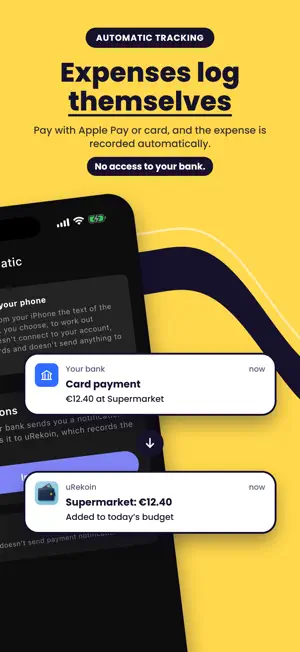
Stop typing in your expenses. uRekoin tells you how much you can spend today without running short at the end of the month, and with iPhone Shortcuts it records expenses for you, without connecting to your bank account. Your budget stays on your phone. No account, no bank connection, no passwords handed to third parties. Only shared expenses, if you create a group, go through our server. MAIN FEATURES • Dynamic daily budget: enter your salary, fixed expenses and savings goal. The app works out what you can spend today and recalibrates every day based on what you've already spent. • Fixed expenses and subscriptions: keep bills (rent, utilities) and subscriptions (Netflix, Spotify) apart, with ready-made suggestions and a reminder before each due date. • Savings goals: name your goals (holiday, new car) and watch your savings grow cycle after cycle. The Parachute tracks your emergency fund. • Categories and pie charts to see at a glance where your money goes. • Full history: browse day by day, edit amounts and dates, delete mistakes. The budget recalculates itself. • Excel export for your personal accounting. • Backup and restore: change phone without losing your history. The backup file stays yours. • Languages: English, Italian, French, German, Spanish. EXPENSES THAT RECORD THEMSELVES • Apple Pay: pay with your phone or watch and the expense lands in uRekoin, with merchant and amount. • Bank notifications: on iOS 27 your iPhone passes your bank's payment notifications to uRekoin. uRekoin doesn't read other apps' notifications: the automation you create sends them, and you can turn it off anytime. • Screenshots: share a screenshot of your bank transactions and uRekoin reads amounts and merchants right on your phone. • No duplicates: if the same payment comes from Apple Pay and from your bank, uRekoin records it only once. Set it up in a minute from Settings › Make it automatic, with a ready-made shortcut. FREELANCERS AND VARIABLE INCOME Classic budget apps only work if the same amount arrives every month. uRekoin handles variable income, shows how much to set aside for taxes and adapts your budget to what you actually earn. MORE YOU WON'T FIND ELSEWHERE • Spread-out surprises: a €600 surprise expense shouldn't ruin your month. uRekoin spreads it over the remaining days of the cycle or, with Premium, over 1 to 6 months. • Backdated entries: forgot an expense from three days ago? Add it and today's budget recalculates at the right point of the cycle. • Holiday Mode: put money aside for a trip and spend from it while you travel, without touching your everyday budget. PREMIUM (optional) Unlimited fixed expenses, categories, reminders and planned expenses • No ads • Unlimited cycle history • Surprise expenses spread over 1–6 months • Advanced charts and forecasts • Unlimited Excel export. Monthly or yearly subscription with a 7-day free trial. Many features can also be unlocked for free by watching a short video. The subscription renews automatically unless you cancel at least 24 hours before the end of the current period. Manage or cancel it in Settings › [your name] › Subscriptions. PRIVACY Your budget data never leaves your phone. The free version shows ads: the app asks whether you can be tracked for more relevant ads, and you can say no. Premium removes ads. uRekoin is a tracking and planning tool: it isn't connected to banks or accounts, doesn't hold or move money and doesn't provide financial services. Terms of Use: https://www.apple.com/legal/internet-services/itunes/dev/stdeula/ Privacy: https://zebbb3d.github.io/mybudjet-privacy/
What’s new
Version 1.2.5 · Updated November 8, 2026
Automatic recognition of bank notifications: turn it on in a moment from a single screen. The most used banks in your country are already inside, PayPal included, and the app checks by itself that it works. If your bank is missing, you add it in three steps. Requires iOS 27. Also: • Shared expenses: split an expense by amounts or by percentages, and create a new group straight from an expense. • When an update is out, uRekoin tells you and shows you what changes. • Lots of fixes.
App privacy
The developer, SEBASTIAN MULE, reported these privacy practices to Apple.
Data Used to Track You
The following data may be used to track you across apps and websites owned by other companies:
- Identifiers: Device ID
Data Linked to You
The following data, which may be collected and linked to your identity, may be used for the following purposes:
- Location: Coarse Location
- Identifiers: Device ID
- Usage Data: Product Interaction, Advertising Data
- Diagnostics: Performance Data, Other Diagnostic Data
- Financial Info: Other Financial Info
- Contact Info: Email Address, Name, Phone Number
- Contacts: Contacts
- User Content: Customer Support
Used for: Third-Party Advertising, Developer’s Advertising or Marketing, Analytics, App Functionality
Data Not Linked to You
The following data, which may be collected but is not linked to your identity, may be used for the following purposes:
- Identifiers: Device ID
- Usage Data: Product Interaction, Advertising Data
- Diagnostics: Performance Data, Crash Data
Used for: Developer’s Advertising or Marketing, Analytics
Alternatives to uRekoin: auto expense tracker
Looking for apps like uRekoin: auto expense tracker? Here are 6 similar apps on the App Store.
-
 Aboclair : suivi de budget
-
 Il Mio Anno Finanziario
-
 Mon-Reliquat : budget
-
 Cashfulness
-
 Budget Bro - Fantasy Finance
-
 Nesti · Budget Planner
| App | Rating | Price | Last updated | Compare |
|---|---|---|---|---|
| uRekoin: auto expense tracker | – | Free | November 8, 2026 | |
| Aboclair : suivi de budget | – | Free | Oct 30, 2026 | Compare |
| Il Mio Anno Finanziario | – | Free | Sep 11, 2026 | Compare |
| Mon-Reliquat : budget | – | Free | Oct 10, 2026 | Compare |
| Cashfulness | – | Free | Nov 25, 2026 | Compare |
| Budget Bro - Fantasy Finance | – | Free | Nov 19, 2026 | Compare |
| Nesti · Budget Planner | – | Free | Apr 29, 2026 | Compare |