

Video Enhancer - EnhanceVid
Hyungsung Kim Photo & Video iPhoneiPadiPod touch
Video Enhancer - EnhanceVid is a free Photo & Video app for iPhone and iPad by Hyungsung Kim. Rated 4.0/5 from 3 ratings. Requires iOS 26.0.
- Rating
- 4.0
- 3 ratings
- Price
- Free
- on the App Store
- Size
- 28 MB
- Age 4+
- Updated
- Oct 23
- 2026 · v1.0.2
Screenshots


About Video Enhancer - EnhanceVid
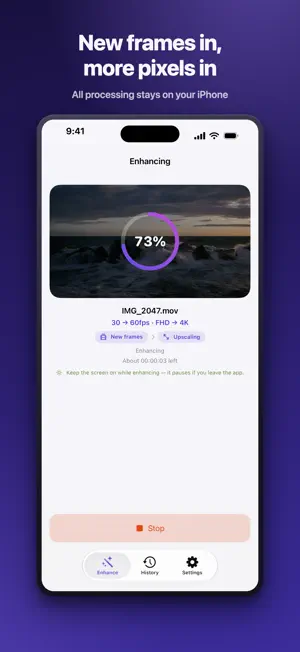
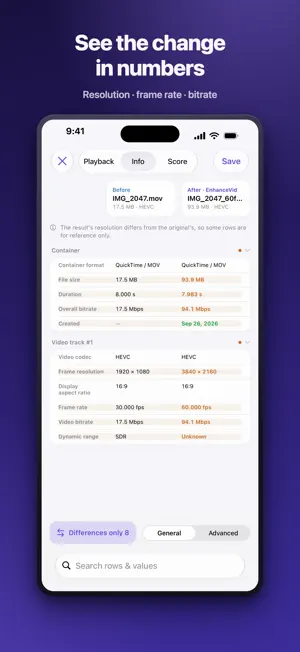
Video that looks choppy, footage that turns blurry when you watch it big — EnhanceVid uses AI to remake it smooth and sharp. Everything runs on your iPhone or iPad, and your original stays untouched: the result is saved as a new video. ■ Smoother — AI frame interpolation • 24fps → 30fps, 30fps → 60fps, 60fps → 120fps • 25fps → 30fps and 50fps → 60fps, too • Apple machine learning (AI) works out the motion between the original frames and adds new frames in between — real in-between moments, not copies of the same picture • Scene changes aren't forced into a blend, so you don't get awkward ghosting ■ Sharper — upscale to a higher resolution • HD → Full HD, Full HD → 4K, HD → 4K • Smaller videos such as 480p or 360p can be upscaled to HD or Full HD • Crisp upscaling with Apple MetalFX • For HD and lower, turn on “High-quality upscale” and AI super resolution refines edges and even cleans up compression artifacts ■ Cleaner — reduce noise • Clean up grainy low-light video (on supported devices) ■ Just what you need — up or down • Both at once: 30fps Full HD to 60fps 4K • You can go down, too — 4K 60fps to 30fps, 4K to Full HD ■ See it, then save it • When it's done, play the original and the result side by side • See resolution, frame rate, and bitrate in a table, and check quality scores (PSNR and SSIM, plus VMAF if you like) • The result is saved next to the original as a new video — the original is never changed or deleted ■ HDR and many file types • HDR and Dolby Vision video shot on iPhone stays HDR • Works with videos from your photo library and the Files app, including MKV, WebM, and AVI ■ Your videos stay on your device • Your videos are never uploaded anywhere, and AI processing happens on your device, too. No account needed
What’s new
Version 1.0.2 · Updated October 23, 2026
• Videos smaller than HD (such as 480p or 360p) can now be upscaled to HD or Full HD • 25 fps and 50 fps videos can now be smoothed to 30 fps and 60 fps • Resolution is now shown as width × height, and frame rate shows the original and the result together, like “24 → 30” • Fixed the time estimate for High-quality upscale, which was showing far longer than the actual time
App privacy
The developer, Hyungsung Kim, reported these privacy practices to Apple.
Data Used to Track You
The following data may be used to track you across apps and websites owned by other companies:
- Identifiers: Device ID
Data Linked to You
The following data, which may be collected and linked to your identity, may be used for the following purposes:
- Location: Coarse Location
- Identifiers: Device ID
- Usage Data: Product Interaction, Advertising Data
Used for: Third-Party Advertising, Developer’s Advertising or Marketing, Analytics, App Functionality
Data Not Linked to You
The following data, which may be collected but is not linked to your identity, may be used for the following purposes:
- Diagnostics: Performance Data, Other Diagnostic Data, Crash Data
Used for: Third-Party Advertising, Developer’s Advertising or Marketing, Analytics, App Functionality
Alternatives to Video Enhancer - EnhanceVid
Looking for apps like Video Enhancer - EnhanceVid? Here are 6 similar apps on the App Store. The highest rated is Neopix: AI Video Upscaler (5.0/5), and all 6 are free to download.
-
 AI Video Enhancer & BG Remover
-
 4K Video Camera Pro
-
 Video Upscaler - AI Upscale
1.0
-
 Brighten Dark Video & Enhance
-
 Remaster AI - Video Enhancer
4.0
-
 Neopix: AI Video Upscaler
5.0
| App | Rating | Price | Last updated | Compare |
|---|---|---|---|---|
| Video Enhancer - EnhanceVid | 4.0 / 5 (3 ratings) | Free | October 23, 2026 | |
| AI Video Enhancer & BG Remover | – | Free | May 17, 2026 | Compare |
| 4K Video Camera Pro | – | Free | Oct 30, 2026 | Compare |
| Video Upscaler - AI Upscale | 1.0 / 5 (1) | Free | Aug 20, 2026 | Compare |
| Brighten Dark Video & Enhance | – | Free | Sep 30, 2026 | Compare |
| Remaster AI - Video Enhancer | 4.0 / 5 (2) | Free | Nov 2, 2026 | Compare |
| Neopix: AI Video Upscaler | 5.0 / 5 (15) | Free | Aug 27, 2026 | Compare |