

Brighten Dark Video & Enhance
katapu.net Photo & Video iPhoneiPadiPod touch
Brighten Dark Video & Enhance is a free Photo & Video app for iPhone and iPad by katapu.net. Requires iOS 17.0. Updated September 30, 2026.
- Price
- Free
- on the App Store
- Size
- 49 MB
- Age 4+
- Updated
- Sep 30
- 2026 · v1.1.0
Screenshots

About Brighten Dark Video & Enhance
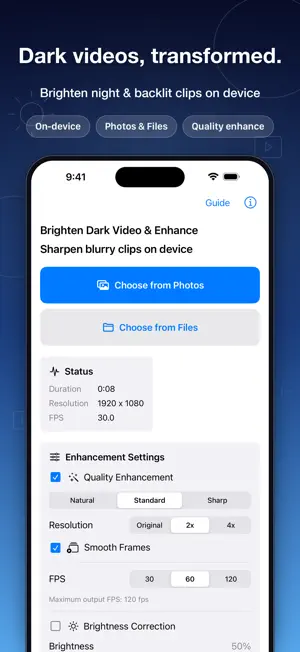
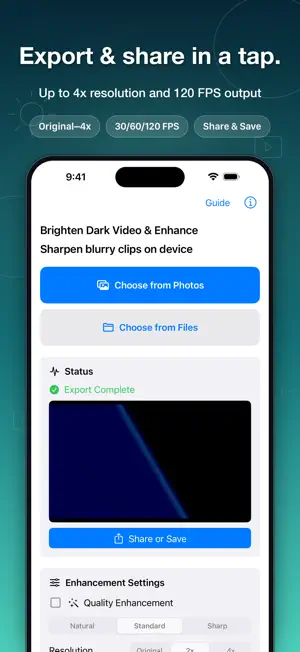
Brighten dark videos and enhance blurry clips with an on-device video correction app. This app helps make hard-to-see videos clearer by combining brightness correction, resolution enhancement, smoother motion, and FPS conversion. It is useful for dim indoor scenes, night videos, backlit subjects, and clips that look a little blurry. Brightness correction can be applied evenly to the entire video. Adjust the strength with a slider, then preview any frame before export so you can check whether the result looks natural and not over-brightened. Quality enhancement offers Natural, Standard, and Sharp modes. Depending on the source resolution, you can export at Original, 2x, or 4x resolution. The app automatically limits settings that would be too heavy for the device or the selected input video. Output FPS supports 30, 60, and 120 FPS when available for the selected settings. With smoothing enabled, frame interpolation can help motion look more fluid. Deinterlace stripe removal can reduce horizontal combing from interlaced footage, as well as fine horizontal stripes that are already baked into the video. It is off by default, so enable it only when needed and check the enhancement preview before export. You can import videos from Photos or the Files app. Audio can be kept or removed, so you can export either a corrected video with sound or video-only output. Main features: - Brighten dark videos - Turn brightness correction on or off - Adjust brightness strength with a slider - Preview brightness on any frame - Enhance blurry videos - Choose Natural, Standard, or Sharp correction - Export at Original, 2x, or 4x resolution when supported - Export at 30, 60, or 120 FPS when supported - Smooth motion with frame interpolation - Deinterlace stripe removal for combing and baked-in horizontal stripes - Keep or remove audio - Import from Photos or Files - Save and share the corrected video - Pause processing in the background and resume when the app returns How to use: 1. Tap “Choose from Photos” or “Choose from Files” and select a video. 2. Set quality enhancement, resolution, FPS, smoothing, brightness correction, and audio. 3. If using brightness correction, adjust the slider and check the preview. 4. Tap “Start Correction” to process and export the video. 5. After export, use “Share / Save” to save or share the result. Video frames are processed on the device. The app uses Core ML, Metal, Core Image, OpenCV, and related technologies according to the selected settings. Some app features, such as ads, analytics, and crash reports, may use the network. Try it when you have a dark, blurry, or hard-to-see video that you want to make brighter, clearer, and smoother.
What’s new
Version 1.1.0 · Updated September 30, 2026
Improved compatibility with iOS 27 and video processing stability. - Improved memory use when exporting videos repeatedly. - Improved cancellation when closing a preview. - Reviewed action labels such as “Save” and “Load” across supported languages. - Improved ad display stability.
App privacy
The developer, katapu.net, reported these privacy practices to Apple.
Data Used to Track You
The following data may be used to track you across apps and websites owned by other companies:
- Identifiers: Device ID
Data Linked to You
The following data, which may be collected and linked to your identity, may be used for the following purposes:
- Location: Coarse Location
- Identifiers: Device ID
- Usage Data: Product Interaction, Advertising Data
- Purchases: Purchase History
Used for: Third-Party Advertising, Developer’s Advertising or Marketing, Analytics, App Functionality
Data Not Linked to You
The following data, which may be collected but is not linked to your identity, may be used for the following purposes:
- Location: Coarse Location
- Identifiers: User ID
- Usage Data: Product Interaction, Advertising Data, Other Usage Data
- Diagnostics: Performance Data, Other Diagnostic Data, Crash Data
- Other Data: Other Data Types
Used for: Third-Party Advertising, Developer’s Advertising or Marketing, Analytics, App Functionality
Alternatives to Brighten Dark Video & Enhance
Looking for apps like Brighten Dark Video & Enhance? Here are 6 similar apps on the App Store. The highest rated is Low Light Video Enhancer (5.0/5), and all 6 are free to download.
-
 Low Light Video Enhancer
5.0
Low Light Video Enhancer
5.0
-
 LusterPicture – Dark Photo Fix
-
 Lumen: AI Video Upscaler
3.0
Lumen: AI Video Upscaler
3.0
-
 Remaster AI - Video Enhancer
-
 AI Video Enhancer & Upscaler
4.0
AI Video Enhancer & Upscaler
4.0
-
 Video Quality Enhance-Vhotopia
3.8
Video Quality Enhance-Vhotopia
3.8
| App | Rating | Price | Last updated | Compare |
|---|---|---|---|---|
| Brighten Dark Video & Enhance | – | Free | September 30, 2026 | |
| Low Light Video Enhancer | 5.0 / 5 (4) | Free | Oct 12, 2026 | Compare |
| LusterPicture – Dark Photo Fix | – | Free | Sep 8, 2026 | Compare |
| Lumen: AI Video Upscaler | 3.0 / 5 (2) | Free | Jul 1, 2026 | Compare |
| Remaster AI - Video Enhancer | – | Free | Oct 26, 2026 | Compare |
| AI Video Enhancer & Upscaler | 4.0 / 5 (7) | Free | Oct 10, 2026 | Compare |
| Video Quality Enhance-Vhotopia | 3.8 / 5 (4) | Free | Sep 29, 2026 | Compare |