

Clipsana: Video Effects
D BEST Photo & Video iPhoneiPadiPod touch
Clipsana: Video Effects is a free Photo & Video app for iPhone and iPad by D BEST. Requires iOS 26.0. Updated October 19, 2026.
- Price
- Free
- on the App Store
- Size
- 36 MB
- Age 4+
- Updated
- Oct 19
- 2026 · v1.1.0
Screenshots

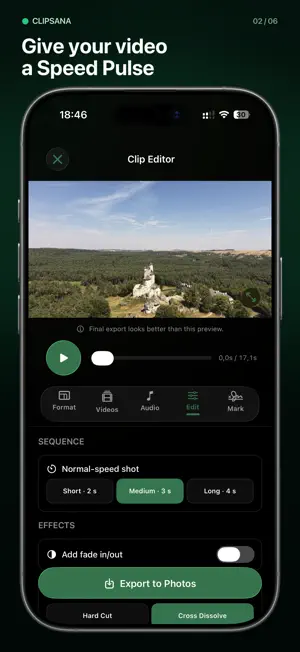

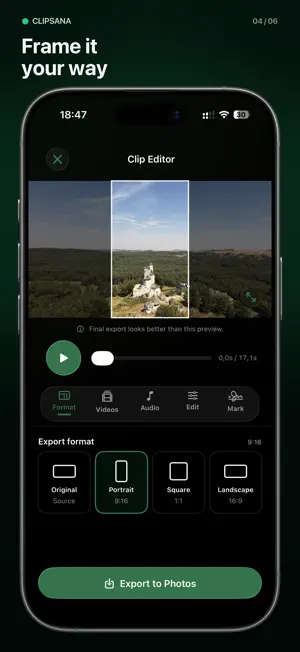
About Clipsana: Video Effects
Your best moments deserve more than a camera roll. Clipsana turns several videos into one finished edit. Choose an effect, select clips from Photos, preview the result, and save your video back to Photos. CHOOSE YOUR EDIT • Motion Match joins similar moments from clips of a repeated movement into one sequence. For the best result, record the action with similar timing and framing. • Speed Pulse races through each clip, then returns to normal speed around the moments you want to show. FIND THE RIGHT FOOTAGE Smart Match suggests clips with compatible video settings. You decide which shots look good together. MAKE IT YOURS • Add, remove, reorder, or reverse clips. • Choose original, vertical (9:16), square (1:1), or wide (16:9) framing and adjust the crop. • Add a built-in soundtrack and choose where it starts. • Adjust transitions and fades; repeat the sequence in Motion Match. • Preview changes before you export. • Save edits on your device and return to them later. Export your finished MP4 to Photos. Free exports include a Clipsana watermark. Clipsana Pro removes the watermark. No account needed. Your videos are processed on your device. Terms of Use (EULA): https://www.apple.com/legal/internet-services/itunes/dev/stdeula/
What’s new
Version 1.1.0 · Updated October 19, 2026
Meet your tidier editing space: new Home, Edits, and More tabs keep your next creation, saved projects, and settings close at hand. Enjoy layouts adapted for iPhone Duo and a roomier editor on iPad. Smart Match now keeps your selected clips visible when filtering to Best fit, and iCloud checks won't make the clips you're browsing jump around. Your footage can do the dancing. We've also improved preview recovery after playback errors, so you can get back to creating with fewer interruptions.
App privacy
The developer, D BEST, reported these privacy practices to Apple.
Data Not Linked to You
The following data, which may be collected but is not linked to your identity, may be used for the following purposes:
- Purchases: Purchase History
- Location: Coarse Location
- Identifiers: Device ID
- Usage Data: Product Interaction
- Diagnostics: Crash Data, Performance Data, Other Diagnostic Data
Used for: Analytics, App Functionality
Alternatives to Clipsana: Video Effects
Looking for apps like Clipsana: Video Effects? Here are 6 similar apps on the App Store. The highest rated is FlowCut - Video Editor & Maker (5.0/5), and all 6 are free to download.
-
 FlowCut - Video Editor & Maker
5.0
FlowCut - Video Editor & Maker
5.0
-
 Shady Far
-
 BlackRAW Studio: Color Grading
5.0
BlackRAW Studio: Color Grading
5.0
-
 Passport Photo App – ID Studio
5.0
Passport Photo App – ID Studio
5.0
-
 Vxio
4.9
Vxio
4.9
-
 Bing video creator
2.0
Bing video creator
2.0
| App | Rating | Price | Last updated | Compare |
|---|---|---|---|---|
| Clipsana: Video Effects | – | Free | October 19, 2026 | |
| FlowCut - Video Editor & Maker | 5.0 / 5 (3) | Free | Oct 27, 2026 | Compare |
| Shady Far | – | Free | Jun 4, 2026 | Compare |
| BlackRAW Studio: Color Grading | 5.0 / 5 (1) | Free | Oct 14, 2026 | Compare |
| Passport Photo App – ID Studio | 5.0 / 5 (7) | Free | Jul 17, 2026 | Compare |
| Vxio | 4.9 / 5 (101) | Free | Oct 9, 2026 | Compare |
| Bing video creator | 2.0 / 5 (4) | Free | Mar 3, 2026 | Compare |