

HeyFam: Family Planner
John Halley Productivity iPhoneiPadiPod touch
HeyFam: Family Planner is a free Productivity app for iPhone and iPad by John Halley. Requires iOS 18.0. Updated October 24, 2026.
- Price
- Free
- on the App Store
- Size
- 26 MB
- Age 4+
- Updated
- Oct 24
- 2026 · v1.2.2
Screenshots


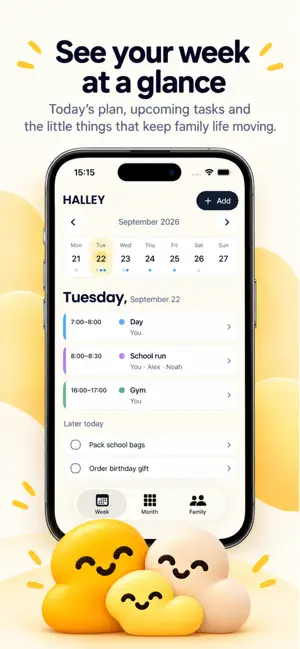
About HeyFam: Family Planner
Family plans, together. HeyFam brings your shared calendar, work shifts, tasks, shopping and birthdays into one family planner. See the week ahead and know who is taking care of each plan. PLAN YOUR WEEK • View family plans by week or month • Add school runs, appointments, activities and work shifts • Choose who is covering a plan and add useful notes • Keep birthdays and local reminders in view KEEP EVERYDAY LIFE TOGETHER • Share tasks and a household shopping list • Add shopping items again and save optional favorites • See upcoming plans with small and medium Family Today Home Screen widgets ONE SUBSCRIPTION FOR YOUR HOUSEHOLD Start planning on your iPhone without creating a HeyFam account. Sign in with Apple when you choose to sync and invite your family. One HeyFam subscription covers one household; invited adults do not need to buy another subscription. Children's profiles do not need accounts. YOUR PLANS AND STORAGE Guest plans stay on this iPhone until you choose to sync and share. Restoring a subscription restores access; it does not recover unsynced plans after reinstalling the app. If coverage expires, saved plans remain readable while paid editing pauses. SUBSCRIPTIONS Planning requires an active monthly or annual family subscription, membership of a covered family, or complimentary access granted by HeyFam. Complimentary recipients can sign in with Apple and refresh their access without starting a subscription. Prices and any eligible introductory offer are shown in the app before purchase. Payment is charged to your Apple Account when you confirm the purchase, or at the end of an eligible trial. Subscriptions renew automatically unless canceled at least 24 hours before the end of the current period. Manage or cancel your subscription in your Apple Account settings. Deleting HeyFam or your HeyFam account does not cancel an Apple subscription. Privacy policy: https://sites.google.com/view/heyfamapp/home Terms of Use: https://www.apple.com/legal/internet-services/itunes/dev/stdeula/
What’s new
Version 1.2.2 · Updated October 24, 2026
Improved subscription support for families using both iPhone and Android.
App privacy
The developer, John Halley, reported these privacy practices to Apple.
Data Linked to You
The following data, which may be collected and linked to your identity, may be used for the following purposes:
- Purchases: Purchase History
- Contact Info: Email Address, Name
- User Content: Other User Content
- Identifiers: User ID
- Diagnostics: Other Diagnostic Data
Used for: App Functionality
Data Not Linked to You
The following data, which may be collected but is not linked to your identity, may be used for the following purposes:
- Purchases: Purchase History
Used for: Analytics
Alternatives to HeyFam: Family Planner
Looking for apps like HeyFam: Family Planner? Here are 6 similar apps on the App Store. The highest rated is Clock Rings (5.0/5), and all 6 are free to download.
-
 Uttr
Uttr
-
 Home Base Calendar
-
 Familia: Family Planner
-
 Clock Rings
5.0
Clock Rings
5.0
-
 Find-Me : Pet Track & Care
-
 Listful: AI Shopping organizer
| App | Rating | Price | Last updated | Compare |
|---|---|---|---|---|
| HeyFam: Family Planner | – | Free | October 24, 2026 | |
| Uttr | – | Free | Sep 29, 2026 | Compare |
| Home Base Calendar | – | Free | Oct 6, 2026 | Compare |
| Familia: Family Planner | – | Free | Oct 26, 2026 | Compare |
| Clock Rings | 5.0 / 5 (3) | Free | Oct 28, 2026 | Compare |
| Find-Me : Pet Track & Care | – | Free | May 29, 2025 | Compare |
| Listful: AI Shopping organizer | – | Free | Aug 18, 2026 | Compare |