

Clock Rings
Eric Rogers Productivity iPhoneiPadiPod touchApple Watch
Clock Rings is a free Productivity app for iPhone and iPad by Eric Rogers. Rated 5.0/5 from 3 ratings. Requires iOS 26.4. Updated October 19, 2026.
- Rating
- 5.0
- 3 ratings
- Price
- Free
- on the App Store
- Size
- 29 MB
- Age 4+
- Updated
- Oct 19
- 2026 · v2026.11.11
Screenshots


About Clock Rings
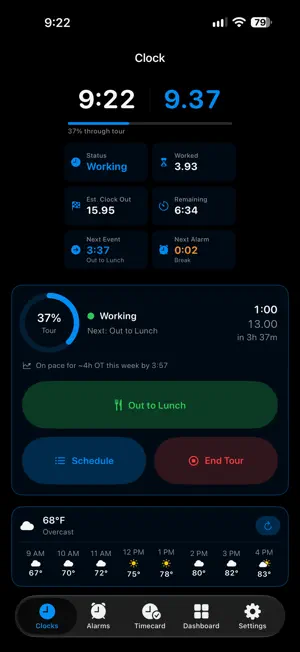
Clock Rings shows your shift at a glance — a dual clock with decimal hours and standard time side by side, built for postal and shift workers who live on a decimal-hour timecard. The whole core is free; an optional one-time Clock Rings Pro unlock adds autopilot and the payroll tools. CLOCK & RINGS • Decimal and standard time together on a clean ring face • Home and Lock Screen widgets, and Apple Watch faces & complications • Live Activities on the Lock Screen, the Dynamic Island, and CarPlay • Your accent color, light/dark, bold, and adjustable text size TRACK YOUR TOUR • Punch Begin Tour, Out/In to Lunch, breaks, and End Tour • Punch from anywhere — Live Activity buttons, widgets, Control Center, the Action Button, or your Apple Watch (even with your phone stowed) • Edit or backfill any punch — forgot to clock out, or clocked in late? Fix it after • Syncs across iPhone, iPad, and Apple Watch through your own iCloud AUTO CLOCK RINGS — AUTOPILOT (Clock Rings Pro) • Let the app punch your whole tour for you — Begin Tour, lunch, and End Tour at your scheduled times, exactly as if you'd tapped them • Follows your Weekly Plan, and only on your scheduled workdays — never a day off, holiday, leave day, or while Time Off is on • Punch, edit, or delete anything by hand anytime KNOW YOUR HOURS & PAY • Reports by day, week, pay period, month, and year — overtime broken into regular, overtime, and penalty, your way (8h/10h/40h or weekly-only) • Pay Estimate (Pro): enter YOUR rates (the app never assumes a number) for an estimated gross from your tracked hours, plus Deductions for an estimated take-home • Earnings Statement Compare (Pro): paste your statement from ePayroll and check it against what you tracked — hours, gross, net, every deduction, and leave balances • Export reports and build a custom PDF (Pro); basic on-screen totals stay free • Leave & balances — Annual, Sick, and more, with optional accrual; the federal holidays count automatically OPERATIONS (Clock Rings Pro) • Clock your tour against TACS operation numbers and move between operations mid-tour • See where your hours went in the Operations Report • Look up what any operation covers — the full text of USPS Handbook M-32, Appendix A (April 2026), searchable by number, title, or any word STAY AHEAD • Proactive overtime alerts before you cross 8h, 10h, or your weekly threshold • Forgot-to-clock-out reminder, plus alarms for every part of your tour • Pause alarms for leave, holidays, and scheduled days off — and they turn back on by themselves • Ask Siri your hours and overtime forecast, plus Shortcuts actions ON YOUR TERMS • Your data stays on your devices and your private iCloud — no account, no ads, no tracking • Backup & Restore — export everything to a file and bring it back • Reconcile with your USPS Virtual Timecard by pasting it in — nothing is uploaded Clock Rings Pro is a one-time purchase (no subscription) and is Family Sharing–ready. Clock Rings is independent and is not affiliated with the United States Postal Service.
What’s new
Version 2026.11.11 · Updated October 19, 2026
• Five-Minute Leeway — Clock Rings now credits your hours the way USPS pays them. For full-time and part-time regular employees, a tour that comes out within 5 minutes of your schedule is credited as a full tour (ELM 432.46) — so a 7-hour-55-minute day is paid as 8.00, not 7.92. It turns on automatically for the career crafts it covers (City Carrier, Clerk, Maintenance, MVS, Mail Handler). Your Pay Estimate, Reports, and Virtual Timecard compare now use these credited hours, while your actual worked time still shows on the Timecard. Prefer your actual clock rings, or you're a PTF/PSE paid on actual rings? Turn it off in Settings ▸ Work Schedule. • Password-protect your reports — when you share a PDF from Export Records or a Custom Report, turn on Password-protect PDF to encrypt it. Tap Generate strong password and it's saved in your iCloud Keychain — perfect for emailing a report to a supervisor or union rep. • Shared Status on Apple Watch — see who you follow and whether they're on the clock from your wrist: a new Shared Status page and a complication for your watch face. Reorder your watch pages (Settings ▸ Watch Faces ▸ Watch Page Order) to put Shared Status first. • Polish — friendlier "Next:" labels, a stray ID removed from the People You Follow card, and more reliable Start Live Activity.
App privacy
The developer, Eric Rogers, reported these privacy practices to Apple.
Data Not Linked to You
The following data, which may be collected but is not linked to your identity, may be used for the following purposes:
- Location: Coarse Location
Used for: App Functionality
Alternatives to Clock Rings
Looking for apps like Clock Rings? Here are 6 similar apps on the App Store. The highest rated is Pailtime: Stop Doom Scrolling (5.0/5), and all 6 are free to download.
-
 Until - Countdown & Reminder
-
 Pailtime: Stop Doom Scrolling
5.0
Pailtime: Stop Doom Scrolling
5.0
-
 Span Timer
-
 ONE WATCH: Timezone Clock
-
 FloatDial: Clock Widget
5.0
FloatDial: Clock Widget
5.0
-
 POSGuys Label Print
| App | Rating | Price | Last updated | Compare |
|---|---|---|---|---|
| Clock Rings | 5.0 / 5 (3 ratings) | Free | October 19, 2026 | |
| Until - Countdown & Reminder | – | Free | Aug 29, 2026 | Compare |
| Pailtime: Stop Doom Scrolling | 5.0 / 5 (1) | Free | Oct 7, 2026 | Compare |
| Span Timer | – | Free | Jan 14, 2026 | Compare |
| ONE WATCH: Timezone Clock | – | Free | Jun 14, 2026 | Compare |
| FloatDial: Clock Widget | 5.0 / 5 (1) | Free | Oct 5, 2026 | Compare |
| POSGuys Label Print | – | Free | Jan 8, 2026 | Compare |
Compare Clock Rings with the top alternatives: ratings, updates, ASO score and keyword gaps →