

Compress PDF: Shrink File
Bokeria Utilities iPhoneiPadiPod touch
Compress PDF: Shrink File is a free Utilities app for iPhone and iPad by Bokeria. Requires iOS 18.0. Updated October 20, 2026.
- Price
- Free
- on the App Store
- Size
- 14 MB
- Age 4+
- Updated
- Oct 20
- 2026 · v1.1.3
Screenshots



About Compress PDF: Shrink File
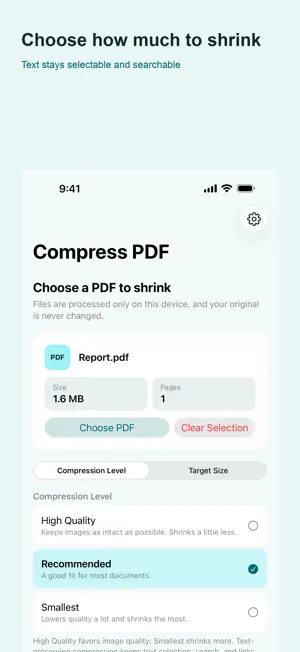
Your PDF never leaves your device. No upload, no account, no waiting. Compress PDF makes PDF files smaller right on your phone. Pick a file, choose how much to shrink it, and save the result as a new file. Your original is never changed. TWO WAYS TO SHRINK Text-preserving compression re-compresses the images inside your PDF while keeping text selection, search, and links working. This is the default. Strong compression turns every page into an image. It shrinks much more, but text selection, search, and links are lost. The app always asks first, so it never happens by surprise. TRY TO REACH YOUR TARGET SIZE Need a file under 5 MB for an email attachment? Set a target and the app tries different quality levels to reach that size or less. It measures the actual file bytes and keeps the smallest result found. Depending on the PDF, the target may not be reachable. Some files cannot be made smaller. Check the result before attaching it. HONEST RESULTS • Real byte sizes before and after, with the actual reduction • If a file cannot be made smaller, the app says so instead of pretending • Cancel any time — the app stops and cleans up • Password-protected PDFs are not supported, and the app tells you why OPEN FROM OTHER APPS Open or share a PDF from Files or your email app and it goes straight into the app. PRIVACY Your PDFs are processed on this device and are never sent anywhere. Usage statistics and error diagnostics help improve the app, and you can turn each one off separately in Settings at any time. On first use in the EEA, the UK, Switzerland, or when the region is unknown, the app asks before enabling usage statistics and diagnostics. In other regions, these options start on. Advertising consent is handled separately. Available in 19 languages.
What’s new
Version 1.1.3 · Updated October 20, 2026
Fixed minor bugs in the app.
App privacy
The developer, Bokeria, reported these privacy practices to Apple.
Data Used to Track You
The following data may be used to track you across apps and websites owned by other companies:
- Identifiers: Device ID
Data Linked to You
The following data, which may be collected and linked to your identity, may be used for the following purposes:
- Location: Coarse Location
- Identifiers: Device ID
- Usage Data: Product Interaction, Advertising Data
Used for: Third-Party Advertising, Developer’s Advertising or Marketing, Analytics
Data Not Linked to You
The following data, which may be collected but is not linked to your identity, may be used for the following purposes:
- Diagnostics: Performance Data, Other Diagnostic Data, Crash Data
Used for: Third-Party Advertising, Developer’s Advertising or Marketing, Analytics, App Functionality
Alternatives to Compress PDF: Shrink File
Looking for apps like Compress PDF: Shrink File? Here are 6 similar apps on the App Store. The highest rated is PDF Size Reducer: PDFBuddy (5.0/5), and all 6 are free to download.
-
 PDF Compressor: Reduce PDF
-
 PDF Under: PDF Compressor
-
 PDF Size Reducer: PDFBuddy
5.0
PDF Size Reducer: PDFBuddy
5.0
-
 Sveabot
-
 Compresso - Video Image PDF
-
 Compress Pdf : Reduce Pdf
| App | Rating | Price | Last updated | Compare |
|---|---|---|---|---|
| Compress PDF: Shrink File | – | Free | October 20, 2026 | |
| PDF Compressor: Reduce PDF | – | Free | Sep 26, 2026 | Compare |
| PDF Under: PDF Compressor | – | Free | Sep 25, 2026 | Compare |
| PDF Size Reducer: PDFBuddy | 5.0 / 5 (3) | Free | Oct 21, 2026 | Compare |
| Sveabot | – | Free | Aug 8, 2026 | Compare |
| Compresso - Video Image PDF | – | Free | Jul 17, 2026 | Compare |
| Compress Pdf : Reduce Pdf | – | Free | Sep 3, 2026 | Compare |