

PDF Zipper - All PDF Tools
Md Arifur Rahman Utilities iPhoneiPadiPod touch
PDF Zipper - All PDF Tools is a free Utilities app for iPhone and iPad by Md Arifur Rahman. Rated 5.0/5 from 2 ratings. Requires iOS 15.0.
- Rating
- 5.0
- 2 ratings
- Price
- Free
- on the App Store
- Size
- 70 MB
- Age 4+
- Updated
- Nov 7
- 2026 · v1.2.2
Screenshots
Save to Pinterest
About PDF Zipper - All PDF Tools
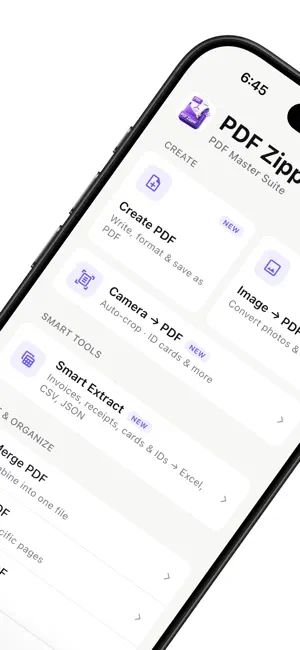
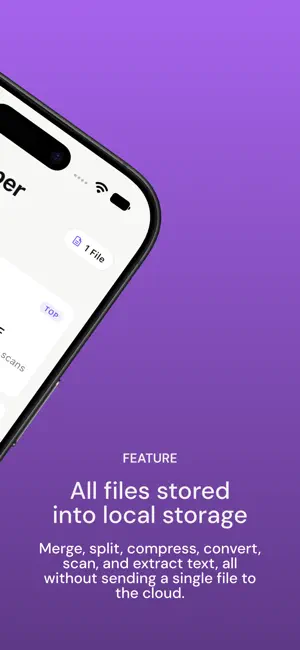
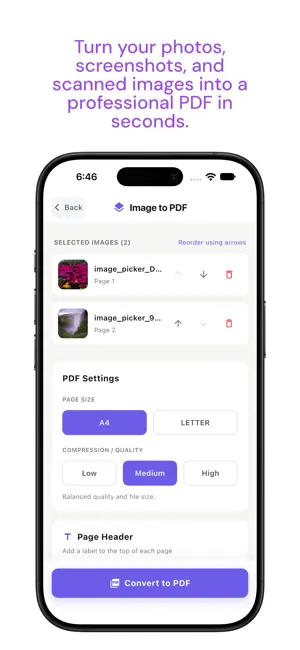
PDF Zipper is an all-in-one PDF scanner, PDF editor, and PDF converter for your phone. Scan documents and ID cards, sign PDFs, merge, split, and compress files, convert Word, JPG, and PDF — and pull data from invoices and receipts straight into Excel. Your files are processed on your phone and never uploaded. DOCUMENT SCANNER — SCAN TO PDF Turn your camera into a smart scanner: • Automatic edge detection, auto-capture, and perspective correction • Scan modes for documents, invoices, NID cards, driving licenses, visiting cards and passports • ID card scanner: front and back on one page at real card size, ready to print • Adjust corners with a magnifier, rotate, retake, and reorder pages • Filters: Original, Enhance, Grey and Black & White • Import from your photo gallery, save as A4 or Letter PDF NEW: SMART EXTRACT — DOCUMENTS TO EXCEL Scan or import a document, and PDF Zipper reads it for you: • Invoices: invoice number, vendor, dates, line items, tax and total • Receipts: store, date, items, tax and total • Business cards: name, company, phone, email, website and address • ID cards and passports: name, date of birth, document number, expiry date • Bank statements: account details, balances and every transaction Check and edit the results, then export to Excel (XLSX), CSV, JSON, Word or PDF. Works with printed English text. SIGN PDF Sign PDF documents in seconds. Draw your signature, add text in different fonts and colors, add or remove pages, or start from a blank PDF. CREATE PDF — PDF MAKER Write documents with headings, fonts, tables, symbols, and your signature, choose page size and margins, then save as PDF. Drafts are saved so you can continue later. MERGE PDF Combine multiple PDF files into one document. Reorder files and see page counts before merging. SPLIT PDF Extract a page range, pick pages from thumbnails, or split every page into its own PDF. COMPRESS PDF Reduce PDF file size for email, WhatsApp, and uploads. Choose a compression level and see the original and new size. IMAGE TO PDF — JPG TO PDF Convert photos, screenshots, and JPG, PNG, or WEBP images to PDF. Choose A4 or Letter, image quality, and optional page headers (numbers, letters or your own text). PDF TO IMAGE — PDF TO JPG Export PDF pages as JPG or PNG images in standard (72 DPI) or print quality (300 DPI). WORD TO PDF & PDF TO WORD Convert DOCX files to PDF with formatting, tables, and images, or turn a PDF into an editable Word file. FILE MANAGER All your PDFs and exports in one place. Search, sort by date, size or name, rename, share, open or delete. Files are saved to your Downloads folder. CLEAN, MODERN DESIGN A fast, simple interface with light and dark mode. PRIVATE BY DESIGN Scanning, conversion, compression, and text recognition all run on your device. Your documents are never uploaded, and you don't need an account. WHY PDF ZIPPER? - 10 tools in one app: PDF scanner, PDF editor, PDF converter, and more - Document, ID card, passport, and receipt scanner - Extract invoice and receipt data to Excel - No sign-up and no uploads - Free to use with ads — go ad-free with an optional subscription Download PDF Zipper — the PDF scanner and PDF editor that handles every task on your phone: scan, sign, merge, split, compress, and convert.
What’s new
Version 1.2.2 · Updated November 7, 2026
What's New in PDF Zipper 1.2.1 • Brand-new look: a fresh design across every screen, a new app icon, and a cleaner, easier-to-read font • Flatten crumpled pages: scans of folded or wrinkled paper are now straightened automatically on your device—text lines come out flat, and the background around the page is removed. • New "Clean" scan filter: removes fold shadows, uneven light, and yellow tint, so paper looks white and text stays sharp. Grey and B&W are cleaner too. • Smoother signatures: lines are smoothed automatically, with natural thick-and-thin strokes and sharp ends—the same ink now in Sign PDF's pen • Bigger scan frame for ID cards, licenses, and passports • Fixed: sharing a PDF on an iPhone could fail with an error. • Performance improvements and bug fixes
App privacy
The developer, Md Arifur Rahman, reported these privacy practices to Apple.
Data Used to Track You
The following data may be used to track you across apps and websites owned by other companies:
- Identifiers: Device ID
Data Not Linked to You
The following data, which may be collected but is not linked to your identity, may be used for the following purposes:
- Identifiers: Device ID
- Usage Data: Product Interaction
- Diagnostics: Crash Data
Used for: Developer’s Advertising or Marketing, Product Personalization
Alternatives to PDF Zipper - All PDF Tools
Looking for apps like PDF Zipper - All PDF Tools? Here are 6 similar apps on the App Store. The highest rated is Zip Authenticator (5.0/5), and 5 of the 6 are free to download.
-
 PureZip: ZIP File Extractor
-
 Zipper: Archive Manager
-
 Zip Authenticator
5.0
-
 ImageZipper: Photo to ZIP
5.0
-
 Zip Extractor: Unzip RAR Files
5.0
-
 Private Browsing White
4.8
| App | Rating | Price | Last updated | Compare |
|---|---|---|---|---|
| PDF Zipper - All PDF Tools | 5.0 / 5 (2 ratings) | Free | November 7, 2026 | |
| PureZip: ZIP File Extractor | – | Free | May 29, 2026 | Compare |
| Zipper: Archive Manager | – | Free | Nov 11, 2026 | Compare |
| Zip Authenticator | 5.0 / 5 (6) | Free | Nov 17, 2026 | Compare |
| ImageZipper: Photo to ZIP | 5.0 / 5 (1) | Free | Oct 26, 2026 | Compare |
| Zip Extractor: Unzip RAR Files | 5.0 / 5 (2) | Free | Sep 14, 2026 | Compare |
| Private Browsing White | 4.8 / 5 (4,406) | 4.99 USD | Oct 28, 2026 | Compare |