

Get Up Already: Mission Alarm
Hyunjin Jang Lifestyle iPhoneiPadiPod touch
Get Up Already: Mission Alarm is a free Lifestyle app for iPhone and iPad by Hyunjin Jang. Requires iOS 26.0. Updated October 31, 2026.
- Price
- Free
- on the App Store
- Size
- 47 MB
- Age 4+
- Updated
- Oct 31
- 2026 · v1.1.13
Screenshots
Save to Pinterest


About Get Up Already: Mission Alarm
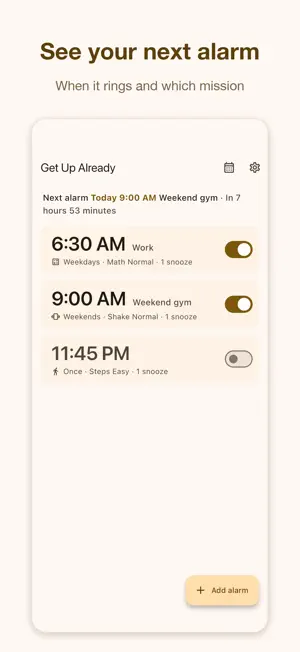
Ever switched off your alarm half asleep and been late? Get Up Already only turns off when you finish a mission. What makes it different - The ringing screen and the mission screen have no purchase button and no close button. There is nothing to tap by mistake while you are half asleep. - Pick a mission for each alarm: solve math problems, shake your phone hard, walk a few steps, or scan a barcode you registered earlier, like the toothpaste in your bathroom. You choose the difficulty and can try the mission the night before. - Snooze is limited for each alarm, from none to 3 times, and you set the gap. Once it is used up, only the mission turns the alarm off. - Every morning is saved to a calendar. See this month's success rate and your streak of days you got up. Alarms - Repeat on weekdays, weekends, every day or just once. Add a label. - 12 sounds including melodies, your own music files, and vibration - A volume that rises gradually - Skip just the next one, without turning the alarm off - In Settings, "Alarm not ringing?" sets a test alarm for 1 minute later so you can check that it rings on this phone - With the iOS 26 alarm feature, alarms ring on the Lock Screen, in silent mode, in Focus, and with the app closed - Tap "Start mission" on the Lock Screen to open the app and begin the mission right away Wake log - Success, success after snooze, and missed days show on the calendar - This month's success rate, based on the days an alarm rang, and your streak Privacy - Your alarms and records are stored only on your device. No account is needed. - The camera is used only to scan a barcode. The motion sensor is used only to count steps. - You can lock the app with a PIN or Face ID. There is no subscription. Requires iOS 26 or later. Contact: [email protected]
What’s new
Version 1.1.13 · Updated October 31, 2026
- Forgot your lock PIN? Unlock it with your device's Face ID or passcode. - Small fixes.
App privacy
The developer, Hyunjin Jang, reported these privacy practices to Apple.
Data Linked to You
The following data, which may be collected and linked to your identity, may be used for the following purposes:
- Identifiers: Device ID, User ID
- Contact Info: Email Address, Name
- Other Data: Other Data Types
Used for: Analytics, App Functionality
Data Not Linked to You
The following data, which may be collected but is not linked to your identity, may be used for the following purposes:
- Usage Data: Product Interaction
- Diagnostics: Crash Data, Performance Data
Used for: Analytics, App Functionality
Alternatives to Get Up Already: Mission Alarm
Looking for apps like Get Up Already: Mission Alarm? Here are 6 similar apps on the App Store. The highest rated is Donation Alarm Clock: Tethered (5.0/5), and all 6 are free to download.
-
 バーコードアラーム
-
 ShieldTube: Focused Watching
-
 블라블라 - 보상형 커뮤니티, 앱테크, 돈버는앱
-
 Donation Alarm Clock: Tethered
5.0
-
 보조금24 - 정부 지원금 찾기
-
 AlarmK: Mission Alarm Clock
4.3
| App | Rating | Price | Last updated | Compare |
|---|---|---|---|---|
| Get Up Already: Mission Alarm | – | Free | October 31, 2026 | |
| バーコードアラーム | – | Free | Aug 30, 2026 | Compare |
| ShieldTube: Focused Watching | – | Free | Apr 26, 2026 | Compare |
| 블라블라 - 보상형 커뮤니티, 앱테크, 돈버는앱 | – | Free | Aug 19, 2026 | Compare |
| Donation Alarm Clock: Tethered | 5.0 / 5 (14) | Free | May 7, 2026 | Compare |
| 보조금24 - 정부 지원금 찾기 | – | Free | Nov 15, 2026 | Compare |
| AlarmK: Mission Alarm Clock | 4.3 / 5 (25) | Free | Nov 17, 2026 | Compare |