

AlarmK: Mission Alarm Clock
eazler, inc Lifestyle iPhoneiPadiPod touch
AlarmK: Mission Alarm Clock is a free Lifestyle app for iPhone and iPad by eazler, inc. Rated 4.1/5 from 16 ratings. Requires iOS 26.0.
- Rating
- 4.1
- 16 ratings
- Price
- Free
- on the App Store
- Size
- 62 MB
- Age 4+
- Updated
- Oct 20
- 2026 · v1.7.0
Screenshots



About AlarmK: Mission Alarm Clock
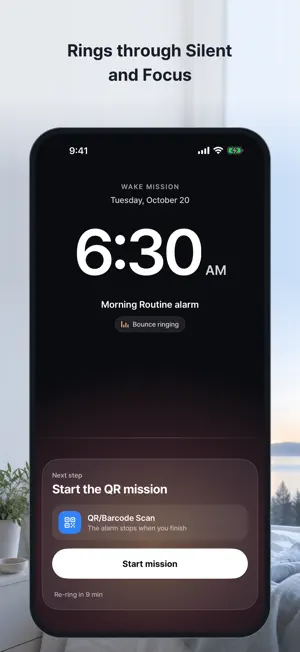
The morning before an exam, the first day at a new job, a 6 AM flight — some mornings you simply can't sleep through. AlarmK is a mission-based wake-up alarm built on iOS 26 AlarmKit. Because it uses system-level alarms, it rings through Silent and Focus modes. To dismiss it, you complete a mission — scan a QR code by your bathroom door, solve a math problem, or shake the phone — something that actually requires you to be out of bed. ▶ Why AlarmK - AlarmKit-based system alarms: same permission model as Apple's Clock app, rings through Silent and Focus - Mission wake-up: QR/barcode, math, memory, typing, shake, squats, walk, object hunt — 8 missions (chain up to 5, with a practice mode) - Object hunt: register things around your home, such as the washing machine or kitchen sink, then photograph the ones picked at random when the alarm rings. Checked on your iPhone, never saved - Deny the system alarm permission and AlarmK won't save an alarm it can't ring — it says why and takes you to Settings - Wake Report: 7-day wake patterns, mission success rate, streaks ▶ Critical Mode for the mornings that matter An eight-item night-before checklist: AlarmKit permission, iPhone charging, Silent mode, Focus mode, a saved QR/barcode for this alarm, Apple Watch pairing, a Clock-app backup alarm, and notification permission. iOS gives apps no way to read the ringer switch, and AlarmK doesn't read your Focus status, so those two rows tell you how tomorrow's alarm will be delivered instead. The Clock backup is yours to make — AlarmK never creates one; tick that row once you have. The reliability score counts only rows that settled on a clear pass or fail. Anything not ready says so on the spot. ▶ Live Activity & Dynamic Island As the alarm gets close, a countdown appears on the Lock Screen and in the Dynamic Island. When it fires, tap the secondary button to jump straight into your mission. The same countdown appears in the Apple Watch Smart Stack. ▶ Widgets · Siri · Shift work - Home and Lock Screen widgets show your next alarm and countdown - Siri & Shortcuts: set alarms, check the next one, start a nap timer, skip an occurrence — without opening the app - Shift rotations (N days on / M days off), optional Korean public-holiday skip, and a fixed-instant option for dated alarms - An optional bedtime reminder and the wake check guard both ends of the night ▶ iCloud sync Your alarm definitions sync via your own iCloud (private database). Switch iPhones and your alarms come with you. Your alarm data is never sent to our servers, and we can't see it. ▶ Honest about the limits - A phone that's powered off, has 0% battery, or has alarm permissions denied — no alarm app can wake you. AlarmK focuses on flagging those risks before they bite. - If the system alarm permission is denied, AlarmK refuses to save or switch on a new alarm rather than let it fail quietly at 6 AM. Alarms saved before the permission was turned off keep trying as notifications — with the ringer switch on Silent they may make no sound, and a Lock Screen card tells you where you stand. ▶ Privacy - Camera and motion permissions are used only during missions and object setup - QR scans are verified on-device, never transmitted - No third-party analytics — no Google Analytics, no Facebook SDK - QR secrets sync end-to-end encrypted in your iCloud Keychain (device-only if you turn iCloud Keychain off) ▶ FAQ Q. What happens if I turn off iCloud? A. iOS removes the synced alarms from this iPhone, and AlarmK cancels their system alarms. Signing back in to the same account restores alarms that had already synced. Q. My alarm didn't fire. A. First check that the system alarm permission, notification permission, and notification sound are all on. Opening the Critical Mode checklist reviews those plus battery and charging, Silent mode and Focus, and points at whatever isn't ready. --- Privacy Policy: https://alarmk.com/privacy Support: https://alarmk.com/help
Ratings & reviews
4.1
16 ratings
What’s new
Version 1.7.0 · Updated October 20, 2026
● Choose your own photo as an alarm's background on the ringing and mission screens. Open Background in the alarm editor and tap Choose a photo. The photo isn't synced to your other devices. ● If you stop a mission alarm with the side or volume buttons, or from Apple Watch, it now rings again sooner: after 30, then 20, then 15 seconds, within your Re-ring duration. ● New Shortcuts action: Change Alarm Time moves an alarm that's turned on to a new time. ● Fixed: the completion screen said "Good afternoon" before noon. Leftover repeating notifications from deleted or turned-off alarms are now cleaned up.
App privacy
The developer, eazler, inc, reported these privacy practices to Apple.
Data Not Collected
The developer does not collect any data from this app.
Alternatives to AlarmK: Mission Alarm Clock
Looking for apps like AlarmK: Mission Alarm Clock? Here are 6 similar apps on the App Store. The highest rated is Doodlewake - Alarm Clock (4.3/5), and all 6 are free to download.
-
 Momentum: Morning Alarm
-
 AlarmBear
-
 Wayk: Alarm Clock & Wake Up
3.0
-
 Mission Alarm - Wake Up App
-
 Doodlewake - Alarm Clock
4.3
-
 AlarmPop: Annoying Alarm Clock
4.0
| App | Rating | Price | Last updated | Compare |
|---|---|---|---|---|
| AlarmK: Mission Alarm Clock | 4.1 / 5 (16 ratings) | Free | October 20, 2026 | |
| Momentum: Morning Alarm | – | Free | May 28, 2026 | Compare |
| AlarmBear | – | Free | Mar 22, 2026 | Compare |
| Wayk: Alarm Clock & Wake Up | 3.0 / 5 (2) | Free | Jul 29, 2026 | Compare |
| Mission Alarm - Wake Up App | – | Free | Aug 4, 2026 | Compare |
| Doodlewake - Alarm Clock | 4.3 / 5 (48) | Free | Sep 25, 2026 | Compare |
| AlarmPop: Annoying Alarm Clock | 4.0 / 5 (2) | Free | Aug 20, 2026 | Compare |