

Fit Wallpaper: Photo Resizer
NEXUS Incorporated Photo & Video iPhoneiPadiPod touch
Fit Wallpaper: Photo Resizer is a free Photo & Video app for iPhone and iPad by NEXUS Incorporated. Requires iOS 17.0. Updated October 28, 2026.
- Price
- Free
- on the App Store
- Size
- 17 MB
- Age 4+
- Updated
- Oct 28
- 2026 · v1.8.1
Screenshots



About Fit Wallpaper: Photo Resizer
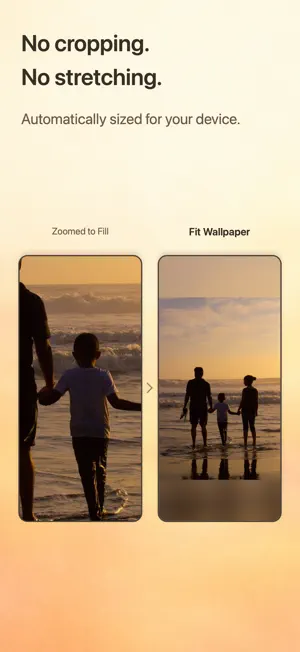
Turn your favorite photos into wallpapers that fit your iPhone or iPad. Adjust a photo's position, size and background, then save it at the right size for your device. Keep family portraits, pet photos and special memories in view without cropping or stretching the image. HOW TO USE 1. Tap Select Photo, or share a photo to Fit Wallpaper from the Photos app. 2. Drag and pinch to adjust its position and size. 3. Tap Change Background to choose a background. 4. Tap Save to save the result to your photo library. 5. Open your device's Settings > Wallpaper to set the saved image as your wallpaper. When you set it, check the photo's position and size in your device's preview. SEVEN BACKGROUND STYLES From Your Photo • Blurred Photo: blur the photo and adjust the blur strength. • Photo Color: use a color taken from the photo. • Photo Color Gradient: create a gradient from the photo's colors. • Mirror: fill the space with a mirrored copy of the photo. • Stretched Edges: extend the edges of the photo to fill the space. Another Photo • Custom Photo: place a different photo behind your photo and adjust its position and size. Color • Custom Color: choose any color with the color picker. OPEN FROM THE SHARE MENU Share a photo from the Photos app or other apps to open it directly in the editor. SIZED FOR YOUR DEVICE The app detects your device and exports at its screen dimensions. You can also select another iPhone or iPad model manually, including the outer and inner displays of foldable iPhone models. ROTATE YOUR PHOTO Rotate in 90-degree steps. Your changes appear in the preview, the background and the saved wallpaper. GREAT FOR • Keeping faces in view when you use a favorite photo as your wallpaper • Using pet or family photos on your Lock Screen and Home Screen • Fitting a landscape photo on a portrait screen • Images or screenshots whose size doesn't match your screen ON-DEVICE PHOTO EDITING Photos selected for wallpaper editing are processed on your device. They are not sent to a server for editing. ADS AND IN-APP PURCHASES You may be asked to rate the app after your first save. Subsequent saves require watching a rewarded ad unless Pro is active. Choose a yearly or lifetime Pro plan to remove banner ads and ads shown when saving. Existing lifetime purchases remain valid. The yearly plan renews automatically every year and you will be charged unless cancelled in Apple subscription settings at least 24 hours before renewal. After cancellation, Pro remains available until the end of the paid period. The lifetime plan is a one-time purchase with no automatic renewal. See the app and App Store purchase sheet for the current price. The optional Buy me a coffee purchase supports development and does not remove ads or unlock features. SUPPORT Send questions, feedback or bug reports from Settings > Contact Us in the app. Terms of Use (Apple Standard EULA): https://www.apple.com/legal/internet-services/itunes/dev/stdeula/ Privacy Policy: https://g-session.github.io/wallpaper-privacy/privacy/2026-10-22/en/
What’s new
Version 1.8.1 · Updated October 28, 2026
The text in our App Store screenshots is now easier to read.
App privacy
The developer, NEXUS Incorporated, reported these privacy practices to Apple.
Data Used to Track You
The following data may be used to track you across apps and websites owned by other companies:
- Identifiers: Device ID
Data Linked to You
The following data, which may be collected and linked to your identity, may be used for the following purposes:
- Location: Coarse Location
- Identifiers: Device ID
- Usage Data: Product Interaction, Advertising Data
- Diagnostics: Other Diagnostic Data
- Contact Info: Email Address
- User Content: Photos or Videos, Customer Support
Used for: Third-Party Advertising, Developer’s Advertising or Marketing, Analytics, App Functionality
Data Not Linked to You
The following data, which may be collected but is not linked to your identity, may be used for the following purposes:
- Diagnostics: Performance Data, Crash Data
- Purchases: Purchase History
- Location: Coarse Location
- Usage Data: Product Interaction
Used for: Third-Party Advertising, Developer’s Advertising or Marketing, Analytics, App Functionality
Alternatives to Fit Wallpaper: Photo Resizer
Looking for apps like Fit Wallpaper: Photo Resizer? Here are 6 similar apps on the App Store.
-
 Imagitar - AI Creative Studio
-
 Oryon
-
 ぴったりトリミング
-
 Nut AI: Video Generator & Chat
-
 AI Photo Editor: Prompt Edit
-
 3sec Vlog
| App | Rating | Price | Last updated | Compare |
|---|---|---|---|---|
| Fit Wallpaper: Photo Resizer | – | Free | October 28, 2026 | |
| Imagitar - AI Creative Studio | – | Free | Sep 23, 2026 | Compare |
| Oryon | – | Free | Dec 16, 2025 | Compare |
| ぴったりトリミング | – | Free | Apr 21, 2026 | Compare |
| Nut AI: Video Generator & Chat | – | Free | Oct 25, 2026 | Compare |
| AI Photo Editor: Prompt Edit | – | Free | Oct 19, 2026 | Compare |
| 3sec Vlog | – | Free | Jul 17, 2026 | Compare |