

AI Photo Editor: Prompt Edit
DrawingData, Inc. Photo & Video iPhoneiPadiPod touch
AI Photo Editor: Prompt Edit is a free Photo & Video app for iPhone and iPad by DrawingData, Inc. Requires iOS 17.6. Updated October 19, 2026.
- Price
- Free
- on the App Store
- Size
- 21 MB
- Age 4+
- Updated
- Oct 19
- 2026 · v1.2
Screenshots



About AI Photo Editor: Prompt Edit
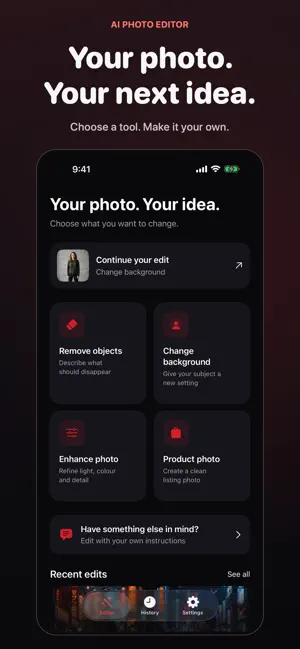
Edit photos with AI using your own words. Choose an image, describe what you want to change and explore a new version without working through complex editing tools. MAKE THE EDIT YOU HAVE IN MIND • Ask AI to remove unwanted objects or change the background. • Retouch a photo, adjust its look or try a different artistic style. • Add or replace elements with a text prompt. • Continue editing a result with follow-up instructions. • Upscale images, revisit your editing history, and save or share your creations. Start with a clear photo and a specific instruction, such as changing a background or removing a distracting object. Review the result and refine your prompt to keep shaping the image. An internet connection is required, and AI results can vary. SUBSCRIPTIONS Free use is limited. Weekly and yearly subscriptions are available; paid features depend on the selected plan. Payment is charged to your Apple Account at purchase confirmation. Subscriptions renew automatically unless canceled at least 24 hours before the current period ends. Manage or cancel your subscription in your App Store account settings. Terms of Use: https://www.apple.com/legal/internet-services/itunes/dev/stdeula/ Privacy Policy: https://drawingdata.io/privacy-policy
What’s new
Version 1.2 · Updated October 19, 2026
Editing starts with your photo. Choose an image from Photos, Files, or Camera and go straight to the editor. Find Remove Objects, Change Background, Enhance Photo, and Product Photo in the Templates menu. Switch between tools while keeping your selected photo. Enjoy a cleaner Home screen, improved iPad layouts, and more complete translations across all supported languages.
App privacy
The developer, DrawingData, Inc., reported these privacy practices to Apple.
Data Not Linked to You
The following data, which may be collected but is not linked to your identity, may be used for the following purposes:
- User Content: Photos or Videos
Used for: App Functionality
Alternatives to AI Photo Editor: Prompt Edit
Looking for apps like AI Photo Editor: Prompt Edit? Here are 6 similar apps on the App Store. The highest rated is ReviseImage: AI Image Edit (5.0/5), and all 6 are free to download.
-
 ReviseImage: AI Image Edit
5.0
-
 AI Photo Editor : Edit AI
5.0
-
 Deep Image: AI Photo Editor
3.0
-
 Edit AI - AI Photo Editor
4.8
-
 Pixy - AI Photo Editor
4.8
-
 AI Photo Editing
4.6
| App | Rating | Price | Last updated | Compare |
|---|---|---|---|---|
| AI Photo Editor: Prompt Edit | – | Free | October 19, 2026 | |
| ReviseImage: AI Image Edit | 5.0 / 5 (4) | Free | Sep 18, 2026 | Compare |
| AI Photo Editor : Edit AI | 5.0 / 5 (3) | Free | Apr 8, 2026 | Compare |
| Deep Image: AI Photo Editor | 3.0 / 5 (2) | Free | Oct 15, 2026 | Compare |
| Edit AI - AI Photo Editor | 4.8 / 5 (4) | Free | Apr 5, 2025 | Compare |
| Pixy - AI Photo Editor | 4.8 / 5 (4) | Free | Apr 28, 2025 | Compare |
| AI Photo Editing | 4.6 / 5 (9) | Free | Oct 13, 2026 | Compare |