

Popo: Cute Screen Time Blocker
QOLTAS LIMITED LIABILITY COMPANY Health & Fitness iPhoneiPadiPod touch
Popo: Cute Screen Time Blocker is a free Health & Fitness app for iPhone and iPad by QOLTAS LIMITED LIABILITY COMPANY. Requires iOS 17.0.
- Price
- Free
- on the App Store
- Size
- 3 MB
- Age 4+
- Updated
- Nov 4
- 2026 · v1.1
Screenshots



About Popo: Cute Screen Time Blocker
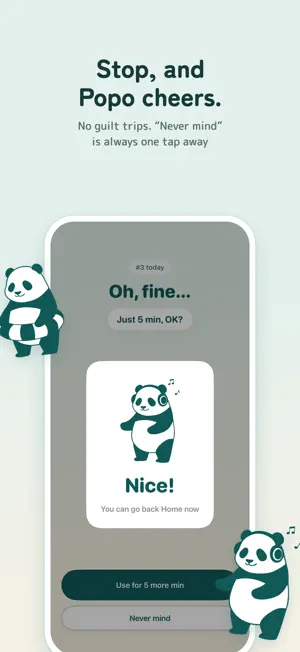
A gentle nudge, not a lock. When you use an app too much, Popo the panda comes to get in your way. Free, no quiz, no paywall. Popo cheers you on instead of shaming you. Set how long you can use each app in a day. When the time is up, Popo shows up in front of that app. Tap to move Popo, and you can use the app for a few more minutes. When the time runs out, Popo comes back. On Popo's screen in the app, tap "Never mind" and Popo cheers you on. What it does • Set a daily limit, and Popo watches Just pick the minutes. Set 0 and Popo comes the moment you open the app. • See time left at a glance The Home tab shows the time left for each app. The widget shows about how much is left. • You can't open it until you move Popo The more times you open an app in a day, the more Popos show up. • 9 Popos to choose from Pick your favorites. • Everything stays on your iPhone No account, no ads. The app sends no data. Which apps you use, and for how long, never leaves your iPhone. The app opens a web page or the App Store only when you tap a button in Settings. Getting started 1. Tap "Pick apps to block," then an app name 2. When asked for Screen Time access, tap "Continue" 3. In Apple's list, check only that app → "Done" Please note • Works on iPhone with iOS 17 or later. On iOS 26.4 and earlier, instead of opening this app from the block screen, you get a notification. Tap it and Popo appears. • Popo uses iPhone's Screen Time features. • While Popo is blocking an app, you may not get that app's notifications. For apps whose notifications you need, set a longer daily limit. Notifications come through until the limit is used up. • If an app stays blocked, go to Settings → Screen Time → "Apps with Screen Time Access" at the bottom and turn off Popo (you may need your Screen Time passcode). That lifts every block.
What’s new
Version 1.1 · Updated November 4, 2026
Popo now speaks English! Added "Cheer Popo on (write a review)," "Privacy Policy," and "Support" to Settings. Small fixes so Popo's words fit better on screen.
App privacy
The developer, QOLTAS LIMITED LIABILITY COMPANY, reported these privacy practices to Apple.
Data Not Collected
The developer does not collect any data from this app.
Alternatives to Popo: Cute Screen Time Blocker
Looking for apps like Popo: Cute Screen Time Blocker? Here are 6 similar apps on the App Store. The highest rated is Gamijii: Screen Time Grandpa (5.0/5), and all 6 are free to download.
-
 Movin: Walk to Unlock Apps
-
 Hitokokyu: Pause Before Apps
-
 ZenLock – App Blocking App
-
 Gamijii: Screen Time Grandpa
5.0
-
 OneBreath: Screen Time Blocker
-
 muupo: App Blocker & Focus
| App | Rating | Price | Last updated | Compare |
|---|---|---|---|---|
| Popo: Cute Screen Time Blocker | – | Free | November 4, 2026 | |
| Movin: Walk to Unlock Apps | – | Free | Nov 11, 2026 | Compare |
| Hitokokyu: Pause Before Apps | – | Free | Oct 8, 2026 | Compare |
| ZenLock – App Blocking App | – | Free | Sep 23, 2025 | Compare |
| Gamijii: Screen Time Grandpa | 5.0 / 5 (1) | Free | Nov 16, 2026 | Compare |
| OneBreath: Screen Time Blocker | – | Free | Nov 10, 2026 | Compare |
| muupo: App Blocker & Focus | – | Free | Nov 17, 2026 | Compare |