

Tape Measure AR: Ruler Pro
Dev Navadiya Utilities iPhoneiPadiPod touch
Tape Measure AR: Ruler Pro is a free Utilities app for iPhone and iPad by Dev Navadiya. Requires iOS 17.0. Updated September 25, 2026.
- Price
- Free
- on the App Store
- Size
- 82 MB
- Age 4+
- Updated
- Sep 25
- 2026 · v1.0
Screenshots



About Tape Measure AR: Ruler Pro
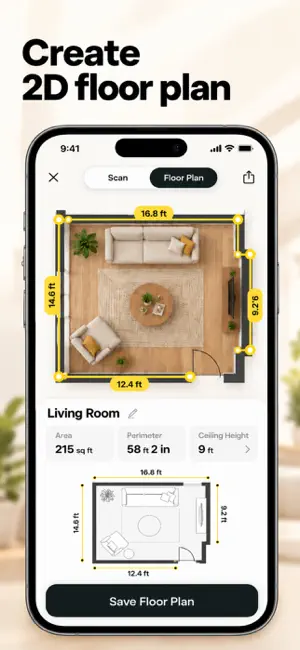
Turn your iPhone into a practical measurement toolkit for everyday spaces, objects and home projects. Tape Measure AR helps you measure real-world length with the camera, then gives you additional tools for area, angles, height, floor plans, room capture and more. KEY FEATURES Tape Measure - place two points on a real surface and measure the distance between them. Area Measure - measure multiple points to estimate surface area. Angle Measure - check angles between measured points. Height Measure - measure vertical dimensions with AR. Person Height - estimate a person’s height using supported camera-based measurement. 2D Floor Plan - capture room dimensions and create a clean plan you can review later. 3D Room Scan - capture supported rooms using Apple RoomPlan on compatible devices. 3D Scanner - create spatial mesh scans on devices that support scene reconstruction. Bubble Level - use your device sensors as a convenient leveling tool. Screen Ruler - make quick on-screen measurements. TV Sizer and additional utility tools help with common measuring tasks. BUILT FOR REAL-WORLD MEASURING: Helpful tracking guidance shows when the camera needs more movement, better lighting or a clearer surface. Metric and imperial measurement formats are supported. Measure Pro unlocks premium measurement tools and removes ads. Weekly and yearly auto-renewable subscription options are shown in the app before purchase. You can restore an eligible purchase in the app. AR measurements are estimates and accuracy can vary with device hardware, lighting, surface texture, tracking quality and user technique. For construction, safety-critical work, purchases that depend on an exact fit, or other important dimensions, verify the result with a calibrated physical measuring tool. Some advanced room and 3D scanning features require compatible Apple hardware, including supported depth-sensing or LiDAR capabilities. Privacy Policy: https://ios-tape-measurement-2026.web.app/privacy/ Terms of Use: https://ios-tape-measurement-2026.web.app/terms/
App privacy
The developer, Dev Navadiya, reported these privacy practices to Apple.
Data Used to Track You
The following data may be used to track you across apps and websites owned by other companies:
- Identifiers: Device ID
Data Not Linked to You
The following data, which may be collected but is not linked to your identity, may be used for the following purposes:
- Purchases: Purchase History
- Location: Coarse Location
- Identifiers: User ID, Device ID
- Usage Data: Product Interaction, Advertising Data
- Diagnostics: Crash Data, Performance Data
- User Content: Photos or Videos
Used for: Analytics, App Functionality
Alternatives to Tape Measure AR: Ruler Pro
Looking for apps like Tape Measure AR: Ruler Pro? Here are 6 similar apps on the App Store.
-
 Rulio: AR Tape Measure
-
 AR Ruler: 3D Tape Measure App
-
 4Measure: Photo Dimensions
-
 Hair Color Formula Book
-
 Wonder Ruler - Camera Ruler
-
 SIP Planner and Calculator
| App | Rating | Price | Last updated | Compare |
|---|---|---|---|---|
| Tape Measure AR: Ruler Pro | – | Free | September 25, 2026 | |
| Rulio: AR Tape Measure | – | Free | Oct 17, 2026 | Compare |
| AR Ruler: 3D Tape Measure App | – | Free | Sep 17, 2026 | Compare |
| 4Measure: Photo Dimensions | – | Free | Sep 29, 2026 | Compare |
| Hair Color Formula Book | – | Free | Oct 6, 2026 | Compare |
| Wonder Ruler - Camera Ruler | – | Free | Oct 10, 2026 | Compare |
| SIP Planner and Calculator | – | Free | Dec 8, 2025 | Compare |