

AR Ruler: 3D Tape Measure App
Mittal Vagadiya Utilities iPhoneiPadiPod touch
AR Ruler: 3D Tape Measure App is a free Utilities app for iPhone and iPad by Mittal Vagadiya. Requires iOS 17.6. Updated September 17, 2026.
- Price
- Free
- on the App Store
- Size
- 63 MB
- Age 4+
- Updated
- Sep 17
- 2026 · v1.0.0
Screenshots

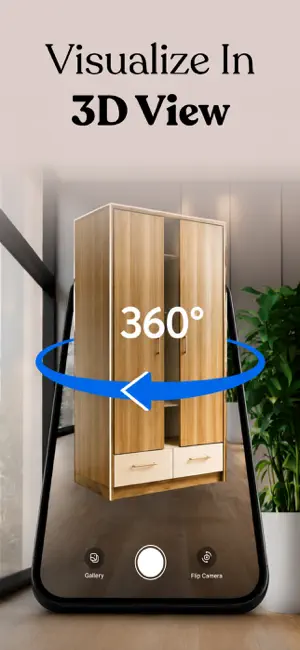
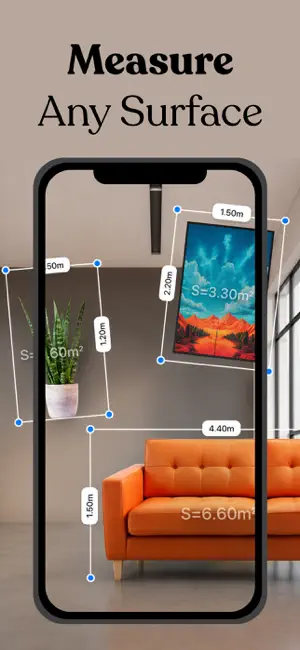

About AR Ruler: 3D Tape Measure App
Point your iPhone camera at any object to get its length, width, and height in metric or imperial, right on your screen. ARRuler Measure & Scan is built for DIY renovators, tradespeople, and shoppers who need a tape, angle finder, and code reader in one pocket tool. Hold the phone up to a wall, door, or piece of furniture and the height reading appears as you move. The angle and slope finder shows real-time surface guidance, so checking a shelf for level or a ramp for pitch takes seconds. Counting repeated items is just as quick: tap each one on screen and the app marks and tracks the tally for you. The same camera reads QR codes and product barcodes with instant results, and it picks out printed links and text you can act on with one tap. When you need a record, capture a photo, draw your measurements and markings straight onto it, and export the annotated image. Everything you capture is kept in an on-device history, so last week's room dimensions or the barcode from the hardware store are still there when you need them. FEATURES - AR tape for the length and width of objects and rooms, in metric or imperial units - Angle and slope finder with live surface guidance as you tilt the phone - Height readings for people, walls, doors, and furniture - Tap-to-count tool that marks each item and keeps the running total - QR code and product barcode reader with instant results - Link and text detection through the camera with quick actions - Photo capture with measurement annotations and drawing, ready to export - On-device history holding every past measurement and code result Whether you are sizing a sofa before buying it, checking if a new appliance fits the gap, or logging materials on a job, this is the toolkit that is already in your pocket. Subscription Details - Weekly and yearly plans - Payment is charged to your Apple Account at confirmation of purchase - Subscriptions auto-renew unless canceled at least 24 hours before the end of the period - Manage or cancel anytime in Apple Account settings Terms of use : https://mittalvagadiyapolicy.blogspot.com/2026/06/terms-of-use.html Privacy Policy : https://mittalvagadiyapolicy.blogspot.com/2026/06/privacy-policy.html
App privacy
The developer, Mittal Vagadiya, reported these privacy practices to Apple.
Data Used to Track You
The following data may be used to track you across apps and websites owned by other companies:
- Identifiers: Device ID
- Usage Data: Advertising Data
Data Not Linked to You
The following data, which may be collected but is not linked to your identity, may be used for the following purposes:
- Identifiers: Device ID
- Usage Data: Advertising Data
- Diagnostics: Performance Data
Used for: Third-Party Advertising, Analytics
Alternatives to AR Ruler: 3D Tape Measure App
Looking for apps like AR Ruler: 3D Tape Measure App? Here are 6 similar apps on the App Store.
-
 Tape Measure AR: Ruler Pro
-
 AR Ruler: Distance & Area Tool
-
 Micro Drone GST
-
 Endaze: Measuring Tool & Level
-
 WA Video Splitter
-
 AR Ruler: Tape Measure App
| App | Rating | Price | Last updated | Compare |
|---|---|---|---|---|
| AR Ruler: 3D Tape Measure App | – | Free | September 17, 2026 | |
| Tape Measure AR: Ruler Pro | – | Free | Sep 25, 2026 | Compare |
| AR Ruler: Distance & Area Tool | – | Free | Aug 20, 2026 | Compare |
| Micro Drone GST | – | Free | Jan 7, 2025 | Compare |
| Endaze: Measuring Tool & Level | – | Free | Oct 30, 2026 | Compare |
| WA Video Splitter | – | Free | Nov 4, 2025 | Compare |
| AR Ruler: Tape Measure App | – | Free | Sep 24, 2026 | Compare |