

Game Emulator | Classic Games
宏勋 蔡 Entertainment iPhoneiPadiPod touch
Game Emulator | Classic Games is a free Entertainment app for iPhone and iPad by 宏勋 蔡. Rated 5.0/5 from 1 ratings. Requires iOS 17.0.
- Rating
- 5.0
- 1 ratings
- Price
- Free
- on the App Store
- Size
- 88 MB
- Age 4+
- Updated
- Sep 28
- 2026 · v1.0
Screenshots


About Game Emulator | Classic Games
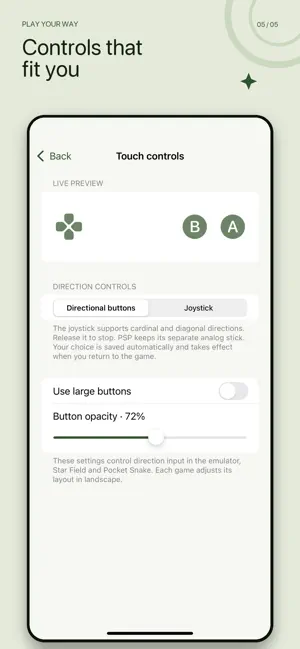
Game Emulator Your games, ready anytime. Game Emulator brings a clean, convenient classic gaming experience to iPhone and iPad, with support for NES, GBC, NDS, and PSP games. Import game files you legally own from the Files app, organize your library, and start playing—no account required. Key features: • Play supported NES, GBC, NDS, and PSP games • Import and manage local games through the Files app • Search by name and filter by platform or favorites • Save and load progress so you can continue later • Choose between directional buttons and a virtual joystick • Adjust control size and opacity • Play in portrait or landscape • Review recently played games and play time • Use compatible iOS game controllers Four original games, ready to play No import is needed to enjoy the four original games included with the app: • Star Field — move across the grid and collect each star • Pocket Snake — guide the snake, collect lights, and chase a higher score • Memory Pairs — uncover and match six pairs of geometric symbols • Light Grid — switch neighboring tiles and solve increasingly challenging levels Each built-in game includes pause, autosave, favorites, sound controls, and simple instructions. Leave whenever you like and continue from your saved progress later. Designed for play on the go A focused library, straightforward pause menu, and adjustable touch controls let you play your way. By default, your game files, saves, and play history remain on your device. Local importing and gameplay do not require a Game Emulator account. Important information Game Emulator does not provide a commercial game catalog, commercial ROM downloads, or copyrighted BIOS files. Only import and use game or system files that you have the legal right to use. Compatibility and performance may vary depending on the device, iOS version, game file, and emulation core. This is an independent project and is not affiliated with, authorized by, or endorsed by any console manufacturer or game publisher. Game names, console names, and related trademarks belong to their respective owners.
App privacy
The developer, 宏勋 蔡, reported these privacy practices to Apple.
Data Used to Track You
The following data may be used to track you across apps and websites owned by other companies:
- Identifiers: Device ID
Data Linked to You
The following data, which may be collected and linked to your identity, may be used for the following purposes:
- Identifiers: Device ID
Used for: Third-Party Advertising
Alternatives to Game Emulator | Classic Games
Looking for apps like Game Emulator | Classic Games? Here are 6 similar apps on the App Store. The highest rated is Nova Retro (5.0/5), and all 6 are free to download.
-
 Nova Retro
5.0
Nova Retro
5.0
-
 Snapemu - Retro Emulator
5.0
Snapemu - Retro Emulator
5.0
-
 RetroKit: Game Emulator
5.0
RetroKit: Game Emulator
5.0
-
 POK Emulator: Retro Delta Skin
4.7
POK Emulator: Retro Delta Skin
4.7
-
 RetroPocket: Retro Games
5.0
RetroPocket: Retro Games
5.0
-
 Zenulator
5.0
Zenulator
5.0
| App | Rating | Price | Last updated | Compare |
|---|---|---|---|---|
| Game Emulator | Classic Games | 5.0 / 5 (1 rating) | Free | September 28, 2026 | |
| Nova Retro | 5.0 / 5 (2) | Free | Oct 11, 2026 | Compare |
| Snapemu - Retro Emulator | 5.0 / 5 (1) | Free | Oct 15, 2026 | Compare |
| RetroKit: Game Emulator | 5.0 / 5 (1) | Free | Oct 14, 2026 | Compare |
| POK Emulator: Retro Delta Skin | 4.7 / 5 (3) | Free | Oct 15, 2026 | Compare |
| RetroPocket: Retro Games | 5.0 / 5 (1) | Free | Oct 22, 2026 | Compare |
| Zenulator | 5.0 / 5 (1) | Free | Oct 1, 2026 | Compare |