

Nova Retro
振东 史 Entertainment iPhoneiPadiPod touchMac
Nova Retro is a free Entertainment app for iPhone and iPad by 振东 史. Rated 5.0/5 from 2 ratings. Requires iOS 18.0. Updated October 11, 2026.
- Rating
- 5.0
- 2 ratings
- Price
- Free
- on the App Store
- Size
- 18 MB
- Age 4+
- Updated
- Oct 11
- 2026 · v1.2
Screenshots

About Nova Retro
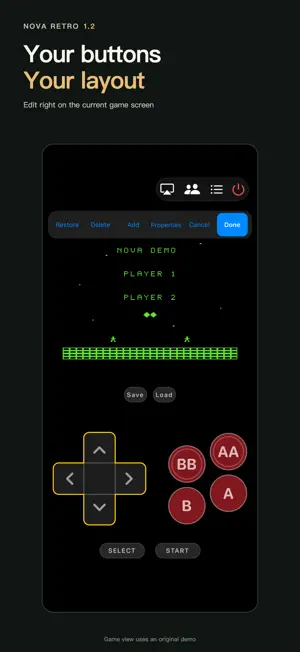
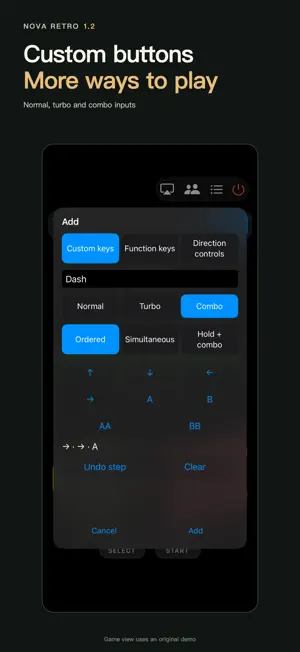
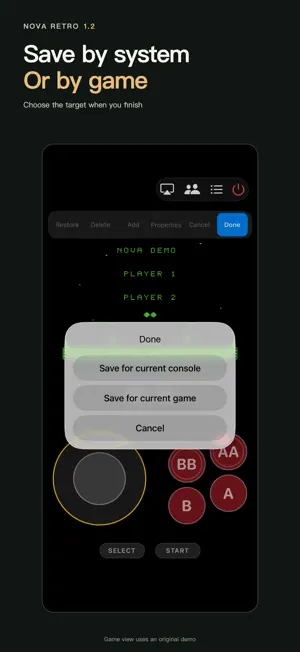
Nova Retro brings six classic systems to iPhone and iPad: NES, SNES, Game Boy, Game Boy Color, Game Boy Advance and Genesis / Mega Drive. Bring your own games No games are included and no ROM downloads are provided. Import files you legally own and have the right to use through Files. Play on the same local network Create a room for friends to join or watch from devices on the same local network that can reach one another. The host runs the game; clients receive video and audio and send input for their assigned player slot, without importing the same ROM. Player limits depend on the system and game. Internet-based remote multiplayer is not available. Handheld systems currently support spectating only. Edit touch controls right in the game Freely add, remove and move buttons, with individual size and opacity settings. Duplicates are welcome. The default 8-way D-pad supports diagonals; a 4-way D-pad and an 8-way joystick are also available. Create normal, turbo or combo buttons. Choose a sequential combo, a simultaneous combo, or a hold-and-sequence combo. Sequential combos allow repeated steps. Normal and turbo buttons support automatic or slide-to-lock activation. Sequential and hold-and-sequence combos run once per tap. A simultaneous combo presses its buttons together while held and releases its own inputs when let go. Turbo is NES-only. AA and BB mean turbo A and turbo B, not A+A or B+B. Completing a hold-and-sequence combo releases only that combo's held and turbo inputs, not other independent button presses or locks. Save for a system or a game Choose the current system or game when you finish editing. Portrait, landscape and external-display controller layouts are stored separately for the active mode. Default Save and Load buttons use slot 1; custom buttons can target a specific slot. Move, proportionally resize or reset the game view. Local layout editing does not move the picture on an external display. The system means the emulated console, not the iPhone or iPad model. Game-specific layouts take priority; changing the system default does not overwrite them. Everyday tools Save states, load states, fast-forward, cheats, keyboards and game controllers. Choose Simplified Chinese, Traditional Chinese, English, Japanese, Spanish, Brazilian Portuguese, Korean, French or German. Games, saves and layouts stay on your device. Local multiplayer transmits video, audio and control data, not ROM or save files to clients.
What’s new
Version 1.2 · Updated October 11, 2026
• Local-network rooms, joining, player-slot selection and spectating. Clients do not need the same ROM. • In-game touch-layout editing: freely add, remove and move buttons, adjust size and opacity, and add duplicates. • Default 8-way D-pad, with 4-way D-pad and 8-way joystick options. • Normal and turbo buttons, plus three combo modes: sequential, simultaneous or hold-and-sequence. Normal and turbo buttons support automatic or slide-to-lock activation. • Save by system or game, independently for portrait, landscape and external-display controller modes. • Default Save and Load buttons use slot 1; custom buttons can target a specific slot. • Improved sustained touch input, sliding between direction buttons and layout saving. Done is highlighted at the far right of the editor toolbar. Multiplayer requires the same reachable local network. Player limits depend on the system and game.
App privacy
The developer, 振东 史, reported these privacy practices to Apple.
Data Not Collected
The developer does not collect any data from this app.
Alternatives to Nova Retro
Looking for apps like Nova Retro? Here are 6 similar apps on the App Store. The highest rated is Game Emulator | Classic Games (5.0/5), and all 6 are free to download.
-
 Game Emulator | Classic Games
5.0
-
 RetroKit: Game Emulator
5.0
-
 POK Emulator: Retro Delta Skin
4.7
-
 Pizza Boy AIO Emulator
5.0
-
 RetroPocket: Retro Games
5.0
-
 GameMory: Game Emulator
5.0
| App | Rating | Price | Last updated | Compare |
|---|---|---|---|---|
| Nova Retro | 5.0 / 5 (2 ratings) | Free | October 11, 2026 | |
| Game Emulator | Classic Games | 5.0 / 5 (1) | Free | Sep 28, 2026 | Compare |
| RetroKit: Game Emulator | 5.0 / 5 (1) | Free | Oct 14, 2026 | Compare |
| POK Emulator: Retro Delta Skin | 4.7 / 5 (3) | Free | Oct 15, 2026 | Compare |
| Pizza Boy AIO Emulator | 5.0 / 5 (1) | Free | Oct 13, 2026 | Compare |
| RetroPocket: Retro Games | 5.0 / 5 (1) | Free | Oct 22, 2026 | Compare |
| GameMory: Game Emulator | 5.0 / 5 (1) | Free | Oct 24, 2026 | Compare |
Compare Nova Retro with the top alternatives: ratings, updates, ASO score and keyword gaps →