

Minivid - Compress Video Size
Dao Van Thuong Photo & Video iPhoneiPadiPod touch
Minivid - Compress Video Size is a free Photo & Video app for iPhone and iPad by Dao Van Thuong. Requires iOS 15.1. Updated October 13, 2026.
- Price
- Free
- on the App Store
- Size
- 39 MB
- Age 4+
- Updated
- Oct 13
- 2026 · v1.6
Screenshots
Save to Pinterest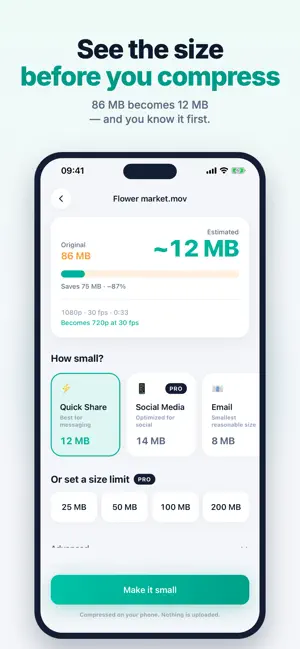


About Minivid - Compress Video Size
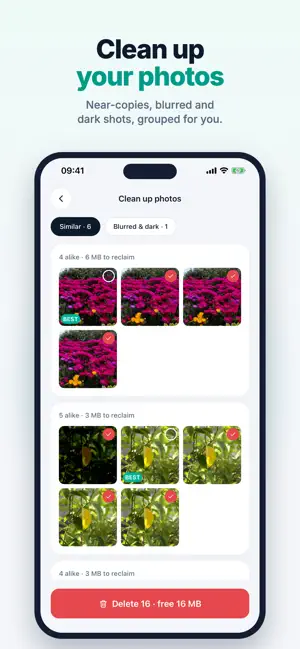
Minivid compresses videos and reduces their file size on your iPhone or iPad, so they fit email and chat apps and your storage gets space back. Pick a video and Minivid shows you exactly how small it will get before you commit. One tap and it is done, and your videos never leave your device. NO ADS, NO WEEKLY PLAN, NO CARD TO TRY The free version works without ads, an account or a card. Pro is monthly, yearly or a one-time purchase — never a weekly plan. Every compressed video and converted photo keeps the original’s date and location, so it sits in the right place in Photos and the big original can go. FIND WHAT IS EATING YOUR STORAGE Every video on your device, ranked by size, with the total you could get back — filter to the ones older than a year. Compress the heavy ones in one run, then delete the originals once the smaller copies are safely in Photos. That last step is the one that actually frees the space, so Minivid offers it instead of pretending the job is done. CLEAN UP PHOTOS Near-identical shots grouped together with the sharpest one kept, plus the blurred, dark and blown-out photos nobody will miss. Turn Live Photos into stills and drop the movie each one carries. SEARCH YOUR SCREENSHOTS Minivid reads the words in your screenshots — the Wi-Fi password, the seat number, the receipt — so you can find them by what they say. Read on your device; your screenshots are never uploaded. SEE THE RESULT FIRST Minivid reads your video and shows the size you will end up with, updating as you change settings. 1.2 GB becomes 86 MB, and you know that before you start. COMPRESS TO AN EXACT SIZE Need to stay under 25 MB for email, or 100 MB for a chat app? Name the limit and Minivid works out the settings that fit under it. SEND VIA ANY APP Pick Zalo, WhatsApp, Gmail, Discord and more: Minivid fits the video under that app’s limit, then opens the share sheet. MORE THAN COMPRESSION • Take the sound out of a video and save it as its own file, copied untouched • Speed a long clip up into a 4x, 8x or 16x time-lapse • Stamp your name or handle on every frame • Resize and convert photos in batches, JPEG or PNG • Share a video or photo into Minivid from any app YOUR VIDEOS NEVER LEAVE YOUR DEVICE There is no account. Every video and photo is read, processed and written on this device, with the same hardware encoder your camera uses. It works in airplane mode. No ads, no tracking across apps; anonymous usage statistics and crash reports, which never include your videos or file names, help us improve Minivid. ALSO • Watch any video before and after compressing • Add videos to an album, or delete them from Photos, from inside Minivid • 4K, 1080p and 720p output, H.264 or HEVC • Settings shows exactly what the working files are costing you KEEP YOUR DEVICE CLEAN • Discover: every tool in one place, each with a preview • An optional weekly cleanup digest: new large videos and screenshots worth a look, worked out on your device • A Home Screen widget with free space, what you could clear, and Clean now • Siri & Shortcuts: “How much space can I free?”, “Compress my last video”, “Open screenshot cleaner” • Short tips at the right moment, and a card to share when you pass a milestone MINIVID PRO Free compresses videos up to 100 MB at 720p, one at a time. Pro removes every limit: • Any file size, any length • 1080p and 4K output • Compress to an exact size • A whole batch in one go • Time-lapse at 4x, 8x and 16x • Your own watermark on every frame • HEVC for smaller files • Frame rate and audio, your call • Every compression, kept • Erase anything out of a photo • A private vault with no limit Pro is available monthly, yearly, or as a one-time lifetime purchase. The yearly plan starts with a 7-day free trial. Subscriptions renew until cancelled and can be managed in your App Store account settings. Terms of Use (EULA): https://www.apple.com/legal/internet-services/itunes/dev/stdeula/
What’s new
Version 1.6 · Updated October 13, 2026
Minivid 1.6: a calmer, cleaner look. • Warmer colours, softer cards and one clear button on every screen • The same tools, easier to read on iPhone and iPad • Fixes and small improvements
App privacy
The developer, Dao Van Thuong, reported these privacy practices to Apple.
Data Not Linked to You
The following data, which may be collected but is not linked to your identity, may be used for the following purposes:
- Purchases: Purchase History
- Location: Coarse Location
- Identifiers: Device ID, User ID
- Usage Data: Product Interaction
- Contact Info: Email Address
- User Content: Photos or Videos, Customer Support
- Diagnostics: Crash Data
Used for: Analytics, App Functionality
Alternatives to Minivid - Compress Video Size
Looking for apps like Minivid - Compress Video Size? Here are 6 similar apps on the App Store. The highest rated is Squish: Video Compressor (5.0/5), and all 6 are free to download.
-
 Accordion: Video Compressor
-
 Offpaint
-
 Compress Videos - Condenso
-
 Squish: Video Compressor
5.0
-
 Video Compressor & Resize: Kio
-
 Camera Boss for OneDrive
3.5
| App | Rating | Price | Last updated | Compare |
|---|---|---|---|---|
| Minivid - Compress Video Size | – | Free | October 13, 2026 | |
| Accordion: Video Compressor | – | Free | Nov 22, 2026 | Compare |
| Offpaint | – | Free | Sep 14, 2026 | Compare |
| Compress Videos - Condenso | – | Free | Sep 18, 2026 | Compare |
| Squish: Video Compressor | 5.0 / 5 (2) | Free | Nov 25, 2026 | Compare |
| Video Compressor & Resize: Kio | – | Free | Nov 11, 2026 | Compare |
| Camera Boss for OneDrive | 3.5 / 5 (2) | Free | Dec 15, 2025 | Compare |