

Wavevra
Tom Silas Helmke Music iPhoneiPadiPod touch
Wavevra is a free Music app for iPhone and iPad by Tom Silas Helmke. Requires iOS 18.0. Updated October 9, 2026.
- Price
- Free
- on the App Store
- Size
- 4 MB
- Age 4+
- Updated
- Oct 9
- 2026 · v1.0
Screenshots


About Wavevra
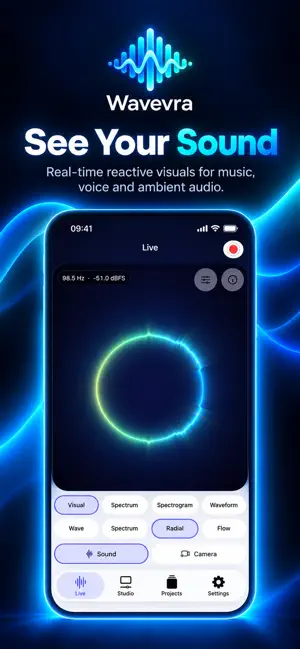
See what sound looks like with Wavevra. Wavevra combines real-time audio analysis with expressive audio-reactive visuals and a creator-focused Studio. Explore sound as it happens, record audio or video, import existing media, shape the result, and export videos directly on your iPhone. SEE SOUND IN REAL TIME Watch your audio come to life through Wave, Spectrum, Radial, and Flow visual styles. Wavevra uses real audio analysis to drive its visuals. Explore dominant frequencies, RMS and peak levels in dBFS, headroom, frequency bands, and strong frequency peaks. For a more technical view, switch between Spectrum, Spectrogram, and Waveform. CREATE YOUR LOOK Choose from multiple visual styles and color palettes. Adjust intensity and smoothness to shape the motion and appearance of your visual. Wavevra Pro unlocks additional visual styles, palettes, and creator options. RECORD OR IMPORT Use your microphone for live analysis and recordings. Capture video with your camera or import supported audio and video files already on your device. Imported media is analyzed locally and can be opened directly in Studio. EDIT IN STUDIO Play back your media, move through the timeline, choose the part you want to export, and adjust the presentation. Use layouts including visual-only, split, side-by-side, and overlay compositions. Choose from multiple aspect ratios including: • 9:16 for Shorts and Reels • 16:9 for YouTube and landscape video • 1:1 for square content • 4:5 for portrait content EXPORT AND SHARE Create finished videos from your audio-reactive visuals. Share your exports, save them to Photos, or save them through Files. Wavevra Pro adds longer recording and export options, measurement overlays in exported videos, additional creative options, and removes Wavevra export branding. BUILT FOR PRIVACY Wavevra does not require an account. Your audio, video, analysis data, projects, and exports are processed on your device. Wavevra does not use advertising, tracking, or analytics. FREE TO USE Wavevra remains useful without a subscription. Live analysis, technical analyzer views, local projects, recording, Studio, and core export features are available in Free. Wavevra Pro expands the creative and export capabilities of the app through monthly or yearly subscriptions available through the App Store. Wavevra reports digital audio levels such as dBFS. It is not a calibrated sound level meter and does not report dB SPL. Terms of Use: https://www.apple.com/legal/internet-services/itunes/dev/stdeula/ Privacy Policy: https://tommsel.com/en/privacy/wavevra
App privacy
The developer, Tom Silas Helmke, reported these privacy practices to Apple.
Data Not Collected
The developer does not collect any data from this app.
Alternatives to Wavevra
Looking for apps like Wavevra? Here are 6 similar apps on the App Store. The highest rated is Audiolyze (5.0/5), and all 6 are free to download.
-
 DecibelRTA
-
 MicMyPhone
-
 Audiolyze
5.0
-
 JMixRemote
2.7
-
 Vizo - Music Visualizer
4.0
-
 STAGEPAS Controller
2.1
| App | Rating | Price | Last updated | Compare |
|---|---|---|---|---|
| Wavevra | – | Free | October 9, 2026 | |
| DecibelRTA | – | Free | Sep 25, 2026 | Compare |
| MicMyPhone | – | Free | Aug 29, 2026 | Compare |
| Audiolyze | 5.0 / 5 (1) | Free | Jun 16, 2026 | Compare |
| JMixRemote | 2.7 / 5 (3) | Free | Feb 26, 2026 | Compare |
| Vizo - Music Visualizer | 4.0 / 5 (20) | Free | Oct 21, 2026 | Compare |
| STAGEPAS Controller | 2.1 / 5 (7) | Free | May 29, 2026 | Compare |
Compare Wavevra with the top alternatives: ratings, updates, ASO score and keyword gaps →