

Audiolyze
Stephen Berry Music iPhoneiPadiPod touch
Audiolyze is a free Music app for iPhone and iPad by Stephen Berry. Rated 5.0/5 from 1 ratings. Requires iOS 16.0. Updated June 16, 2026.
- Rating
- 5.0
- 1 ratings
- Price
- Free
- on the App Store
- Size
- 6 MB
- Age 4+
- Updated
- Jun 16
- 2026 · v1.0.0
Screenshots

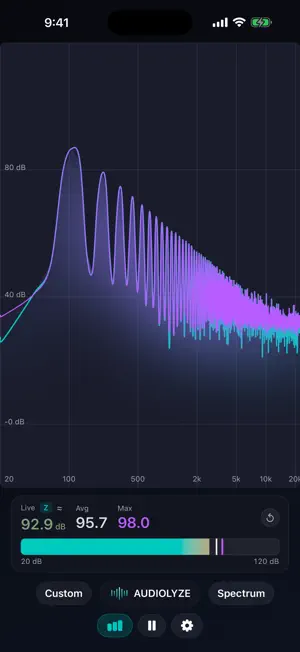


About Audiolyze
Transform your iPhone or iPad into a professional audio analysis workstation. Audiolyze delivers real-time spectrum analysis, waterfall spectrograms, and oscilloscope visualization with the precision tools you need for sound engineering, acoustic analysis, and audio production. SPECTRUM ANALYZER Visualize audio frequencies in real-time with a high-resolution FFT spectrum analyzer. Choose from multiple display modes (dB, Amplitude, Power) and trace styles (smooth spline curves, linear, or classic bars). Switch between logarithmic and linear frequency scales, and select from multiple constant-Q resolutions for RTA analysis, from 1 octave down to 1/24 octave precision. WATERFALL SPECTROGRAM Track how your audio evolves over time with a scrolling 2D spectrogram display. Capture up to 20 seconds of frequency history to identify temporal patterns, transients, and spectral changes that a standard analyzer would miss. OSCILLOSCOPE Examine waveforms in the time domain with a responsive oscilloscope view. Multiple trigger modes (rising edge, falling edge, auto, free-run) help you capture stable waveforms, with adjustable amplitude scaling and trigger threshold controls. HARMONIC ANALYSIS Automatically detect and display harmonics with intelligent fundamental frequency tracking. View overtone relationships, cent deviations, and harmonic order labels overlaid directly on the spectrum — valuable for tuning, voicing, and timbre analysis. SPL REFERENCE LEVELS View relative sound pressure level readings with a built-in SPL meter. Calibrate against an external reference meter to align readings, with optional Z-weighting (flat response) or A-weighting (human hearing curve). Provided for reference and comparison; not a substitute for a certified, type-approved sound level meter. ADVANCED SIGNAL PROCESSING - Multiple FFT sizes (512 to 4096 samples) - Selectable window functions: Hann, Blackman-Harris, Flat-Top - Configurable frame overlap (0-75%) for improved averaging - Rolling window and exponential smoothing modes - High-pass and low-pass filters with adjustable slopes (6/12/18 dB per octave) CUSTOMIZE YOUR WORKFLOW - Peak hold display with decay - Snapshot comparison for before/after analysis - Visual glow effects for enhanced readability - Sparse or dense grid overlays - Save and recall custom presets for each visualization mode FOR SOUND ENGINEERS & MUSICIANS Whether you're a sound engineer tuning a PA system, a musician analyzing instrument tone, a podcaster optimizing room acoustics, or an audio enthusiast exploring the science of sound, Audiolyze provides the analytical depth you need in a beautiful, intuitive interface. EVERYTHING UNLOCKED Every feature is available from the moment you launch. No subscriptions, no in-app purchases, no paywalls, and no ads. Works on iPhone and iPad. Optimized for performance with GPU-accelerated Metal rendering. Available in 13 languages.
App privacy
The developer, Stephen Berry, reported these privacy practices to Apple.
Data Not Collected
The developer does not collect any data from this app.
Alternatives to Audiolyze
Looking for apps like Audiolyze? Here are 6 similar apps on the App Store. The highest rated is NAMILIUM – Spectrum Analyzer (5.0/5), and all 6 are free to download.
-
 NAMILIUM – Spectrum Analyzer
5.0
NAMILIUM – Spectrum Analyzer
5.0
-
 Sound Visualizer - Vibe
2.5
Sound Visualizer - Vibe
2.5
-
 FFT Spectrogram Music Player
-
 MixEar: Ear Trainer for Mixing
-
 K3 Tones
-
 PRISM Monitor
| App | Rating | Price | Last updated | Compare |
|---|---|---|---|---|
| Audiolyze | 5.0 / 5 (1 rating) | Free | June 16, 2026 | |
| NAMILIUM – Spectrum Analyzer | 5.0 / 5 (1) | Free | Oct 15, 2026 | Compare |
| Sound Visualizer - Vibe | 2.5 / 5 (2) | Free | Oct 14, 2026 | Compare |
| FFT Spectrogram Music Player | – | Free | Oct 3, 2026 | Compare |
| MixEar: Ear Trainer for Mixing | – | Free | Oct 10, 2026 | Compare |
| K3 Tones | – | Free | Oct 19, 2026 | Compare |
| PRISM Monitor | – | Free | Oct 7, 2026 | Compare |
Compare Audiolyze with the top alternatives: ratings, updates, ASO score and keyword gaps →