

Onplana Schedule: MPP Viewer
Onplana Productivity iPhoneiPadiPod touchMac
Onplana Schedule: MPP Viewer is a free Productivity app for iPhone and iPad by Onplana. Requires iOS 17.4. Updated November 16, 2026.
- Price
- Free
- on the App Store
- Size
- 13 MB
- Age 4+
- Updated
- Nov 16
- 2026 · v1.1.2
Screenshots
Save to Pinterest


About Onplana Schedule: MPP Viewer
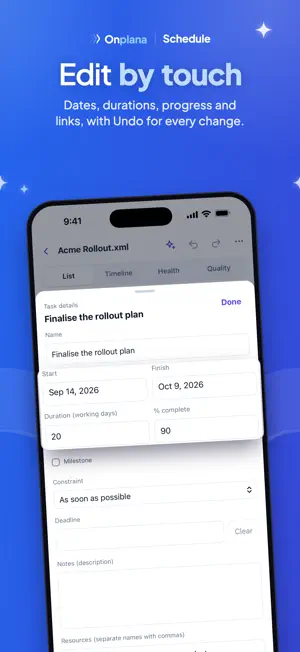
Onplana Schedule is a free app for iPhone and iPad that opens, edits and reschedules Microsoft Project .mpp files without Microsoft Project, and also opens Primavera P6 .xer, Project XML, ProjectLibre, GanttProject and Excel plans as a Gantt chart. Microsoft Project XML files open on your device with no internet connection. Other formats need one: they are uploaded to Onplana's servers to be converted, and the uploaded copy is deleted within 3 days, and removed from backups 7 days after that. How do I open an .mpp file on my iPhone? Tap Open a file and choose it in Files, or share it to Onplana Schedule from another app. The plan opens as a list of tasks or as a timeline, with the links, milestones and critical path. What is an .xer file? A schedule exported from Primavera P6. It opens as a plan and saves as Microsoft Project XML; the .xer file is never changed. What is the critical path? The chain of tasks with no float: if one slips, the finish moves. It is drawn in red, and Critical tasks only narrows the list to it. How do I check a schedule against the DCMA 14 points? Open Quality. The 14 checks, from logic and leads to CPLI and BEI, run on your device. Nothing is uploaded, and each finding shows its tasks. How do I compare two versions of a plan? Choose Compare with another version. The Changes view lists the tasks added, removed or changed. Edit on your iPhone Tap a task to change its name, start, finish, duration, percent complete and predecessors, add a subtask, or indent it. Drag a bar on the timeline, or select several tasks and change them together. Each change reschedules the linked tasks, and Undo takes it back. Save and share Save writes back to the file you opened in Files. A file opened as .mpp, or one sent from another app, saves as a new Project XML file where you choose, so the original is never overwritten, and a recovery copy is kept while you work. Share sends the plan as Project XML, the task table as CSV, or the chart as a PDF or picture. On iPad The full Gantt chart beside the task grid. Pinch to zoom, move a bar or draw a link with a finger, and work beside another app in Split View. Resource usage shows each resource's work by month, week or day. Also Ten built-in templates or a blank schedule, with no account. A free Schedule Health Check report by email. In nine languages. Generative AI Describe a project and Ask AI use generative AI, on Onplana's servers and an AI provider, only when you choose them. Describe a project writes a plan from what you type. Ask AI answers questions about the open plan and suggests changes you review before they apply; it needs an Onplana account and never sends the file. On iPad, Optimize with AI rewrites a copy of the plan you checked to level resources, compress the timeline or reduce risk. Review AI results before you rely on them. Report a problem through Feedback in Settings or [email protected]. Know what leaves your device A Microsoft Project XML file is uploaded only when you choose a health check or a publish. Before it uploads a file without an account, the app names the file and asks. Project ribbon commands Signed in to an Onplana organization whose plan includes them: Set baseline (Baseline and Baseline 1 to 10, with variance) and Move project, and on iPad also Links between projects, Subproject, Manage sprints and Schedule risk. What a file already carries shows for everyone. Share a copy Publish imports a copy into a free Onplana workspace (2 projects, 5 members) that your team opens in a browser. The original file is not changed. What it opens .mpp, .mpt, .mpx, .xer, Primavera P6 XML, Microsoft Project XML, ProjectLibre .pod, GanttProject .gan, Excel .xlsx and .csv.
What’s new
Version 1.1.2 · Updated November 16, 2026
What's new - On iPhone, a Resources tab takes Network's place: each resource's tasks and hours in the look-ahead window, with a mark on any resource that is over-allocated. Tap one to see its tasks. Network moves under More. - On iPhone, the link editor reads a lag such as 5d, 4h, -5d, 2ed or 50%, and an elapsed lag stays elapsed when you save. - On iPhone, the view tabs and the search's clear button are sized for a finger, and the More menu is never cut off under the home indicator. - After you publish a plan to Onplana, and in Share with people…, Share link… sends the plan's link with any app on your device, and Copy invite link copies it. You choose who gets it. - Schedule quality says how many checks could not run and why, such as no baseline saved, and scores the plan on the checks that ran. A plan where nothing failed but some checks did not run reads Incomplete. - Start from a template also offers Project Milestones. - On iPad, the app follows Larger Text, up to 135%, and the whole screen grows with it. - On iPad, Plan > Working time… sets the plan's working days, hours a day, holidays and other non-working days, saved in the file. - On iPad, the Predecessors cell's button, now sized for a finger, changes a link's type and lag, such as a 5-day lead. - On iPad, Analysis and Tools move from Plan to a new Analyze menu, between Plan and Reports. - On iPad, the Look-ahead report offers a 3-week window. - On iPad, Resource usage shades each resource's work by load, in four steps up to capacity and red over it, with a legend. Settings > Appearance > Shade cells by load turns it off. - On iPad, a row whose links miss its constraint is flagged with both days, the constraint's date and the day the links reach. Tap the flag, or Change to a deadline in the row's … menu, to make the constraint a deadline on the same day. - On iPad, the view bar stays on one row when there are unsaved changes.
App privacy
The developer, Onplana, reported these privacy practices to Apple.
Data Linked to You
The following data, which may be collected and linked to your identity, may be used for the following purposes:
- Contact Info: Email Address, Name
- User Content: Other User Content
- Identifiers: User ID
Used for: Developer’s Advertising or Marketing, App Functionality
Data Not Linked to You
The following data, which may be collected but is not linked to your identity, may be used for the following purposes:
- Identifiers: Device ID
- Usage Data: Product Interaction
- Diagnostics: Crash Data, Other Diagnostic Data
Used for: Analytics, App Functionality
Alternatives to Onplana Schedule: MPP Viewer
Looking for apps like Onplana Schedule: MPP Viewer? Here are 6 similar apps on the App Store. The highest rated is Hunter 360 Mobile (1.0/5), and all 6 are free to download.
-
 MPP Project Wizard
-
 Indent
-
 APLOWBS - WBS Task Manager
-
 Pl4nner
-
 Gantt Chart: Project Timeline
-
 Hunter 360 Mobile
1.0
| App | Rating | Price | Last updated | Compare |
|---|---|---|---|---|
| Onplana Schedule: MPP Viewer | – | Free | November 16, 2026 | |
| MPP Project Wizard | – | Free | Oct 31, 2026 | Compare |
| Indent | – | Free | Sep 15, 2026 | Compare |
| APLOWBS - WBS Task Manager | – | Free | Mar 24, 2026 | Compare |
| Pl4nner | – | Free | Aug 27, 2024 | Compare |
| Gantt Chart: Project Timeline | – | Free | Nov 23, 2026 | Compare |
| Hunter 360 Mobile | 1.0 / 5 (1) | Free | Jun 8, 2026 | Compare |