

Crop&Scale
Ilia Bogdanovski Photo & Video iPhoneiPadiPod touch
Crop&Scale is a free Photo & Video app for iPhone and iPad by Ilia Bogdanovski. Requires iOS 15.0. Updated October 13, 2026.
- Price
- Free
- on the App Store
- Size
- 26 MB
- Age 4+
- Updated
- Oct 13
- 2026 · v1.0.0
Screenshots


About Crop&Scale
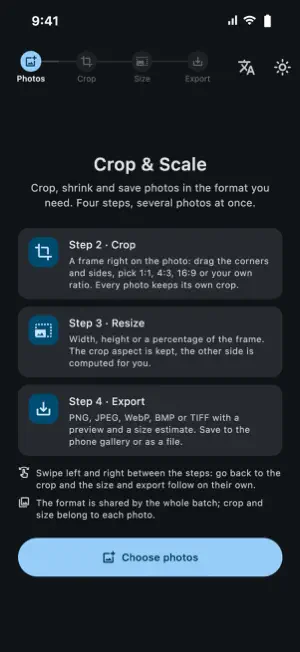
Crop&Scale is a simple tool for preparing images: open photos, crop each one right on the screen, pick a size and format, and save the whole batch at once. CROP ON THE PHOTO • Drag the frame, resize it by the corners and sides • Presets: free, 1:1, 4:3, 3:4, 16:9, 9:16 • Custom ratio from your own numbers, e.g. 244×377 • Every photo keeps its own crop and aspect ratio RESIZE • Set width or height in pixels, the other side follows the crop proportions • Or scale by percent with a slider • Output size in pixels is shown before saving CONVERT • PNG (lossless), JPEG, WebP, BMP, TIFF • Quality slider for JPEG and WebP with a live preview and an estimated file size • BMP 24 / 8 / 4 / 1 bit with optional dithering, and a compact header for e-ink displays • Opens HEIC, JPEG, PNG, WebP, GIF, BMP, TIFF BATCH EXPORT • Several images are processed in parallel in the background, the interface stays responsive • Save one photo with the system dialog, or a whole batch into a folder you choose • Existing files are never overwritten PRIVACY • Everything happens on your device, nothing is uploaded • Location and other EXIF metadata are stripped from saved files • No ads, no accounts, no tracking Light and dark themes, English and Russian interface.
What’s new
Version 1.0.0 · Updated October 13, 2026
Crop & Scale 1.0 – a new step-by-step design. • Four clear steps – Photos, Crop, Size, Export – that you swipe through. Go back to any step and the later ones update instantly. • Save straight to your photo library, or export as files as before. • Custom size: type the exact pixel dimensions you need, and the crop frame locks to that ratio. • Made for iPad and iPhone Duo: on wide screens the photo and the controls sit side by side. • Your photos are shown as a grid of cards. • Start over after an export to begin a new batch in one tap. • Fixed a crash when entering sizes for large photos and reduced memory use with big HEIC images. • The number keyboard now closes when you tap outside it.
App privacy
The developer, Ilia Bogdanovski, reported these privacy practices to Apple.
Data Not Collected
The developer does not collect any data from this app.
Alternatives to Crop&Scale
Looking for apps like Crop&Scale? Here are 6 similar apps on the App Store.
-
 Nepenthe
-
 picsnip - Photo & Video Tools
-
 Website Photo Optimizer
-
 Encadra
-
 Resize My Photo
-
 Pass Photo: Passport ID Size
| App | Rating | Price | Last updated | Compare |
|---|---|---|---|---|
| Crop&Scale | – | Free | October 13, 2026 | |
| Nepenthe | – | Free | Sep 23, 2026 | Compare |
| picsnip - Photo & Video Tools | – | Free | Sep 9, 2026 | Compare |
| Website Photo Optimizer | – | Free | Sep 10, 2026 | Compare |
| Encadra | – | Free | Oct 14, 2026 | Compare |
| Resize My Photo | – | 0.99 USD | Sep 29, 2026 | Compare |
| Pass Photo: Passport ID Size | – | Free | Sep 18, 2026 | Compare |
Compare Crop&Scale with the top alternatives: ratings, updates, ASO score and keyword gaps →