

picsnip - Photo & Video Tools
Piotr Gebski Photo & Video iPhoneiPadiPod touch
picsnip - Photo & Video Tools is a free Photo & Video app for iPhone and iPad by Piotr Gebski. Requires iOS 17.0. Updated September 9, 2026.
- Price
- Free
- on the App Store
- Size
- 6 MB
- Age 4+
- Updated
- Sep 9
- 2026 · v1.0
Screenshots

About picsnip - Photo & Video Tools
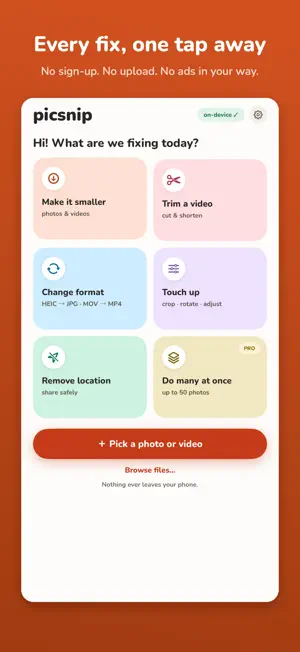
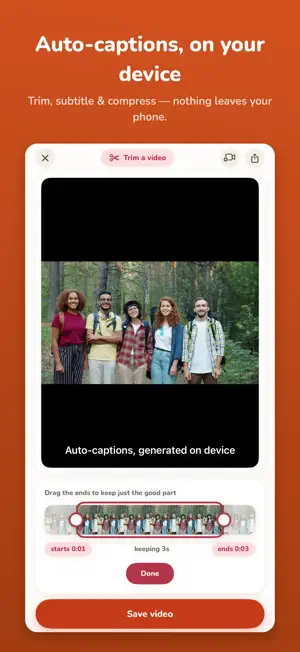
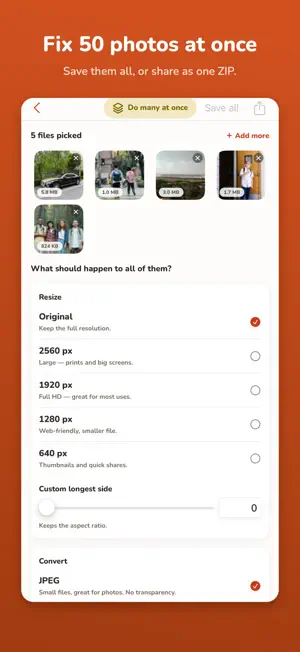
Every photo and video you process stays on your iPhone. No uploads. No servers. No account required. picsnip is a complete photo and video toolkit — compress, convert, resize, trim, batch-export, and generate captions entirely on-device, using Apple's own frameworks. Nothing leaves your phone. Unlock every feature once for $4.99. No subscription. No renewal. No catch. **PHOTO TOOLS — FREE** • Compress — Set a target file size in KB or MB. picsnip hits it without guesswork. • Convert — JPG, PNG, and HEIC in seconds, with format preview before saving. • Resize — Enter exact pixel dimensions or scale by percentage, with aspect-ratio lock. • Crop — Freeform or constrained to standard ratios. • Rotate & Flip — Fix orientation in one tap. Horizontal or vertical flip included. **PHOTO TOOLS — PRO** • Adjust — Brightness, contrast, saturation, and sharpness with real-time preview. • Filters — Mono, Noir, Sepia, Vintage, Chrome. Applied on-device, no cloud render. • Watermark — Add text or image watermarks before you share or sell your shots. • Strip Metadata — Remove EXIF data, GPS coordinates, and device info. Share without revealing where, when, or with what you shot. • Modern Formats — Export to WebP and AVIF for web publishing and archiving. **VIDEO TOOLS** • Trim — Choose your exact in and out points. Export only the segment you want. • Compress — Target a specific file size in MB. Useful before emailing or uploading to platforms with size limits. • Convert — MP4 or MOV output. H.264 or HEVC codec. Your choice. • Resize — Downscale to any resolution, with aspect ratio maintained. • Adjust & Filter — Colour-correct or apply cinematic looks to your footage. • Watermark — Protect video content with text or image overlays. • Strip Metadata — Clean location and device data from videos before sharing. • Auto-Captions — Generated on your device using Apple's speech recognition engine. No audio is transmitted anywhere. Edit the transcript, choose your language, set font size and colour, and burn the captions into the exported video. • Extract Audio — Save the soundtrack from any video as a .m4a file. • Export GIF — Turn any clip or segment into a shareable animated GIF. **BATCH PROCESSING** Select dozens of images at once and apply resize, convert, compress, strip metadata, or watermark operations across all of them in one pass. Export everything as a single ZIP archive. Built for people who work with images at scale. **WHY picsnip?** Not a single byte of your media leaves your iPhone or iPad. picsnip uses native iOS frameworks — Core Image, AVFoundation, SFSpeechRecognizer — to process everything on-chip. There are no third-party servers involved, no analytics attached to your files, and no account to create. Most caption apps charge $40–$65 per year and route your audio through cloud speech APIs. picsnip's auto-captions run entirely on your device with Apple's on-device speech recognition, and are included in the one-time Pro unlock. Photo AND video tools in one app means you stop paying for four separate subscriptions to do four separate tasks. picsnip handles the complete workflow. **picsnip Pro — $4.99, one time.** No weekly plan. No monthly plan. No annual renewal. Pay once, unlock everything, keep it forever including all future updates.
App privacy
The developer, Piotr Gebski, reported these privacy practices to Apple.
Data Not Collected
The developer does not collect any data from this app.
Alternatives to picsnip - Photo & Video Tools
Looking for apps like picsnip - Photo & Video Tools? Here are 6 similar apps on the App Store. The highest rated is Visual LabX: AI Photo Editor (4.8/5), and all 6 are free to download.
-
 Crop&Scale
-
 Atelier Photo Editor
-
 ImageResize - Photo Resizer
4.5
ImageResize - Photo Resizer
4.5
-
 Visual LabX: AI Photo Editor
4.8
Visual LabX: AI Photo Editor
4.8
-
 SloMo Slow Motion Video Editor
4.2
SloMo Slow Motion Video Editor
4.2
-
 Linx: Camera Effects App
4.8
Linx: Camera Effects App
4.8
| App | Rating | Price | Last updated | Compare |
|---|---|---|---|---|
| picsnip - Photo & Video Tools | – | Free | September 9, 2026 | |
| Crop&Scale | – | Free | Oct 13, 2026 | Compare |
| Atelier Photo Editor | – | Free | Oct 25, 2026 | Compare |
| ImageResize - Photo Resizer | 4.5 / 5 (228) | Free | Oct 24, 2026 | Compare |
| Visual LabX: AI Photo Editor | 4.8 / 5 (619) | Free | Sep 21, 2026 | Compare |
| SloMo Slow Motion Video Editor | 4.2 / 5 (52,788) | Free | Jun 29, 2026 | Compare |
| Linx: Camera Effects App | 4.8 / 5 (237) | Free | Aug 11, 2025 | Compare |