

The Habbits: Habit Tracker
Ravish Chandra Productivity iPhoneiPadiPod touch
The Habbits: Habit Tracker is a free Productivity app for iPhone and iPad by Ravish Chandra. Requires iOS 26.0. Updated November 20, 2026.
- Price
- Free
- on the App Store
- Size
- 67 MB
- Age 4+
- Updated
- Nov 20
- 2026 · v1.1
Screenshots
Save to Pinterest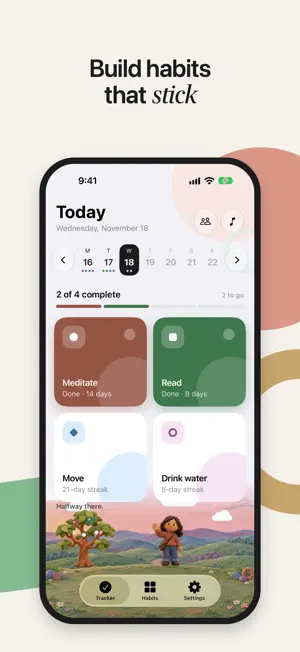

About The Habbits: Habit Tracker
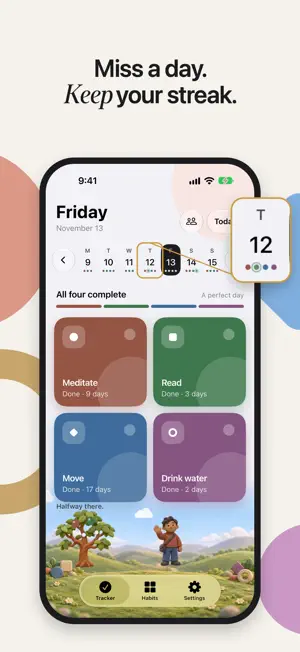
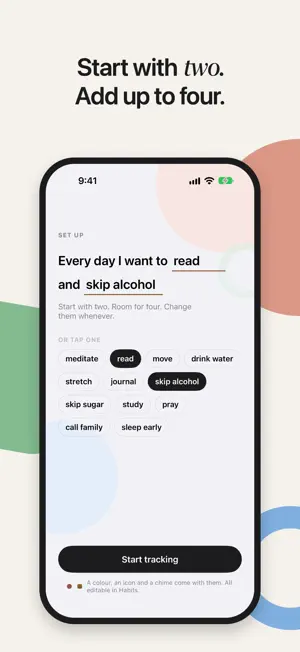
The Habbits makes keeping habits effortless and fun. Tap a habit when it's done and it plays a note; finish your day and it lands a chord. Up to four habits, no more, so you focus on what matters. FOUR, ON PURPOSE • The Habits tab reads "4 of 4 in rotation" and stops there. A fifth means choosing what leaves. • Start with two. Setup is one sentence: "Every day I want to ___ and ___." • Retire a habit instead of deleting it. Its history and streak wait for it to come back. YOU CAN HEAR A GOOD DAY • Each habit has its own chime, a two-note pair like Bowl in C–G. Twenty-four to choose from; three are earned by keeping a streak and one by a lucky perfect day. • Finish all four and the notes resolve into the day's chord. • Once a week, on the evening you choose, the week arrives as a song. MADE FOR IPHONE DUO • Unfold it and Today spreads across both screens: habits on one side, your scene on the other. • Half-open on a desk, it's a music box that plays your week. On the charger at night, a dim bedside view. • Your week, the month mosaic and Duet open as two-page spreads. MISS A DAY. KEEP THE STREAK. ONCE. • Skip Thursday, tap on Friday, and Thursday is mended. Miss two days in a row and the streak ends. • One mend per rolling week. A mended day doesn't add to the count, so a 30-day streak still means thirty days of doing it. • Milestones at 3, 7, 14, 30, 60, 100 and 365 days. WITHOUT OPENING THE APP • Home Screen widgets mark a habit done in place. • A Lock Screen widget shows how many are done as a ring, a line or a word. • 18 widget themes, from a lotus pond to a snowy night, plus a streak widget for each habit in small, medium and large. • Seven scene styles for Today and its widgets, from paper cut to clay. • Control Center and the Action button toggle one habit. • Last Call at eight in the evening: a Live Activity with a button per open habit. It says what's left and when the day closes. It never nags. REMINDERS ONLY IF YOU ASK • Reminders are off until you turn them on. The first time you finish a habit, the app offers a reminder once and then leaves it alone. • Reminders and Last Call reach your Apple Watch. THE MONTH AS A WALLPAPER • Every day a habit was in rotation takes one seat on a spiral. A completion is a mark, a miss is a gap, a mended day is a sage seam. • Save it to Photos (the app asks for add-only access when you choose Save) and set it as your Lock Screen from Photos. DUET, IF YOU WANT COMPANY • Pair with exactly one person. When you both do the same habit on the same day, your chimes harmonize and they get a soft notice. No feed, no ranking. • Duet needs an account on both sides. YOURS • No ads, no advertising identifiers, no subscription. • The app is complete without an account. Sign in with Apple or Google adds sync across devices and Duet. • It never asks for health, contacts or the microphone. Location only if you turn on live weather for widgets, and then only your approximate area. • Export everything as CSV or JSON. Delete your account from inside the app. NOT FOR EVERYONE If you want to track twelve things, count reps or write notes, another app will serve you better. The Habbits is for the four that matter. Requires iOS 26 or later. Made for iPhone and iPhone Duo. Questions: [email protected]
What’s new
Version 1.1 · Updated November 20, 2026
• 18 widget themes, plus a streak widget for each habit in small, medium and large. • Seven scene styles for Today and your widgets, from paper cut to clay. • Live weather in widgets, if you turn it on. Only your approximate area is used. • Made for iPhone Duo. • More habits to pick at the start, including ones you're quitting, like skipping alcohol.
App privacy
The developer, Ravish Chandra, reported these privacy practices to Apple.
Data Linked to You
The following data, which may be collected and linked to your identity, may be used for the following purposes:
- Contact Info: Email Address, Name
- User Content: Customer Support, Other User Content
- Identifiers: User ID, Device ID
Used for: App Functionality
Data Not Linked to You
The following data, which may be collected but is not linked to your identity, may be used for the following purposes:
- Identifiers: Device ID
Used for: Developer’s Advertising or Marketing, Analytics
Alternatives to The Habbits: Habit Tracker
Looking for apps like The Habbits: Habit Tracker? Here are 6 similar apps on the App Store. The highest rated is Daily Habits Tracker & Planner (5.0/5), and all 6 are free to download.
-
 Eumento: shared habit tracker
-
 Habits - Planner and Heatmap
-
 Bythen
4.3
-
 思考ノート(箇条書&チェックリスト)
-
 Daily Habits Tracker & Planner
5.0
-
 G-Force Meter+ Accelerometer
3.3
| App | Rating | Price | Last updated | Compare |
|---|---|---|---|---|
| The Habbits: Habit Tracker | – | Free | November 20, 2026 | |
| Eumento: shared habit tracker | – | Free | Nov 12, 2026 | Compare |
| Habits - Planner and Heatmap | – | Free | Nov 16, 2026 | Compare |
| Bythen | 4.3 / 5 (3) | Free | Apr 13, 2026 | Compare |
| 思考ノート(箇条書&チェックリスト) | – | Free | Nov 15, 2026 | Compare |
| Daily Habits Tracker & Planner | 5.0 / 5 (4) | Free | Aug 20, 2024 | Compare |
| G-Force Meter+ Accelerometer | 3.3 / 5 (3) | Free | Nov 21, 2026 | Compare |