

G-Force Meter+ Accelerometer
Kyu-Hee Jang Productivity iPhoneiPadiPod touch
G-Force Meter+ Accelerometer is a free Productivity app for iPhone and iPad by Kyu-Hee Jang. Rated 3.7/5 from 3 ratings. Requires iOS 16.4.
- Rating
- 3.7
- 3 ratings
- Price
- Free
- on the App Store
- Size
- 60 MB
- Age 17+
- Updated
- Sep 25
- 2026 · v1.0.29
Screenshots
About G-Force Meter+ Accelerometer
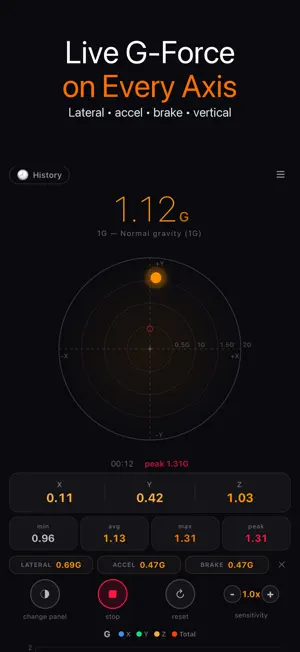
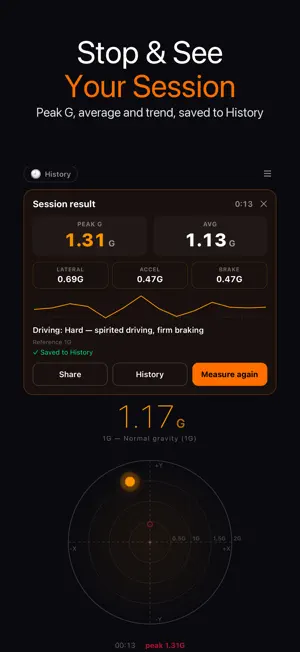
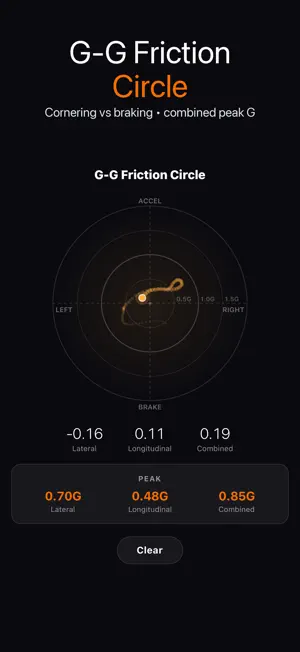
G-Force Meter+ Accelerometer shows the G-force your phone feels right now on every axis, then turns each drive, ride or run into a result you can read: press Start, press Stop, and a session card shows the peak G, the average G and how hard you cornered, accelerated and braked. ▶ Live G-force on every axis • Total G on a round gauge with a moving dot for the direction of the force • Lateral (X), longitudinal (Y) and vertical (Z) values side by side • Min, average, max and peak while you record, plus peak chips for lateral, accel and brake • A scrolling chart of X, Y, Z and total G, or a sentence that explains the current G level ▶ Stop and see the session Press Stop and a Session result card appears: • Duration, peak G and average G • Peak lateral, peak accel and peak brake • A second-by-second G trend line (the first 10 minutes of a session) • With the Car activity selected, a plain-language reading of the drive, from Gentle to Very hard, based on the peak horizontal G Every finished session is saved to History automatically (the last 20). A session shorter than 2 seconds is not saved. If you switch apps mid-session, recording pauses in the background and the same session resumes when you return, and a session cut off when the system closes the app is recovered into History on the next launch. Share a result as text in one tap. ▶ History and personal bests Open History from the top of the Meter screen: personal bests, every session with its G trend, your race runs and rolling runs. Export sessions, runs or rolling intervals as CSV. A statistics report CSV unlocks for 24 hours after a short ad. ▶ G-G friction circle A dedicated tab plots lateral against longitudinal G as a trail inside rings at 0.5, 1.0 and 1.5 G, with peak lateral, longitudinal and combined G, so you can see how much grip you used in corners and under braking. ▶ Race mode • 0-60 mph launch timing with raw and rollout times • 60-0 mph brake test with time, distance and speed shed, estimated from the motion sensors • Rolling intervals: 60-120 mph, 100-200 km/h, 30-50 mph or your own range • GPS cross-check with a GPS 0-60 time, a quarter mile time and trap speed. A good fix shows a GPS-verified badge, otherwise the result is labelled as a sensor estimate • Regen profile for electric cars: braking events sorted by their strength into likely regen (gentle) and likely friction (hard), with their maximum G ▶ Set up for your car • Dash or Holder mount, auto-level and Re-level now • Reference 1G (resting reads 1.00 G) or 0G (resting reads 0.00 G) • Display sensitivity from 0.5x to 2.0x for the live gauge; the result card always shows the true values • Activity presets for Car, Roller-coaster, Sport, Elevator and Aircraft explain what each G level means there • A Guide tab with 8 tips on mounting, reading each axis and typical G in daily life • The screen stays on while recording • Interface in 30 languages ▶ Good to know Readings come from the phone's motion sensor, so mount the phone firmly and level it before you record. Launch and braking times are estimates unless they carry the GPS-verified badge. Only drive-test where it is safe and legal. For drivers checking how smooth or hard they drive, track-day and drag-strip fans, roller-coaster riders, and students who want to see physics in numbers.
What’s new
Version 1.0.29 · Updated September 25, 2026
• Press Stop to get a Session result card: duration, peak and average G, peak lateral, accel and brake, and a G trend line • Every session is saved to History automatically, and a History button now sits at the top of the Meter screen • With the Car activity, the card rates the drive from Gentle to Very hard • Czech, Danish, Finnish, Hebrew and Dutch now show their own language
App privacy
The developer, Kyu-Hee Jang, reported these privacy practices to Apple.
Data Used to Track You
The following data may be used to track you across apps and websites owned by other companies:
- Identifiers: Device ID
- Usage Data: Advertising Data
Data Not Linked to You
The following data, which may be collected but is not linked to your identity, may be used for the following purposes:
- Identifiers: Device ID
- Usage Data: Advertising Data, Product Interaction
- Diagnostics: Crash Data, Performance Data
Used for: Third-Party Advertising, Analytics, App Functionality
Alternatives to G-Force Meter+ Accelerometer
Looking for apps like G-Force Meter+ Accelerometer? Here are 6 similar apps on the App Store. The highest rated is FocusFlight - Deepfocus Timer (4.9/5), and all 6 are free to download.
-
 BimmerLink
4.7
BimmerLink
4.7
-
 Carly — OBD2 car scanner
4.6
Carly — OBD2 car scanner
4.6
-
 Onshape 3D CAD
3.5
Onshape 3D CAD
3.5
-
 Google AI Edge Gallery
4.0
Google AI Edge Gallery
4.0
-
 BimmerCode
4.7
BimmerCode
4.7
-
 FocusFlight - Deepfocus Timer
4.9
FocusFlight - Deepfocus Timer
4.9
| App | Rating | Price | Last updated | Compare |
|---|---|---|---|---|
| G-Force Meter+ Accelerometer | 3.7 / 5 (3 ratings) | Free | September 25, 2026 | |
| BimmerLink | 4.7 / 5 (9,197) | Free | Sep 26, 2026 | Compare |
| Carly — OBD2 car scanner | 4.6 / 5 (9,884) | Free | Sep 17, 2026 | Compare |
| Onshape 3D CAD | 3.5 / 5 (411) | Free | Sep 23, 2026 | Compare |
| Google AI Edge Gallery | 4.0 / 5 (160) | Free | Sep 4, 2026 | Compare |
| BimmerCode | 4.7 / 5 (21,321) | Free | Apr 28, 2026 | Compare |
| FocusFlight - Deepfocus Timer | 4.9 / 5 (9,585) | Free | Jun 7, 2026 | Compare |