

Nescanner Document Scanner
Global Tech Distribution s.r.o. Productivity iPhoneiPadiPod touch
Nescanner Document Scanner is a free Productivity app for iPhone and iPad by Global Tech Distribution s.r.o. Requires iOS 26.0. Updated October 1, 2026.
- Price
- Free
- on the App Store
- Size
- 4 MB
- Age 4+
- Updated
- Oct 1
- 2026 · v1.2
Screenshots


About Nescanner Document Scanner
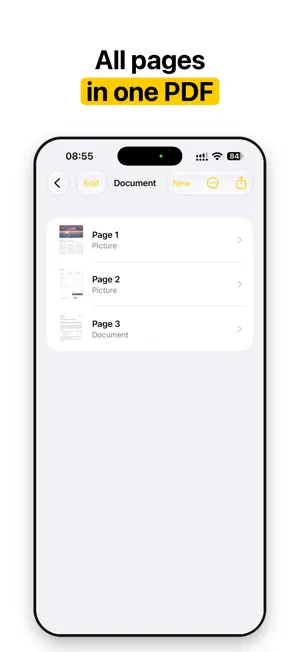
Nescanner turns your iPhone or iPad camera into a document scanner that respects your paper and your privacy. WHAT IT DOES • Finds the page edges and straightens the shot into a flat, rectangular scan. • Evens out lighting: shadows from your hand or the phone disappear, paper becomes uniformly white. • Keeps text crisp and photos natural. Pictures, colour text and highlights on the page are preserved, not bleached. • Flattens book pages that curve towards the spine, with straight lines of text. Letters are never redrawn. • Removes camera noise without smearing fine strokes. • Detects text direction and rotates the page the right way up. • Recognises the text on the device and adds it to the PDF, so you can search and copy it. BEFORE THE SHOT • Hints tell you to level the phone or step back when the page does not fit, so the scan is sharp from edge to edge. • Captures in RAW. On iPhone models with Apple ProRAW it uses ProRAW; in dim light other models take several frames at once to remove grain. Devices without RAW use the processed photo. BATCH MODE • Hold the phone over a book and turn the pages. Each page is taken by itself as soon as it is still, and never twice. IMPORT • Already have a photo of a page? Import pictures from Photos or image files from Files, and each becomes a clean scan. SIRI AND SHORTCUTS • Say "Scan with Nescanner", press the Action button, or tap the Scan control in Control Center to go straight to the camera. "Import photos into Nescanner" opens the photo picker. TWO MODES • Document: white paper, crisp text, for printed pages, receipts and contracts. • Picture: straightens the page but keeps the original colours, for book covers, artwork and magazines. iPad • A layout made for the larger screen: camera controls at the side in landscape, pages and corners side by side. EXPORT • One tap builds a single PDF of all pages. Choose Low, Medium or High quality. • Export a single page as JPEG or PDF from the corners screen. • Send through the share sheet: Save to Files, AirDrop, Mail or any other app. PRIVACY BY DESIGN • No account, no sign-in. • No servers of ours: your scans never leave your device. • No analytics, no tracking, no ads. Available in 33 languages. FREE AND PRO Every feature is free at the same quality for everyone. Without a subscription you can export up to 30 pages a day. Nescanner Pro removes the daily limit and changes nothing else: US$1.99 a month or US$14.99 a year, with Family Sharing. The subscription renews automatically unless you turn it off at least 24 hours before the end of the current period; manage it in your Apple Account settings. Terms of Use: https://nescanner.org/terms/ Privacy Policy: https://nescanner.org/privacy/
What’s new
Version 1.2 · Updated October 1, 2026
• Import: turn photos from Photos or image files from Files into clean scans, several at a time. • Siri and Shortcuts: say "Scan with Nescanner" to open the camera, or "Import photos into Nescanner". • Action button: set it to Scan document or Import photos and start with one press. • Control Center: add the Scan control to open the camera from anywhere. • Now available in 33 languages, including Indonesian, Malay, Thai, Hindi and Catalan.
App privacy
The developer, Global Tech Distribution s.r.o., reported these privacy practices to Apple.
Data Not Collected
The developer does not collect any data from this app.
Alternatives to Nescanner Document Scanner
Looking for apps like Nescanner Document Scanner? Here are 6 similar apps on the App Store. The highest rated is Hear2Text: Transcribe Audio (4.8/5), and all 6 are free to download.
-
 SOLAGEC
-
 Scanner: PDF & Document Scan
-
 Scanling – PDF Scanner & OCR
-
 Patriot
-
 Hear2Text: Transcribe Audio
4.8
Hear2Text: Transcribe Audio
4.8
-
 ARD-ZDF-Box
| App | Rating | Price | Last updated | Compare |
|---|---|---|---|---|
| Nescanner Document Scanner | – | Free | October 1, 2026 | |
| SOLAGEC | – | Free | May 27, 2025 | Compare |
| Scanner: PDF & Document Scan | – | Free | Oct 9, 2026 | Compare |
| Scanling – PDF Scanner & OCR | – | Free | Jul 13, 2026 | Compare |
| Patriot | – | Free | Aug 25, 2026 | Compare |
| Hear2Text: Transcribe Audio | 4.8 / 5 (31) | Free | Oct 5, 2026 | Compare |
| ARD-ZDF-Box | – | Free | Aug 20, 2026 | Compare |