

Hear2Text: Transcribe Audio
MIA DIGITAL SOLUTIONS Productivity iPhoneiPadiPod touchMacApple Watch
Hear2Text: Transcribe Audio is a free Productivity app for iPhone and iPad by MIA DIGITAL SOLUTIONS. Rated 4.8/5 from 31 ratings. Requires iOS 18.0.
- Rating
- 4.8
- 31 ratings
- Price
- Free
- on the App Store
- Size
- 78 MB
- Age 4+
- Updated
- Oct 27
- 2026 · v2.8
Screenshots


About Hear2Text: Transcribe Audio
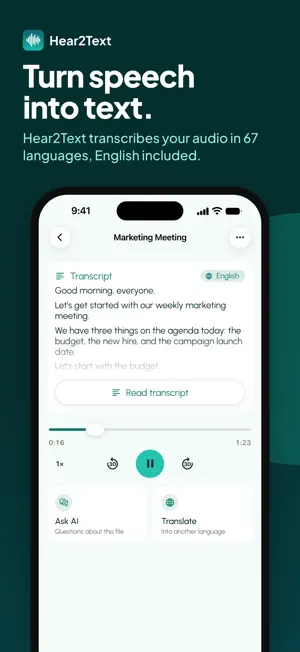
Turn audio recordings into text with Hear2Text. Record a meeting, lecture, interview or voice memo, or import an audio or video file. Read the transcript alongside your recording, edit the wording and share it in the format you need. RECORD OR IMPORT • Record meetings, lectures, interviews and voice memos straight into the app • Import audio and video files from your phone, or paste a supported file link • Follow the transcript as it plays, and tap any line to jump to that moment TRANSCRIBE IN 67 LANGUAGES • Automatic language detection, punctuation and paragraph breaks • Speaker labels, so you can see who said what • Correct any line by hand, and the timing stays in sync ASK AI ABOUT YOUR RECORDING Ask questions about what was actually said and get answers drawn from the transcript itself. Pull out the decisions, the action items, the recurring themes. Get 10 free AI answers per recording, or unlimited answers with Unlimited. TRANSLATE AND EXPORT • Translate a transcript into 24 languages • Export as PDF, Word, TXT, SRT or VTT, including subtitle files • Share a transcript, or keep it in a shared workspace with your team IN YOUR LANGUAGE Hear2Text's own interface is available in 22 languages. FOR MEETINGS, CLASSES AND INTERVIEWS A meeting transcript gives you a written record to revisit after the conversation. Check the wording of a decision, listen again to a discussion or ask about the tasks mentioned. Keep the recording and the transcript together as you review the details. Studying from a lecture? Read through the explanation, then tap the relevant line when you want to hear it again. A transcript can help you work through material at your own pace and compare your notes with what was said in class. For interviews and research, check a quotation against the original audio before using it. Speaker labels help you follow questions and answers, while manual editing lets you correct names or specialist terms. Timestamps stay in place as you make those changes. If you create videos or podcasts, turn spoken material into a written draft you can review before publication. Export subtitles for use in your video workflow, or share a text version with someone reviewing the content. ASK A SPECIFIC QUESTION What deadline was discussed? Which points did the speaker make about a particular topic? Instead of asking about the whole recording, focus your question on the information you need. AI answers use the transcript as their source, and you can return to the audio to check the context. CHOOSE THE RIGHT FILE FORMAT Use PDF for a document you want to read or share, Word when you plan to keep editing, and TXT when you need plain text. SRT and VTT contain subtitle text and timing information for use with compatible video tools. Choose the format that fits your next step rather than retyping the same material. Working with colleagues who speak another language? Translate the transcript, then share the text for them to read. The recording language and the app's interface language do not have to match. BEFORE YOU SHARE Check the names and figures against the recording. If a passage needs clarification, listen to it in context and adjust the wording before sending the document. Use an exported Word file to prepare a report or article. A written transcript is also useful when you cannot play audio: read the conversation first and return to the recording later. HEAR2TEXT UNLIMITED Start for free. Choose a monthly or yearly Unlimited subscription for unlimited transcription and AI answers, speaker labels, translation and all five export formats. Payment is charged to your Apple Account at confirmation of purchase. The subscription renews automatically unless it is canceled at least 24 hours before the end of the period. Manage or cancel it in your App Store account settings. Support: [email protected] Privacy: https://heartotext.com/pages/privacy-policy Terms of use: https://heartotext.com/pages/terms-of-use
Ratings & reviews
4.8
31 ratings
What’s new
Version 2.8 · Updated October 27, 2026
Hear2Text is now on Apple Watch. Record from your wrist, and the take goes to Voice Records on your iPhone to be transcribed. Your recent transcripts are on the watch too. On iPhone Duo, every screen now fits both the open display and the cover display. The app, and the messages from our servers, now come in 36 languages. Plus other fixes and improvements.
App privacy
The developer, MIA DIGITAL SOLUTIONS, reported these privacy practices to Apple.
Data Used to Track You
The following data may be used to track you across apps and websites owned by other companies:
- Other Data: Other Data Types
Data Linked to You
The following data, which may be collected and linked to your identity, may be used for the following purposes:
- Identifiers: User ID, Device ID
- Other Data: Other Data Types
Used for: Analytics, Product Personalization, App Functionality, Other Purposes
Data Not Linked to You
The following data, which may be collected but is not linked to your identity, may be used for the following purposes:
- Contact Info: Email Address
- User Content: Photos or Videos
Used for: Developer’s Advertising or Marketing, Analytics, App Functionality
Alternatives to Hear2Text: Transcribe Audio
Looking for apps like Hear2Text: Transcribe Audio? Here are 6 similar apps on the App Store. The highest rated is Transcribe Video - AnyScribe (4.9/5), and all 6 are free to download.
-
 Transcribe: Voice to Text+
3.5
Transcribe: Voice to Text+
3.5
-
 Video to Text, Transcribe, AI
3.7
Video to Text, Transcribe, AI
3.7
-
 Voice Memo: AI Transcribe
-
 Transcribe, Speech To Text
4.2
Transcribe, Speech To Text
4.2
-
 Speakwrite:Voice-to-text
4.2
Speakwrite:Voice-to-text
4.2
-
 Transcribe Video - AnyScribe
4.9
Transcribe Video - AnyScribe
4.9
| App | Rating | Price | Last updated | Compare |
|---|---|---|---|---|
| Hear2Text: Transcribe Audio | 4.8 / 5 (31 ratings) | Free | October 27, 2026 | |
| Transcribe: Voice to Text+ | 3.5 / 5 (6) | Free | Aug 22, 2026 | Compare |
| Video to Text, Transcribe, AI | 3.7 / 5 (3) | Free | Aug 20, 2026 | Compare |
| Voice Memo: AI Transcribe | – | Free | Jul 27, 2026 | Compare |
| Transcribe, Speech To Text | 4.2 / 5 (5) | Free | Aug 12, 2026 | Compare |
| Speakwrite:Voice-to-text | 4.2 / 5 (5) | Free | Feb 21, 2024 | Compare |
| Transcribe Video - AnyScribe | 4.9 / 5 (27) | Free | Oct 27, 2026 | Compare |