

Transcribe Video - AnyScribe
Aleksandr Subbotin Productivity iPhoneiPadiPod touchApple Watch
Transcribe Video - AnyScribe is a free Productivity app for iPhone and iPad by Aleksandr Subbotin. Rated 4.9/5 from 27 ratings. Requires iOS 17.0.
- Rating
- 4.9
- 27 ratings
- Price
- Free
- on the App Store
- Size
- 39 MB
- Age 4+
- Updated
- Sep 23
- 2026 · v1.22
Screenshots



About Transcribe Video - AnyScribe
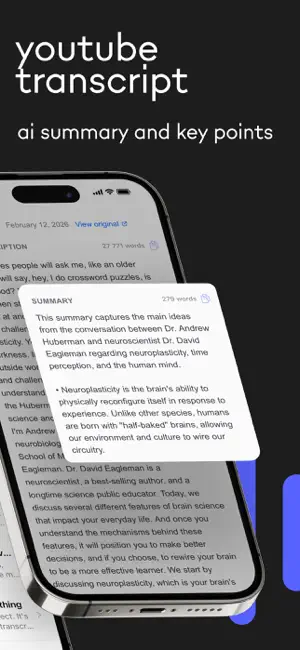
Looking for an app that can transcribe a YouTube video to text? Need to convert a podcast, lecture recording, or Instagram reel into a written transcript? Want an AI to summarize a long meeting or interview for you? AnyScribe does exactly that — paste a link, upload a file, or record live, and get accurate text in seconds. What you can do: — Paste a YouTube, TikTok, Instagram, or Twitter link and get a full transcript automatically — Record a lecture, meeting, or conversation and see real-time transcription as you speak — Upload any audio or video file from your phone and convert it to text — Get an AI-generated summary with key points so you don't have to read the whole thing People use it for: — "I need to transcribe my professor's lecture so I can study from the notes" — "I want to turn this podcast episode into a blog post" — "Can an app convert my voice memo into text I can copy and paste?" — "How do I get subtitles from a YouTube video without typing everything?" — "I recorded a meeting and need a summary of the key decisions" — "I want to save what someone said in an Instagram reel as text" Works with YouTube videos and Shorts, TikTok, Instagram Reels and Stories, Twitter/X, Facebook, Vimeo, SoundCloud, Reddit, Twitch, and more. Or just upload a file from your gallery or Files app. The AI doesn't just transcribe — it also writes a clean summary and highlights the most important parts, so you save hours of manual work. Free to start. No account required. Terms of Use: https://anyscribe.app/terms Privacy Policy: https://anyscribe.app/privacy
Ratings & reviews
4.9
27 ratings
What’s new
Version 1.22 · Updated September 23, 2026
• Apple Watch app: tap to record on your wrist, and the transcript lands on your iPhone. Works with the Action Button too • Smart Folders: describe a folder in plain words and matching notes files themselves. A note can live in several folders • Redesigned transcript screen with a Liquid Glass look — Summary, Transcript and Description in one place, plus a "Show Original Text" toggle • Siri can now work with the transcript on your screen on iOS 27 • Bug fixes and performance improvements
App privacy
The developer, Aleksandr Subbotin, reported these privacy practices to Apple.
Data Linked to You
The following data, which may be collected and linked to your identity, may be used for the following purposes:
- Contact Info: Email Address, Name
- Identifiers: Device ID
Used for: App Functionality
Data Not Linked to You
The following data, which may be collected but is not linked to your identity, may be used for the following purposes:
- Purchases: Purchase History
Used for: App Functionality
Alternatives to Transcribe Video - AnyScribe
Looking for apps like Transcribe Video - AnyScribe? Here are 6 similar apps on the App Store. The highest rated is ReSerch: Transcribe Video (5.0/5), and all 6 are free to download.
-
 Transcribe Video to Text: Vid2
4.5
-
 Transcribe Video to Text :Zeni
-
 Transcribe Video to Text: Nota
4.3
-
 Wordkeep: Transcribe Audio
4.9
-
 Video to Text, Transcribe, AI
3.7
-
 ReSerch: Transcribe Video
5.0
| App | Rating | Price | Last updated | Compare |
|---|---|---|---|---|
| Transcribe Video - AnyScribe | 4.9 / 5 (27 ratings) | Free | September 23, 2026 | |
| Transcribe Video to Text: Vid2 | 4.5 / 5 (184) | Free | Oct 17, 2026 | Compare |
| Transcribe Video to Text :Zeni | – | Free | Jan 24, 2026 | Compare |
| Transcribe Video to Text: Nota | 4.3 / 5 (6) | Free | Sep 21, 2026 | Compare |
| Wordkeep: Transcribe Audio | 4.9 / 5 (10) | Free | Oct 8, 2026 | Compare |
| Video to Text, Transcribe, AI | 3.7 / 5 (3) | Free | Aug 20, 2026 | Compare |
| ReSerch: Transcribe Video | 5.0 / 5 (3) | Free | May 28, 2026 | Compare |