

CueRemote
UNQUINTO Utilities iPhoneiPadiPod touch
CueRemote is a free Utilities app for iPhone and iPad by UNQUINTO. Requires iOS 17.6. Updated September 30, 2026.
- Price
- Free
- on the App Store
- Size
- 2 MB
- Age 4+
- Updated
- Sep 30
- 2026 · v1.2.1
Screenshots



About CueRemote
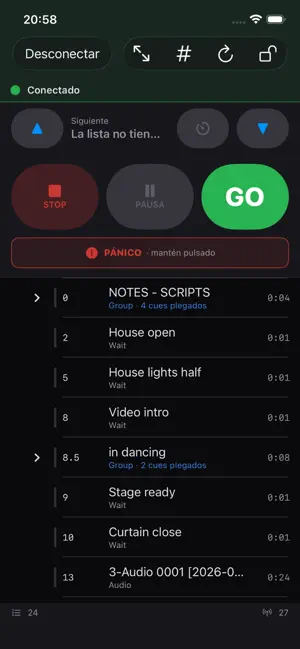
CueRemote is a remote control for operating QLab 5 from an iPhone or iPad over your venue’s local network. See the live workspace, cue lists, playhead, and running or paused cues. Control GO, STOP, pause, resume, and playhead navigation with an interface designed for rehearsals and live shows. LIVE CUE CONTROL • GO, STOP, pause, resume, and stop each running cue individually. • Load to Time: load a cue at a chosen point before GO, using the slider or buttons. • Go to Cue: enter a cue number to fire it or move the playhead to it. • Yellow progress bars show running, paused, and loaded cue progress, including pre-wait. • Selecting another cue resets the previous cue and updates Load to Time. • Open or close a Group in CueRemote and it updates in QLab. • Select cues and move the playhead from the list. • Switch cue lists from your device; GO fires the list shown in CueRemote. • Carts: tap a cue to fire it. • Lock controls to prevent accidental changes during a show. • Get a warning when QLab and CueRemote show different cue lists. CONNECTION • Discover QLab automatically with Bonjour or connect manually by IP address. • OSC over TCP with automatic reconnection. • Connection status stays visible. Stale workspace data is identified and unsafe commands are disabled. PRIVACY CueRemote requires no account, has no ads, and uses no analytics or tracking. Connection data stays on your device. The QLab passcode is stored in the device’s Keychain and is not synced to iCloud. REQUIREMENTS • A Mac running QLab 5. • iOS or iPadOS 17.6 or later. • Your iPhone or iPad and Mac must be able to communicate over the local network. • Enable OSC access in QLab and grant View and Control permissions. CueRemote never requests Edit permission. QLab runs the show and plays its media. CueRemote displays workspace state and sends OSC control commands; it does not create, edit, or delete cues. QLab is a trademark of Figure 53, LLC. CueRemote is not affiliated with or endorsed by Figure 53.
What’s new
Version 1.2.1 · Updated September 30, 2026
Improved touch cue selection and playhead updates, including better compatibility with QLab 4.7. Also improved switching between cue lists and workspaces, plus connection stability.
App privacy
The developer, UNQUINTO, reported these privacy practices to Apple.
Data Not Collected
The developer does not collect any data from this app.
Alternatives to CueRemote
Looking for apps like CueRemote? Here are 6 similar apps on the App Store. The highest rated is RasterLab Mobile (5.0/5), and all 6 are free to download.


| App | Rating | Price | Last updated | Compare |
|---|---|---|---|---|
| CueRemote | – | Free | September 30, 2026 | |
| WOW DB Meter & RTA | – | Free | Oct 13, 2026 | Compare |
| RasterLab Mobile | 5.0 / 5 (3) | Free | Sep 17, 2026 | Compare |
| The Missing Tape | – | Free | Oct 22, 2026 | Compare |
| PC WatchX | – | Free | Sep 15, 2025 | Compare |
| Sounn VR Audio Analyzer | – | Free | May 5, 2026 | Compare |
| OSC Deck | – | Free | Mar 26, 2026 | Compare |
Compare CueRemote with the top alternatives: ratings, updates, ASO score and keyword gaps →