

ForgotTheDongle
Benjamin Amhof Utilities iPhoneiPadiPod touch
ForgotTheDongle is a free Utilities app for iPhone and iPad by Benjamin Amhof. Requires iOS 17.0. Updated September 28, 2026.
- Price
- Free
- on the App Store
- Size
- 2 MB
- Age 4+
- Updated
- Sep 28
- 2026 · v1.1
Screenshots


About ForgotTheDongle
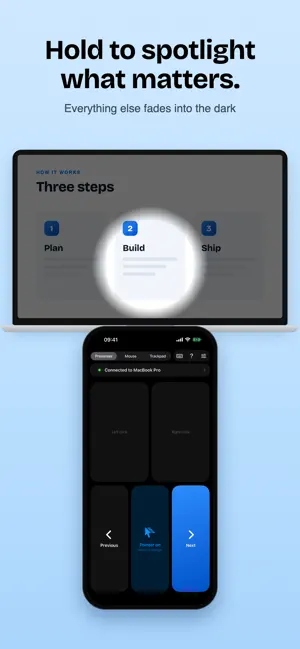
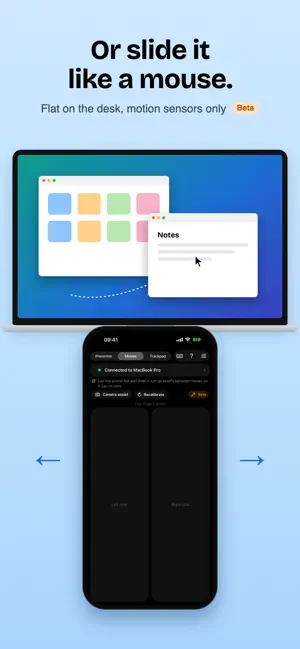
Forgot the dongle? It's in your pocket. ForgotTheDongle turns your iPhone into a presentation clicker, a laser pointer, a mouse and a trackpad for your Mac or Windows PC. Phone and computer talk directly over Wi-Fi or the iPhone's Personal Hotspot: no Bluetooth, no USB receiver, no internet needed. PRESENTER Hold the phone in your hand. Previous and Next flip the slides in PowerPoint, Keynote, Google Slides, Canva or any PDF viewer, and a red laser dot follows where you point, also on top of full-screen slideshows, with a short trail so everyone can follow it. Hold the Pointer button to spotlight a spot: everything else dims. No calibration needed. MOUSE (BETA) Lay the phone screen-up on the desk and slide it like a mouse. The gyroscope and accelerometer follow it instantly, even in the dark. The two halves of the screen are the left and right mouse buttons, and two fingers scroll. Optionally the front camera helps with slow, fine moves. TRACKPAD The screen becomes a touchpad: tap to click, tap with two fingers to right-click, drag two fingers to scroll. Works anywhere, no desk needed. KEYBOARD Type on the computer with the iPhone's keyboard, in every mode. WHEN IT COMES IN HANDY - The clicker is still at home, ten minutes before your talk - No mouse on the train, in a café or in a hotel room, or its battery just died - Movie night: the laptop is plugged into the TV and you're on the couch - Pointing at the projector in a meeting room or a classroom HOW IT WORKS ForgotTheDongle needs its free helper app on the computer (macOS 13 or later, or Windows 10/11), available at forgotthedongle.slackers.dev. Start the helper, pick your computer on the phone and type the 6-digit code it shows. After that they reconnect on their own. PRIVATE AND SECURE Only phones you paired yourself can control your computer. Everything the phone sends is encrypted and authenticated (AES-256-GCM, with a key agreed during pairing that never crosses the network). There is no server in between, no account and no tracking, and camera images never leave the phone. Free. No ads, no account, no subscription.
What’s new
Version 1.1 · Updated September 28, 2026
- Spotlight: hold the Pointer button and everything but the spot you point at dims - The laser dot leaves a short trail, and its size is adjustable - Redesigned main screen and a short guide for each mode - New app icon Update the free helper on your Mac or PC to 1.1 for the spotlight and the trail. From now on it tells you when there is a new version.
App privacy
The developer, Benjamin Amhof, reported these privacy practices to Apple.
Data Not Collected
The developer does not collect any data from this app.
Alternatives to ForgotTheDongle
Looking for apps like ForgotTheDongle? Here are 6 similar apps on the App Store. The highest rated is LED Scroll Editor (5.0/5), and all 6 are free to download.
-
 Underwater Stopwatch
-
 Slide Remote: PPT Clicker
-
 Hidden Camera Detector - Block
-
 Pingcoin: Gold & Silver Tester
4.8
-
 LED Scroll Editor
5.0
-
 ProjLink
| App | Rating | Price | Last updated | Compare |
|---|---|---|---|---|
| ForgotTheDongle | – | Free | September 28, 2026 | |
| Underwater Stopwatch | – | Free | Aug 12, 2026 | Compare |
| Slide Remote: PPT Clicker | – | Free | Jul 22, 2026 | Compare |
| Hidden Camera Detector - Block | – | Free | Jun 21, 2025 | Compare |
| Pingcoin: Gold & Silver Tester | 4.8 / 5 (17) | Free | Oct 23, 2026 | Compare |
| LED Scroll Editor | 5.0 / 5 (11) | Free | Jul 19, 2024 | Compare |
| ProjLink | – | Free | Apr 23, 2026 | Compare |
Compare ForgotTheDongle with the top alternatives: ratings, updates, ASO score and keyword gaps →