

Slide Remote: PPT Clicker
CONVERSANTECH Utilities iPhoneiPadiPod touch
Slide Remote: PPT Clicker is a free Utilities app for iPhone and iPad by CONVERSANTECH. Requires iOS 13.0. Updated July 22, 2026.
- Price
- Free
- on the App Store
- Size
- 22 MB
- Age 4+
- Updated
- Jul 22
- 2026 · v1.0.3
Screenshots

About Slide Remote: PPT Clicker
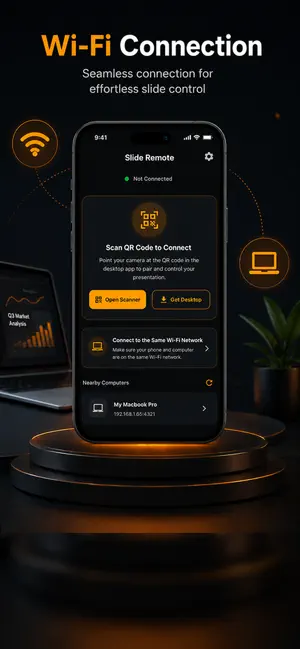
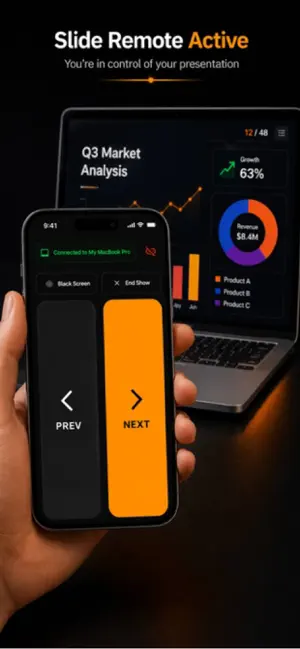
Turn your iPhone into a simple and powerful wireless remote for presentations. Slide Remote: PPT Clicker helps you control your slides without carrying an extra presentation clicker. Use your iPhone to move to the next slide, go back to the previous slide, and present confidently in meetings, classrooms, conferences, training sessions, workshops, and live events. Whether you are presenting from Keynote, Microsoft PowerPoint, Google Slides, Adobe PDF Reader, or any app that supports Page Up and Page Down controls, Slide Remote makes slide navigation smooth and easy. How It Works Bluetooth Mode Use Bluetooth to control your presentation without installing any companion app on your laptop. Network Discovery Mode Install the companion app on your Mac or Linux device and connect over the same network. The macOS DMG file and Linux AppImage can be downloaded directly from inside the mobile app. Key Features • Use your iPhone as a wireless presentation remote • Control next slide and previous slide actions • Works with popular presentation and PDF apps • Supports Bluetooth-based slide control • Supports local network discovery • Companion app available for macOS and Linux • No external clicker device required • Simple and clean interface for live presentations • Useful for speakers, teachers, trainers, students, and business professionals Compatible With • Keynote • Microsoft PowerPoint • Google Slides • Adobe PDF Reader • Presentation apps that support Page Up and Page Down keyboard controls Why Use Slide Remote? Physical presentation clickers are easy to forget, lose, or replace. Slide Remote gives you a smarter and more convenient option by turning the iPhone you already carry into a reliable presentation controller. Important Note Network Discovery Mode requires the companion app on your Mac or Linux device. Bluetooth Mode can be used without installing the companion app, depending on your device and system support. This app may display ads to support ongoing development, maintenance, and future improvements.
What’s new
Version 1.0.3 · Updated July 22, 2026
- Minor bug fixes.
App privacy
The developer, CONVERSANTECH, reported these privacy practices to Apple.
Data Not Collected
The developer does not collect any data from this app.
Alternatives to Slide Remote: PPT Clicker
Looking for apps like Slide Remote: PPT Clicker? Here are 6 similar apps on the App Store. The highest rated is Remote Mouse (4.6/5), and all 6 are free to download.
-
 Presentation Master 2
-
 PPTControl
3.9
PPTControl
3.9
-
 Remote, Mouse and Keyboard
4.5
Remote, Mouse and Keyboard
4.5
-
 Unified Remote
3.8
Unified Remote
3.8
-
 Remote Mouse
4.6
Remote Mouse
4.6
-
 Brother iPrint&Label
4.6
Brother iPrint&Label
4.6
| App | Rating | Price | Last updated | Compare |
|---|---|---|---|---|
| Slide Remote: PPT Clicker | – | Free | July 22, 2026 | |
| Presentation Master 2 | – | Free | Apr 13, 2025 | Compare |
| PPTControl | 3.9 / 5 (24) | Free | Oct 13, 2026 | Compare |
| Remote, Mouse and Keyboard | 4.5 / 5 (14,454) | Free | Oct 28, 2026 | Compare |
| Unified Remote | 3.8 / 5 (296) | Free | Oct 20, 2026 | Compare |
| Remote Mouse | 4.6 / 5 (18,776) | Free | Oct 5, 2026 | Compare |
| Brother iPrint&Label | 4.6 / 5 (8,289) | Free | Oct 6, 2026 | Compare |