

PPTControl
Bastian Aunkofer Utilities iPhoneiPadiPod touchApple Watch
PPTControl is a free Utilities app for iPhone and iPad by Bastian Aunkofer. Rated 3.9/5 from 24 ratings. Requires iOS 15.0. Updated November 8, 2026.
- Rating
- 3.9
- 24 ratings
- Price
- Free
- on the App Store
- Size
- 24 MB
- Age 4+
- Updated
- Nov 8
- 2026 · v3.0.2
Screenshots
Save to Pinterest


About PPTControl
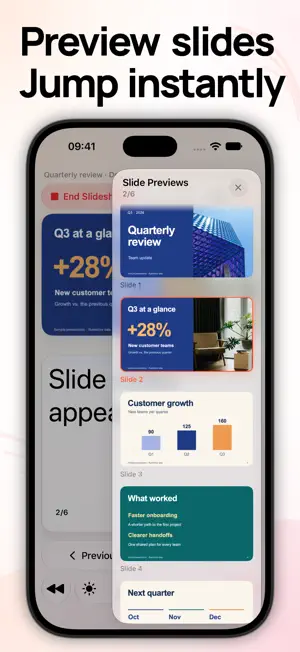
More than a simple clicker: Control PowerPoint, Keynote, and Google Slides on Mac or Windows from your iPhone, iPad, or Apple Watch. Keep your slides and speaker notes in view, highlight key points, and move freely around the room. PRESENT WITH CONFIDENCE • Move to the next or previous slide • Start and end presentations • Black or white out the presentation screen • Present directly from your Apple Watch STAY ONE STEP AHEAD WITH PRO • Preview slides and jump directly to any slide • View speaker notes while presenting • Control the cursor and use it as a laser pointer • Change slides with the volume buttons on your iPhone or iPad — without looking down No account required. PPTControl does not upload your presentation files and includes no ads or tracking. COMPATIBILITY • Microsoft PowerPoint on Windows and macOS • Apple Keynote on macOS • Google Slides on Windows and macOS • iPhone, iPad, and Apple Watch Speaker notes and slide previews are only available for supported PowerPoint and Keynote presentations. Apple Watch control works through the connected iPhone. GET STARTED 1. Download and open the PPTControl Desktop app on your Mac or Windows PC at https://pptcontrol.app. 2. Open PPTControl on your iPhone or iPad and select your computer or scan the pairing qr code. 3. Confirm the connection on your computer and start presenting. PPTControl has been downloaded more than 300,000 times worldwide. Privacy: https://pptcontrol.app/privacy Terms: https://pptcontrol.app/terms
Ratings & reviews
3.9
24 ratings
What’s new
Version 3.0.2 · Updated November 8, 2026
- See your current and next slide right on the screen - Optimizations for iPhone Duo - Bug fixes and stability improvements Thank you for using PPTControl!
App privacy
The developer, Bastian Aunkofer, reported these privacy practices to Apple.
Data Not Collected
The developer does not collect any data from this app.
Alternatives to PPTControl
Looking for apps like PPTControl? Here are 6 similar apps on the App Store. The highest rated is Universal Presenter Remote (5.0/5), and all 6 are free to download.
-
 Unified Remote
3.8
-
 ProPresenter Remote
2.5
-
 Presenter Remote
2.4
-
 Remote, Mouse and Keyboard
4.5
-
 Universal Presenter Remote
5.0
-
 Slide Remote: PPT Clicker
| App | Rating | Price | Last updated | Compare |
|---|---|---|---|---|
| PPTControl | 3.9 / 5 (24 ratings) | Free | November 8, 2026 | |
| Unified Remote | 3.8 / 5 (297) | Free | Oct 20, 2026 | Compare |
| ProPresenter Remote | 2.5 / 5 (79) | Free | Dec 20, 2025 | Compare |
| Presenter Remote | 2.4 / 5 (9) | Free | Jul 16, 2026 | Compare |
| Remote, Mouse and Keyboard | 4.5 / 5 (14,543) | Free | Nov 18, 2026 | Compare |
| Universal Presenter Remote | 5.0 / 5 (1) | Free | Oct 22, 2026 | Compare |
| Slide Remote: PPT Clicker | – | Free | Jul 22, 2026 | Compare |
Compare PPTControl with the top alternatives: ratings, updates, ASO score and keyword gaps →