

Scan Files Pro
Fuzhou Dianyin Network Technology Co., Ltd Utilities iPhoneiPadiPod touch
Scan Files Pro is a free Utilities app for iPhone and iPad by Fuzhou Dianyin Network Technology Co., Ltd. Requires iOS 17.6. Updated November 12, 2026.
- Price
- Free
- on the App Store
- Size
- 83 MB
- Age 4+
- Updated
- Nov 12
- 2026 · v1.2.0
Screenshots
Save to Pinterest


About Scan Files Pro
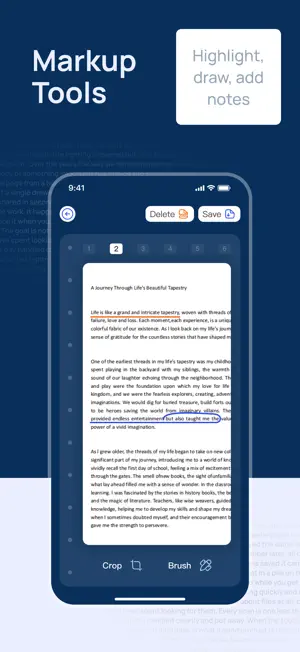
Scan Files Pro brings document viewing, scanning, and PDF tools together in one place. Use the following features to handle study materials, work documents, and everyday files directly from your device. Scan Paper Documents Use your phone’s camera to capture paper documents, notes, receipts, and forms. Review the captured pages, adjust them when needed, and save the finished document as a PDF. Review and Mark Documents Add highlights, notes, drawings, and other supported marks to PDF pages. These tools can be used when reviewing study materials, checking forms, or adding comments to work documents. Convert Supported Files Turn selected photos and compatible documents into PDF files. Useful PDF Actions Use practical tools to merge PDF files, split pages, and add protection to supported files. Tool availability depends on the file format. Import PDF Import PDF files directly from your device’s system folders. Open them instantly and manage your documents with ease. OCR Text Recognition Intelligently recognize text in images or scanned documents. Extract the content with one tap and generate an editable PDF text file. Scan Files Pro is suitable for everyday document tasks at school, at work, or at home. Its clear layout makes frequently used tools easy to access, helping you read, scan, edit, convert, and manage files with fewer steps.
What’s new
Version 1.2.0 · Updated November 12, 2026
Resolved several issues for a smoother, more reliable experience.
App privacy
The developer, Fuzhou Dianyin Network Technology Co., Ltd, reported these privacy practices to Apple.
Data Used to Track You
The following data may be used to track you across apps and websites owned by other companies:
- Identifiers: Device ID
Data Not Linked to You
The following data, which may be collected but is not linked to your identity, may be used for the following purposes:
- Identifiers: Device ID
- Diagnostics: Crash Data, Other Diagnostic Data
Used for: Third-Party Advertising, Analytics, App Functionality, Other Purposes
Alternatives to Scan Files Pro
Looking for apps like Scan Files Pro? Here are 6 similar apps on the App Store. The highest rated is Phone Storage Cleaner, Cleanup (4.4/5), and all 6 are free to download.
-
 QR Handy
-
 SwiftPDF
-
 Auto ScanQR
-
 Photo Cleaner - Phone Manage
4.0
-
 Open QRCode - Scan
-
 Phone Storage Cleaner, Cleanup
4.4
| App | Rating | Price | Last updated | Compare |
|---|---|---|---|---|
| Scan Files Pro | – | Free | November 12, 2026 | |
| QR Handy | – | Free | Nov 11, 2026 | Compare |
| SwiftPDF | – | Free | Nov 13, 2026 | Compare |
| Auto ScanQR | – | Free | Nov 6, 2026 | Compare |
| Photo Cleaner - Phone Manage | 4.0 / 5 (2) | Free | Nov 8, 2026 | Compare |
| Open QRCode - Scan | – | Free | Oct 27, 2026 | Compare |
| Phone Storage Cleaner, Cleanup | 4.4 / 5 (45) | Free | Sep 23, 2026 | Compare |
Compare Scan Files Pro with the top alternatives: ratings, updates, ASO score and keyword gaps →