

SwiftPDF
IINTERGO PTE. LTD. Utilities iPhoneiPadiPod touch
SwiftPDF is a free Utilities app for iPhone and iPad by IINTERGO PTE. LTD. Requires iOS 16.0. Updated November 9, 2026.
- Price
- Free
- on the App Store
- Size
- 77 MB
- Age 17+
- Updated
- Nov 9
- 2026 · v2.0.0
Screenshots
Save to Pinterest


About SwiftPDF
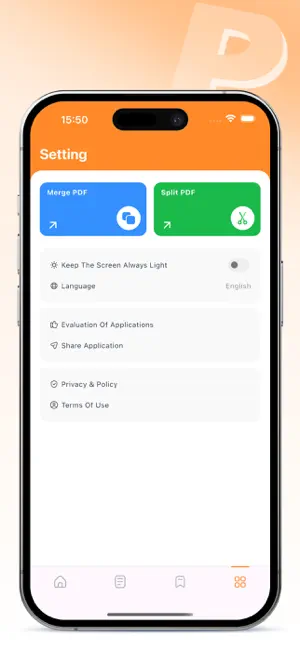
Looking for a simple, lightweight, and easy-to-use PDF app? SwiftPDF is exactly what you need! SwiftPDF is an all-in-one PDF scanner and management tool. It allows you to quickly scan documents, use an image to PDF converter, and easily find and manage all your PDF files in one place. Fully adapted for both iPhone and iPad, SwiftPDF brings you a smooth and clean reading and organizing experience. It's the PDF tools kit you need. Download SwiftPDF and streamline your work and study now! Modern Design iOS 26 Glassmorphism: Enjoy a smooth visual experience with the latest frosted glass design. Dark Mode Supported: Adapts to your system. Read and manage files comfortably with one-tap switch between light and dark modes, protecting your eyes. iPad Optimized: Fully adapted for iPad screens, making good use of the large canvas for better viewing and management. Handy Document Scanner Scan to PDF: Use your camera to scan document like paper receipts and whiteboards, and convert to PDF files. It's a handy PDF maker on your phone. Photo to PDF: Easily select and convert your photos to PDF or photo albums into multi-page PDF documents. It works as a picture to PDF converter free. PDF File Manager Easy Import: Fast import of local PDF files. All Files & Recent: Organized PDF document grid view to find all your files or check recently opened documents. Works well as a document reader and PDF viewer. Quick Actions: Long-press or tap to easily Rename, Share, Print, or Delete your files. Manage your free PDF files easily. Practical PDF Tools Merge PDF: Select 2–5 PDF files, arrange their merging order with a simple tap, and combine them into a single document easily. It acts as a quick PDF page maker. Fast Preview: Smoothly open and view your PDF file right within the app, making it a great file opener and doc reader. Privacy & Security Your files are important to us. All your documents are processed locally on your device. We do not collect or upload your personal files, ensuring your data stays secure and private. (Note: We are continuously working to add more features like PDF to photo conversion and advanced file converter tools in future updates.)
What’s new
Version 2.0.0 · Updated November 9, 2026
Photo to PDF: Easily convert images into PDF files, or combine multiple photos into a single PDF document. Import, view, and manage PDF files effortlessly. Enjoy Dark Mode and an iPad-optimized experience.
App privacy
The developer, IINTERGO PTE. LTD., reported these privacy practices to Apple.
Data Used to Track You
The following data may be used to track you across apps and websites owned by other companies:
- Identifiers: User ID
Data Linked to You
The following data, which may be collected and linked to your identity, may be used for the following purposes:
- Identifiers: User ID
Used for: Third-Party Advertising, Developer’s Advertising or Marketing, Analytics, App Functionality
Data Not Linked to You
The following data, which may be collected but is not linked to your identity, may be used for the following purposes:
- Identifiers: Device ID
- Usage Data: Product Interaction, Advertising Data, Other Usage Data
- Diagnostics: Performance Data, Other Diagnostic Data, Crash Data
Used for: Third-Party Advertising, Developer’s Advertising or Marketing, Analytics, App Functionality
Alternatives to SwiftPDF
Looking for apps like SwiftPDF? Here are 6 similar apps on the App Store. The highest rated is Cleanova: Storage Cleaner (5.0/5), and all 6 are free to download.
-
 Green Routine
-
 Green BiteYum
-
 Cleanova: Storage Cleaner
5.0
-
 AI Cleanup Fast
4.0
-
 Camera Roll Cleaner: Sardis
4.0
-
 Lumirox Optimizer
4.5
| App | Rating | Price | Last updated | Compare |
|---|---|---|---|---|
| SwiftPDF | – | Free | November 9, 2026 | |
| Green Routine | – | Free | Sep 5, 2026 | Compare |
| Green BiteYum | – | Free | Jul 24, 2026 | Compare |
| Cleanova: Storage Cleaner | 5.0 / 5 (2) | Free | Nov 10, 2026 | Compare |
| AI Cleanup Fast | 4.0 / 5 (1) | Free | Sep 22, 2026 | Compare |
| Camera Roll Cleaner: Sardis | 4.0 / 5 (1) | Free | Aug 13, 2026 | Compare |
| Lumirox Optimizer | 4.5 / 5 (2) | Free | Sep 15, 2026 | Compare |
Compare SwiftPDF with the top alternatives: ratings, updates, ASO score and keyword gaps →