

Twill: Film Photo Editor
Changyeon kim Photo & Video iPhoneiPadiPod touch
Twill: Film Photo Editor is a free Photo & Video app for iPhone and iPad by Changyeon kim. Requires iOS 17.0. Updated October 21, 2026.
- Price
- Free
- on the App Store
- Size
- 54 MB
- Age 4+
- Updated
- Oct 21
- 2026 · v1.0.2
Screenshots



About Twill: Film Photo Editor
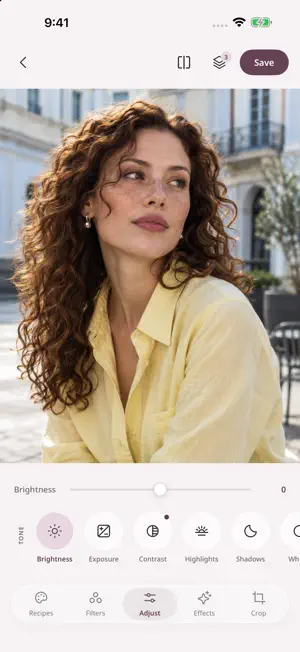
A fleeting moment. A favorite place. A photo that feels like you. Twill helps you turn everyday shots into images with a mood of their own. Start with a filter, shape the light and color, then finish with grain or a soft glow. FIND YOUR LOOK Explore filters and adjust their intensity to suit your photo. Go subtle or expressive, then compare your edit with the original as you work. MAKE THE DETAILS YOURS Fine-tune exposure, contrast, highlights, and shadows. Adjust temperature, tint, saturation, and vibrance. For more control, use HSL and curves to shape individual colors and tones. ADD A FILM-INSPIRED FINISH Bring texture and atmosphere to your images with grain, vignette, glow, and halation. Explore blur, sharpen, diffuse, and prism effects to find the finish you like. KEEP YOUR SIGNATURE STYLE Save your editing settings as a custom recipe to use again. Copy edits to other photos to give a series a consistent look. TELL THE WHOLE STORY WITH COLLAGES Put several photos into one with 300+ layouts — grids, photo booth strips, hero layouts, and shapes. Adjust spacing, background color, and how each photo sits in its cell. FRAME IT. SAVE IT. Crop, straighten, rotate, or flip to refine your composition. Export in JPEG or PNG at full or reduced size. Your edit is saved as a new image, keeping the original intact. No account is needed to start editing. Import a photo and make it yours. When you save, allow Twill to add the result to your photo library. TWILL PRO Pro filters, recipes, and collages are available with TWILL Pro, offered as an auto-renewable annual subscription or a one-time lifetime purchase. The subscription renews automatically unless cancelled at least 24 hours before the end of the current period. You can manage or cancel it in your Apple Account subscription settings. Terms of Use (EULA): https://www.apple.com/legal/internet-services/itunes/dev/stdeula/ Privacy Policy: https://ahope-dev.github.io/twill-support/privacy/
What’s new
Version 1.0.2 · Updated October 21, 2026
• Crop keeps the area you chose when you rotate or flip, and a locked ratio now holds while you drag the corners. • Collage: removing a middle line no longer clears your photos. • Transparent PNGs import cleanly, and saving several photos shows progress. • Other stability and usability improvements.
App privacy
The developer, Changyeon kim, reported these privacy practices to Apple.
Data Linked to You
The following data, which may be collected and linked to your identity, may be used for the following purposes:
- Contact Info: Email Address
- Identifiers: User ID
- Diagnostics: Other Diagnostic Data
Used for: App Functionality
Data Not Linked to You
The following data, which may be collected but is not linked to your identity, may be used for the following purposes:
- Purchases: Purchase History
- Location: Coarse Location
- Identifiers: Device ID
- Usage Data: Product Interaction
- Diagnostics: Performance Data, Crash Data
Used for: Analytics, App Functionality
Alternatives to Twill: Film Photo Editor
Looking for apps like Twill: Film Photo Editor? Here are 6 similar apps on the App Store. The highest rated is GradeLab: Color Grading (5.0/5), and all 6 are free to download.
-
 LAM · Film Camera & Cinema
1.0
LAM · Film Camera & Cinema
1.0
-
 Color Grading - Färg
-
 GradeLab: Color Grading
5.0
GradeLab: Color Grading
5.0
-
 Socio: Reel Maker & Video Clip
5.0
Socio: Reel Maker & Video Clip
5.0
-
 Add Music to Video - Muvi
4.0
Add Music to Video - Muvi
4.0
-
 Resize Video & Photo : InSize
5.0
Resize Video & Photo : InSize
5.0
| App | Rating | Price | Last updated | Compare |
|---|---|---|---|---|
| Twill: Film Photo Editor | – | Free | October 21, 2026 | |
| LAM · Film Camera & Cinema | 1.0 / 5 (1) | Free | Oct 22, 2026 | Compare |
| Color Grading - Färg | – | Free | Aug 31, 2026 | Compare |
| GradeLab: Color Grading | 5.0 / 5 (1) | Free | Oct 29, 2026 | Compare |
| Socio: Reel Maker & Video Clip | 5.0 / 5 (2) | Free | Oct 17, 2026 | Compare |
| Add Music to Video - Muvi | 4.0 / 5 (71) | Free | May 13, 2024 | Compare |
| Resize Video & Photo : InSize | 5.0 / 5 (2) | Free | Apr 15, 2024 | Compare |