

Cinevisor
Crooster Inc. Photo & Video iPhoneiPadiPod touch
Cinevisor is a free Photo & Video app for iPhone and iPad by Crooster Inc. Requires iOS 17.0. Updated October 30, 2026.
- Price
- Free
- on the App Store
- Size
- 8 MB
- Age 4+
- Updated
- Oct 30
- 2026 · v1.6.3
Screenshots


About Cinevisor
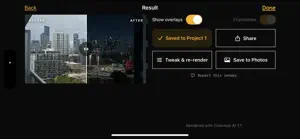
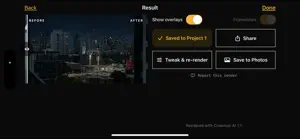
Cinevisor is a director's viewfinder that doesn't stop at the frame. Pick the camera body, sensor mode, lens set and lens you're actually shooting on. The phone's camera is cropped and zoomed to match that rig's real field of view, so what you see on screen is what the lens will see. Framelines, safe areas, anamorphic desqueeze and a HUD with focal length, T-stop and field of view — all of it running on the device, offline, free. Then tap the shutter and take it one step further: describe the light you want, and Cinevisor renders your exact frame with that lighting, that depth of field and that film look. Not a stock photo, not a mood board — your location, your framing, lit the way you're pitching it. THE VIEWFINDER • Real field-of-view matching from the sensor mode and focal length, not an approximation • Camera bodies, sensor modes and lens sets from the manufacturers' own specifications • Swipe through a lens set; the preview ramps to the next focal length • Framelines for multiple ratios at once, custom aspects, safe areas, adjustable opacity • Anamorphic squeeze factors from 1.25x to 2x, viewed desqueezed • Monospaced HUD: focal length, horizontal and vertical FOV, sensor mode, T-stop • Works with no signal. The viewfinder never needs the network. DEPTH OF FIELD FROM REAL OPTICS The blur isn't guessed. Cinevisor reads the scene's depth, then computes the circle of confusion from the rig you picked — focal length, T-stop, sensor size, focus distance — and renders the falloff from that. Change the T-stop and the background separates the way that lens would actually separate it, with round bokeh on the highlights. THE AI LOOK • Describe the lighting in plain words: "early morning, sun through the window", "overcast soft", "sodium vapor at night" • Film stock and look presets, key direction, atmosphere, grain and halation • Your composition, your people and your architecture stay exactly where they are • Before/after slider on every render • Save to a project, export with the rig metadata, or share PROJECTS Organize captures by project and shot. Every frame keeps its rig: camera, sensor mode, lens, T-stop, framelines, location and time. Re-render any shot later with a different look. CREDITS The viewfinder, the framelines, the depth-of-field maths and the projects are free and unlimited. Only the AI renders cost credits, because only they cost real compute. One render, one credit. Credits never expire, they're tied to your Apple Account, and renders that fail are refunded automatically. Unlock Cinevisor once for 30 renders, and buy more in packs of 30, 60 or 120 whenever you need them. There is no subscription. PRIVACY The viewfinder runs entirely on your phone — nothing leaves the device while you're framing. A photo is uploaded only when you tap Render, and only then. We ask for your permission before the first upload, in plain language, and the image is processed and discarded rather than stored on our servers. ABOUT THE RENDERS Renders are generated by an AI model from the frame you captured. They are a visualization of intent, not a photograph of what was there. Treat them the way you'd treat a concept frame in a lookbook. Made by a working filmmaker, for scouts, prep and the conversation where you have to show someone what you mean. Questions or problems: [email protected]
What’s new
Version 1.6.3 · Updated October 30, 2026
• Minor Bug fixes • Added the Leica R Cine Dream lenses.
App privacy
The developer, Crooster Inc., reported these privacy practices to Apple.
Data Linked to You
The following data, which may be collected and linked to your identity, may be used for the following purposes:
- Purchases: Purchase History
- User Content: Other User Content
- Identifiers: User ID
- Usage Data: Product Interaction
Used for: App Functionality
Data Not Linked to You
The following data, which may be collected but is not linked to your identity, may be used for the following purposes:
- User Content: Photos or Videos
Used for: App Functionality
Alternatives to Cinevisor
Looking for apps like Cinevisor? Here are 6 similar apps on the App Store. The highest rated is Shotup Director's Viewfinder (5.0/5), and all 6 are free to download.
-
 Shotup Director's Viewfinder
5.0
Shotup Director's Viewfinder
5.0
-
 Cutvey Viewfinder
-
 SL-Frame Director's Viewfinder
-
 DOPro: Director's Viewfinder
-
 Chroma Grid
-
 Lupo - Film Emulsion Camera
5.0
Lupo - Film Emulsion Camera
5.0
| App | Rating | Price | Last updated | Compare |
|---|---|---|---|---|
| Cinevisor | – | Free | October 30, 2026 | |
| Shotup Director's Viewfinder | 5.0 / 5 (3) | Free | Sep 1, 2026 | Compare |
| Cutvey Viewfinder | – | Free | Oct 18, 2026 | Compare |
| SL-Frame Director's Viewfinder | – | Free | Sep 3, 2026 | Compare |
| DOPro: Director's Viewfinder | – | Free | Sep 30, 2026 | Compare |
| Chroma Grid | – | Free | Jul 2, 2026 | Compare |
| Lupo - Film Emulsion Camera | 5.0 / 5 (1) | Free | Sep 21, 2026 | Compare |
Compare Cinevisor with the top alternatives: ratings, updates, ASO score and keyword gaps →