

SL-Frame Director's Viewfinder
Korner Studio LLC Photo & Video iPhoneiPadiPod touch
SL-Frame Director's Viewfinder is a free Photo & Video app for iPhone and iPad by Korner Studio LLC. Requires iOS 18.0. Updated September 3, 2026.
- Price
- Free
- on the App Store
- Size
- 33 MB
- Age 4+
- Updated
- Sep 3
- 2026 · v0.1.5
Screenshots

About SL-Frame Director's Viewfinder
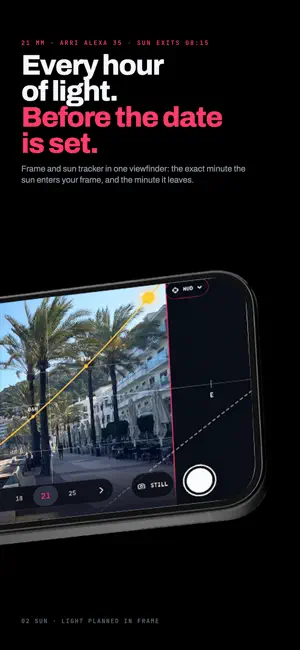
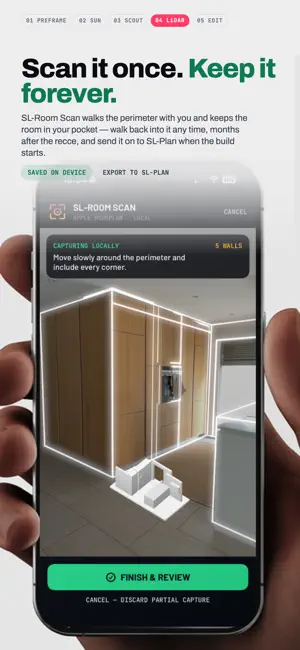
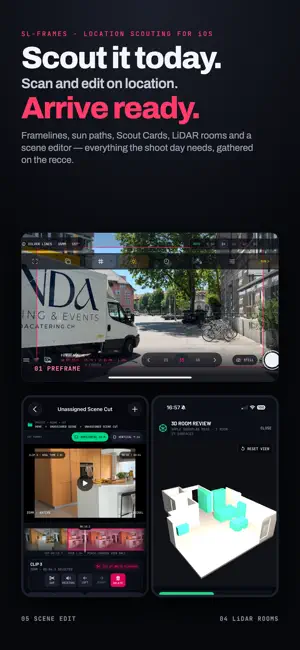
SL-Frames turns an iPhone or iPad into a complete location-scouting and pre-production toolkit for directors, cinematographers, gaffers and location teams. Scout the frame, light and space; preserve the evidence; then edit the scout into material the production can use. FRAME THE SHOT Explore a production catalogue of more than 100 camera bodies and more than 100 lens series. Choose the camera active area, lens series, focal length, optical adapter, anamorphic squeeze and delivery ratio, then see the computed cine frameline over the live camera view. SL-Frames warns when the requested frame extends beyond the phone camera's available preview instead of inventing an image that is not there. PLAN SUN, MOON & TWILIGHT See when light reaches the location from your current position or a remote pin. Work in live AR, Map, Street View where supported, or an interactive sky compass. Save reusable Light Plans with sun, moon, golden hour, blue hour, moon path and twilight timing. BUILD SCOUT CARDS & SHOT LISTS Capture stills and reference motion with the selected cine frame. Keep camera, lens, crop, bearing, position, notes and light context together in a Scout Card. Arrange Scouts into an ordered set, export shareable Scout Sheets and Shot List PDFs, or send selected material deliberately to a linked Silverlines production. EDIT THE SCOUT ON LOCATION Scene Cut is a focused video editor for scouting. Trim and reorder captured motion, keep location sound under control, add narration, and assemble a production reference directly on the scout day without altering the source clips. Use the cut to prepare coverage, communicate intent and move into production with the location already understood. SCAN, REVIEW & WALK THE SPACE On supported LiDAR devices, capture a room with Apple's RoomPlan. Walls, doors, windows, openings and recognized objects are saved with the project and can be reopened as an interactive 3D model. Use OVERVIEW to orbit the complete space or WALK to move through it with separate MOVE and LOOK controls. Export the measured room and portable floor-plan material for later technical and production planning. Spatial capture is clearly identified as planning evidence, not survey-grade geometry. LOCAL BY DEFAULT No account is required for local capture, planning and export. Optional sign-in or an invitation can connect one local project to a restricted Silverlines delivery inbox. Uploads occur only through the connection controls shown in the app. ACCESS Eligible new Annual subscribers receive three days of complete SL-Frames access free, then the localized Annual price shown by Apple is charged unless cancelled. Apple confirms the exact price and terms before Face ID or password approval. Introductory-offer eligibility belongs to the Apple Account and subscription group; deleting or reinstalling the app does not restart it. Monthly and one-time Lifetime remain visible alternatives. Subscriptions auto-renew unless cancelled and can be managed in Apple Account settings. Restore Purchases is available in the app. Privacy Policy: https://silverlines.app/legal/privacy/ Terms of Service: https://silverlines.app/legal/terms/ Terms of Use (EULA): https://www.apple.com/legal/internet-services/itunes/dev/stdeula/
What’s new
Version 0.1.5 · Updated September 3, 2026
SL-Frames now opens directly into a complimentary 10-day full preview—without starting a purchase, subscription or automatic charge. • Cleaner, more professional Home tool design • Faster Scene Cut sharing with compact 720p exports • Refined Shot List control inside FRAME • Improved access and purchase flow After the preview, exploration remains available. Creating, saving, exporting, delivery and RoomPlan capture require Monthly, Annual or Lifetime access.
App privacy
The developer, Korner Studio LLC, reported these privacy practices to Apple.
Data Linked to You
The following data, which may be collected and linked to your identity, may be used for the following purposes:
- Location: Precise Location
- Identifiers: Device ID, User ID
- Other Data: Other Data Types
- Contact Info: Email Address
- User Content: Photos or Videos, Audio Data, Other User Content
- Surroundings: Environment Scanning
Used for: Analytics, App Functionality
Data Not Linked to You
The following data, which may be collected but is not linked to your identity, may be used for the following purposes:
- Location: Coarse Location
- Search History: Search History
- Usage Data: Product Interaction
- Diagnostics: Crash Data, Performance Data
Used for: Analytics, App Functionality
Alternatives to SL-Frame Director's Viewfinder
Looking for apps like SL-Frame Director's Viewfinder? Here are 6 similar apps on the App Store. The highest rated is Shotup Director's Viewfinder (5.0/5), and 5 of the 6 are free to download.
-
 SetScope: Filmmaker Tools
-
 back-to-one
-
 Pontus Viewfinder
-
 Shotup Director's Viewfinder
5.0
Shotup Director's Viewfinder
5.0
-
 DOPro: Director's Viewfinder
-
 Vantage Scout
| App | Rating | Price | Last updated | Compare |
|---|---|---|---|---|
| SL-Frame Director's Viewfinder | – | Free | September 3, 2026 | |
| SetScope: Filmmaker Tools | – | Free | Oct 7, 2026 | Compare |
| back-to-one | – | Free | Oct 20, 2026 | Compare |
| Pontus Viewfinder | – | 12.99 USD | Jun 8, 2026 | Compare |
| Shotup Director's Viewfinder | 5.0 / 5 (3) | Free | Sep 1, 2026 | Compare |
| DOPro: Director's Viewfinder | – | Free | Sep 30, 2026 | Compare |
| Vantage Scout | – | Free | Oct 7, 2026 | Compare |