

ByeCut: AI Video Editor
Thinkbyte Photo & Video iPhoneiPadiPod touch
ByeCut: AI Video Editor is a free Photo & Video app for iPhone and iPad by Thinkbyte. Rated 5.0/5 from 1 ratings. Requires iOS 26.0.
- Rating
- 5.0
- 1 ratings
- Price
- Free
- on the App Store
- Size
- 107 MB
- Age 4+
- Updated
- Oct 29
- 2026 · v0.3.0
Screenshots


About ByeCut: AI Video Editor
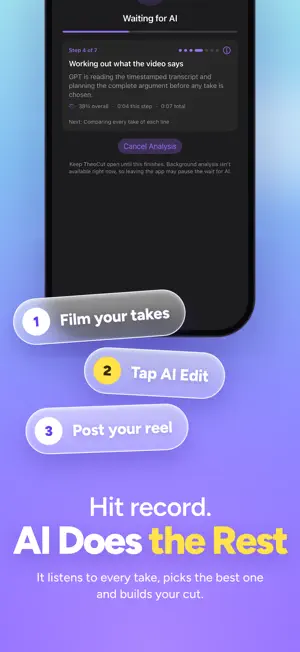
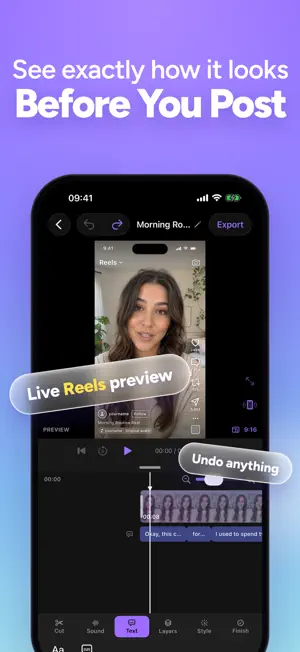
Film your takes. AI Edit does the rest. ByeCut turns raw talking-head footage into a clean first cut. Drop in your clips and AI Edit listens to every take, cuts the silences, filler words and false starts, keeps your best delivery, and hands you a timeline you can review and finish in minutes. HOW IT WORKS 1. Sign in with Apple or use a six-digit code sent to your email. With Apple sign-in, ByeCut only receives your Apple account ID, never your name. 2. Pick your takes from Photos. 3. Optionally paste the script you meant to say, or add notes for the edit. 4. AI Edit transcribes the audio, finds your best takes and builds a first cut. 5. Cuts that pass the checks open in the editor. If a draft needs attention, review it before applying. 6. Add captions and finishing touches, and export. AI EDIT • Removes silences, filler words, restarts and weaker repeated takes • Uses your script, when you add one, to keep the right lines • Detects the spoken language automatically • Review and refine the finished cut in the editor, with warnings when a draft needs your attention • Keeps working in the background, with progress on the Lock Screen • Only audio is sent for AI analysis. Your video frames never leave your iPhone A REAL VIDEO EDITOR • Trim, split, speed, reverse and freeze frames on a full timeline • Word-by-word captions you can edit and style • Titles, photo and video overlays, music and imported audio • Record voiceovers and clean up your voice • Filters, color adjustments, effects and stabilization • Remove the background on device, or use a mask or chroma key • Place text and images behind yourself • On-device face retouch • Project templates to start faster • Ask the editing assistant in plain language, then review its plan • 9:16, 16:9, 1:1, 4:5 and custom canvases, in portrait or landscape EXPORT AND SHARE • Export up to 4K and save to Photos • Share straight to TikTok, Instagram and YouTube Shorts • Exports keep rendering in the background YOUR PROJECTS • Projects are saved on your iPhone • Optional iCloud sync across your devices • Export a portable project backup whenever you want PLANS Editing, captions and exports are free. AI Edit uses a monthly allowance of AI edits. One AI edit covers up to 6 minutes of raw footage. • Creator: 30 AI edits a month • Pro: 90 AI edits a month • Extreme: 300 AI edits a month Creator, Pro and Extreme are available monthly or yearly. Trial eligibility, duration and included AI Edit allowance are shown in the app before you subscribe. Invite friends with your code to earn rewards. ByeCut Creator, Pro and Extreme are auto-renewing subscriptions, billed monthly or yearly at the price shown in the app. Payment is charged to your Apple Account at confirmation of purchase, or when the free trial ends. Subscriptions renew automatically unless cancelled at least 24 hours before the end of the current period. Any unused portion of a free trial is forfeited when you purchase a subscription. Manage or cancel anytime in your Apple Account settings. Terms of Use: https://thinkbyte.tech/en/portfolio/byecut/terms Apple Standard EULA: https://www.apple.com/legal/internet-services/itunes/dev/stdeula/ Privacy Policy: https://thinkbyte.tech/en/portfolio/byecut/privacy
What’s new
Version 0.3.0 · Updated October 29, 2026
- Rate your AI Edit with a thumbs up or down, and add optional feedback about the result. - The editor tour no longer appears over your finished cut after AI Edit.
App privacy
The developer, Thinkbyte, reported these privacy practices to Apple.
Data Linked to You
The following data, which may be collected and linked to your identity, may be used for the following purposes:
- Usage Data: Advertising Data, Other Usage Data
- Purchases: Purchase History
- Contact Info: Email Address
- User Content: Audio Data, Customer Support
- Identifiers: User ID
- Diagnostics: Crash Data, Other Diagnostic Data
Used for: Analytics, App Functionality
Data Not Linked to You
The following data, which may be collected but is not linked to your identity, may be used for the following purposes:
- Usage Data: Product Interaction
- User Content: Other User Content
Used for: Analytics, App Functionality
Alternatives to ByeCut: AI Video Editor
Looking for apps like ByeCut: AI Video Editor? Here are 6 similar apps on the App Store. The highest rated is Refined: AI Video Editor (5.0/5), and all 6 are free to download.
-
 Refined: AI Video Editor
5.0
Refined: AI Video Editor
5.0
-
 Clixly
-
 Eazy Video: AI Video Editor
-
 Pixel P.I.
-
 Groovely: AI Video Generator
5.0
Groovely: AI Video Generator
5.0
-
 AI HD Movie Maker: Director AI
2.4
AI HD Movie Maker: Director AI
2.4
| App | Rating | Price | Last updated | Compare |
|---|---|---|---|---|
| ByeCut: AI Video Editor | 5.0 / 5 (1 rating) | Free | October 29, 2026 | |
| Refined: AI Video Editor | 5.0 / 5 (1) | Free | Oct 15, 2026 | Compare |
| Clixly | – | Free | Oct 20, 2026 | Compare |
| Eazy Video: AI Video Editor | – | Free | Oct 28, 2026 | Compare |
| Pixel P.I. | – | Free | Oct 14, 2026 | Compare |
| Groovely: AI Video Generator | 5.0 / 5 (3) | Free | Oct 13, 2026 | Compare |
| AI HD Movie Maker: Director AI | 2.4 / 5 (8) | Free | Oct 18, 2026 | Compare |