

Refined: AI Video Editor
Build With Tori LLC Photo & Video iPhoneiPadiPod touch
Refined: AI Video Editor is a free Photo & Video app for iPhone and iPad by Build With Tori LLC. Rated 5.0/5 from 1 ratings. Requires iOS 16.4.
- Rating
- 5.0
- 1 ratings
- Price
- Free
- on the App Store
- Size
- 95 MB
- Age 4+
- Updated
- Oct 15
- 2026 · v1.0.4
Screenshots


About Refined: AI Video Editor
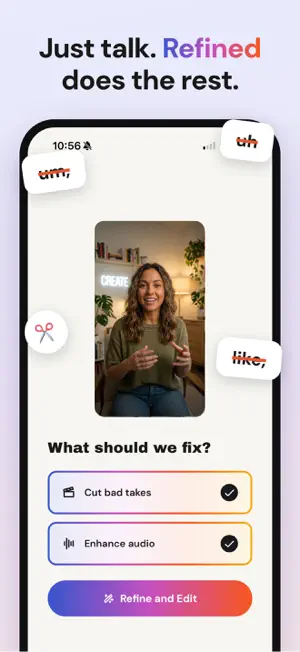
Refined: The Video Editor for Yappers You already know how to talk to a camera. Refined helps with everything that comes after. Refined turns your video into a transcript, suggests a cleaner first cut, removes filler words and weaker repeated takes, and lets you adjust every choice before exporting. EDIT BY READING - Tap a word to cut it. Tap again to restore it. - Use the transcript or timeline to adjust your edit. - Keep full control over Refined's suggestions. START WITH A CLEANER FIRST CUT - Find strong takes when you repeat a line. - Remove common filler words. - Tighten pauses using your chosen pace. - Restore anything you want to keep. RECORD IN REFINED - Record multiple takes without leaving the app. - Rearrange takes before editing. - Save recordings to Photos when permission is granted. - Hold to record, or tap to start and stop. GREEN SCREEN - Use a photo or color as your background. - Record with the front or back camera. - Create the effect without a physical green screen. FINISH YOUR VIDEO - Reduce background noise and normalize audio levels. - Make detailed adjustments on the timeline. - Export at supported resolutions up to 4K, based on the source video. - Save to Photos or use the iOS share sheet. WHO IT IS FOR Refined is for people who talk to a camera and want to spend more time creating. It works well for UGC creators, educators, coaches, founders, and people making videos for Reels, TikTok, and Shorts. YOUR VIDEO FILE STAYS ON YOUR DEVICE Your video file is edited, previewed, and exported on your phone. Refined sends the extracted audio to processing partners for transcription and optional audio enhancement. It sends transcript text to an AI provider for edit suggestions. Refined stores account, processing, and transcript history needed to operate and improve the service. The full data flow is explained in our privacy policy. PAYMENT Refined includes one free video of up to 15 minutes. Eligible new subscribers can start a 3-day free trial that includes 7,200 processing credits, equal to up to 2 hours of footage. Refined Pro and Refined Pro Plus are auto-renewing subscriptions. Payment is charged to your Apple Account at confirmation of purchase. Unless canceled, the subscription renews automatically at the displayed price and period. You can manage or cancel your subscription in your Apple Account subscription settings. Cancel at least 24 hours before the end of the current period or trial to avoid the next charge. Questions? Email [email protected] TERMS OF USE: https://www.refined.video/terms PRIVACY POLICY: https://www.refined.video/privacy LICENSE (EULA): https://www.refined.video/eula
What’s new
Version 1.0.4 · Updated October 15, 2026
A new onboarding: watch Refined cut a messy take in seconds, tell us a little about how you make videos, and try your first video free. Also in this update: • Faster, more reliable audio cleanup, including on long clips • Ready for the iPhone Duo • Bug fixes and polish
App privacy
The developer, Build With Tori LLC, reported these privacy practices to Apple.
Data Used to Track You
The following data may be used to track you across apps and websites owned by other companies:
- Purchases: Purchase History
- Identifiers: Device ID
- Usage Data: Product Interaction, Other Usage Data
Data Linked to You
The following data, which may be collected and linked to your identity, may be used for the following purposes:
- Identifiers: User ID, Device ID
- Usage Data: Product Interaction, Other Usage Data
- Diagnostics: Crash Data, Performance Data, Other Diagnostic Data
- Purchases: Purchase History
- Contact Info: Email Address, Name
- User Content: Audio Data, Other User Content
Used for: Analytics, App Functionality
Data Not Linked to You
The following data, which may be collected but is not linked to your identity, may be used for the following purposes:
- Purchases: Purchase History
- Identifiers: Device ID
- Usage Data: Product Interaction, Other Usage Data
Used for: Developer’s Advertising or Marketing
Alternatives to Refined: AI Video Editor
Looking for apps like Refined: AI Video Editor? Here are 6 similar apps on the App Store. The highest rated is ByeCut: AI Video Editor (5.0/5), and all 6 are free to download.
-
 ByeCut: AI Video Editor
5.0
ByeCut: AI Video Editor
5.0
-
 Clixly
-
 Pro Camera: Smart Shot Studio
-
 Pixel P.I.
-
 ProTune AI Camera
5.0
ProTune AI Camera
5.0
-
 Ai Video Generator : Fun Video
| App | Rating | Price | Last updated | Compare |
|---|---|---|---|---|
| Refined: AI Video Editor | 5.0 / 5 (1 rating) | Free | October 15, 2026 | |
| ByeCut: AI Video Editor | 5.0 / 5 (1) | Free | Oct 29, 2026 | Compare |
| Clixly | – | Free | Oct 20, 2026 | Compare |
| Pro Camera: Smart Shot Studio | – | Free | Oct 8, 2026 | Compare |
| Pixel P.I. | – | Free | Oct 14, 2026 | Compare |
| ProTune AI Camera | 5.0 / 5 (1) | Free | Oct 19, 2026 | Compare |
| Ai Video Generator : Fun Video | – | Free | Sep 1, 2026 | Compare |