

Linkalyst: Network Toolkit
Entromoonic Ltd Utilities iPhoneiPadiPod touch
Linkalyst: Network Toolkit is a free Utilities app for iPhone and iPad by Entromoonic Ltd. Rated 5.0/5 from 2 ratings. Requires iOS 17.0.
- Rating
- 5.0
- 2 ratings
- Price
- Free
- on the App Store
- Size
- 25 MB
- Age 4+
- Updated
- Oct 24
- 2026 · v2.2.0
Screenshots


About Linkalyst: Network Toolkit
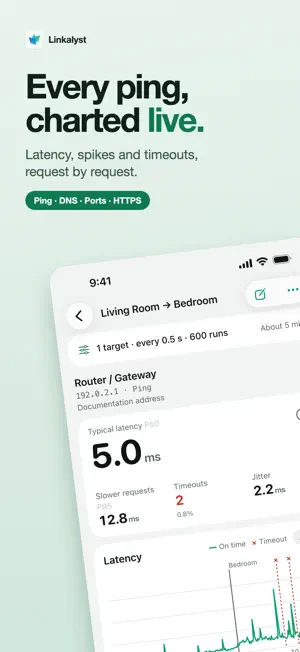
Ping with a live latency chart, compare encrypted DNS (DoH and DoT) across resolvers, scan TCP ports, see where an HTTPS request spends its time and trace every hop, on iPhone and iPad. Test results are saved as reports you can search, compare and export. NEW IN 2.0 • Internet Speed Test: download and upload in one tap • Popular Services: how fast popular sites and services connect, ordered for your region • Discover: your gateway, Bonjour services and My Devices in one place • This Device: model, battery, storage and how this device connects • Share a Card: share a speed test, Popular Services or latency result as an image MEASURE THE CONNECTION • Chart Ping (ICMP) or UDP probes to up to six targets in one run • Typical latency (P50), slower requests (P95, P99), variation, timeout rate and longest timeout streak • Tap the chart to inspect a request and add notes as you test; timeouts are marked, never plotted as latency • Check a TCP port once or up to 50 times in a row SEE WHERE EVERY MILLISECOND GOES • Website Check sends five HEAD or GET requests in a row and can follow redirects hop by hop • Times DNS, TCP, TLS and time to first byte • Shows the HTTP protocol, TLS version, cipher suite and certificate chain, with expiry dates and SHA-256 fingerprints COMPARE DNS RESULTS • Query system DNS or choose UDP, TCP, DNS over HTTPS (DoH) or DNS over TLS (DoT) • Compare system DNS with up to four resolvers, each on its own protocol: fastest this round, record differences, response codes and failures • Presets for Cloudflare, Google and DNSPod, or a custom endpoint • A, AAAA, CNAME, MX, TXT, NS, SOA and PTR records, with TTLs • DoH and DoT apply to queries in Linkalyst; they don't change your device's DNS settings SCAN PORTS AND ORGANIZE DEVICES • Batch Scan in Port Check takes IPv4 lists or CIDR and known IPv6 addresses, with port presets or your own ranges: up to 256 addresses and 4,096 address/port pairs per run • Discover scans your network and lists devices that answer, with names, services and open ports; on iOS 27 also hardware addresses and makers • Keep targets, notes and related reports in My Devices, optionally grouped by network Discover lists only devices that answer the scan; one that's asleep or ignores probes won't appear. Batch Scan only makes TCP connections. ROUTES, SPEED AND ADDRESSES • Route Trace for IPv4 and IPv6: up to 30 hops, 1 to 3 probes per hop, optional hop hostname lookup • See this device's addresses and gateway; turn on IP Lookup in Settings for your public IP, region, network organization and ASN (via FreeIPAPI) • Download Test for a URL you choose, up to 64 MiB or 10 seconds • Throughput Test for upload or download to a free test peer you run on your own computer • Offline IPv4/IPv6 Subnet Calculator KEEP THE RESULTS • Search, star and tag reports; share them as JSON, or request-level data as CSV • Compare two runs with latency curves overlaid; repeated port checks, website checks, download and throughput tests and route traces are paired by target • Optional iCloud Drive report sync (off by default) BUILT FOR IPHONE AND IPAD • Follow a running test on the Lock Screen and, on supported iPhones, in the Dynamic Island, where you can also stop it • On iPad, open the tools or a single report in its own window Use network tests only on systems you own or have permission to test. UDP latency and Throughput Test require a compatible test peer; instructions are linked in the app. Linkalyst is free to download with all tools available. Linkalyst Plus, a one-time purchase, removes all ads and supports Family Sharing. Privacy Policy: https://linkalyst.entromoonic.com/privacy-policy Terms of Service: https://linkalyst.entromoonic.com/terms-of-service
What’s new
Version 2.2.0 · Updated October 24, 2026
• Discover can now scan your network: see the devices that answer, with their names, services and open ports, and on iOS 27 their hardware addresses and makers. • Internet Speed Test can also measure with Measurement Lab (M-Lab) servers; choose the provider in Settings. • The Privacy Policy and Terms of Service have been updated. • Improvements to the app experience.
App privacy
The developer, Entromoonic Ltd, reported these privacy practices to Apple.
Data Used to Track You
The following data may be used to track you across apps and websites owned by other companies:
- Identifiers: Device ID
Data Linked to You
The following data, which may be collected and linked to your identity, may be used for the following purposes:
- Location: Coarse Location
- Identifiers: Device ID
- Usage Data: Product Interaction, Advertising Data
Used for: Third-Party Advertising, Developer’s Advertising or Marketing, Analytics, App Functionality
Data Not Linked to You
The following data, which may be collected but is not linked to your identity, may be used for the following purposes:
- Diagnostics: Performance Data, Other Diagnostic Data, Crash Data
- Purchases: Purchase History
- Other Data: Other Data Types
Used for: Third-Party Advertising, Developer’s Advertising or Marketing, Analytics, App Functionality
Alternatives to Linkalyst: Network Toolkit
Looking for apps like Linkalyst: Network Toolkit? Here are 6 similar apps on the App Store. The highest rated is DNS Button: Changer & Switcher (5.0/5), and all 6 are free to download.


| App | Rating | Price | Last updated | Compare |
|---|---|---|---|---|
| Linkalyst: Network Toolkit | 5.0 / 5 (2 ratings) | Free | October 24, 2026 | |
| DNS Button: Changer & Switcher | 5.0 / 5 (3) | Free | Oct 14, 2026 | Compare |
| 商砼管家 | – | Free | Jul 6, 2026 | Compare |
| NekoLink | – | Free | Oct 22, 2026 | Compare |
| Am I Hacked? | – | Free | Sep 15, 2026 | Compare |
| ModernClean | 5.0 / 5 (1) | Free | Oct 24, 2026 | Compare |
| Fasty DNS Changer | – | Free | Oct 14, 2026 | Compare |