

DNS Button: Changer & Switcher
SR WORKS LLC Utilities iPhoneiPadiPod touchMac
DNS Button: Changer & Switcher is a free Utilities app for iPhone and iPad by SR WORKS LLC. Rated 5.0/5 from 3 ratings. Requires iOS 26.0.
- Rating
- 5.0
- 3 ratings
- Price
- Free
- on the App Store
- Size
- 8 MB
- Age 4+
- Updated
- Oct 14
- 2026 · v1.1.8
Screenshots



About DNS Button: Changer & Switcher
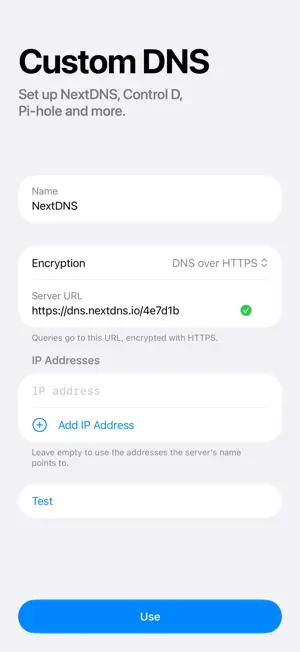
DNS Button switches the DNS on your iPhone and iPad. Pick a provider, turn it on, and approve it once in Settings. It covers Wi-Fi and cellular, and always shows the resolver in use. BUILT-IN PROVIDERS AdGuard, Canadian Shield, CleanBrowsing, Cloudflare, Control D, DNS4EU, Google, NextDNS, OpenDNS and Quad9, with the filtering options each one offers for malware, ads and families. RESPONSE TIMES See how fast every provider answers from where you are, measured on your device. ENCRYPTED DNS DNS over HTTPS or TLS, wherever the provider offers it. SHORTCUTS AND SIRI Switch providers or turn DNS Button on and off from Shortcuts, Spotlight or Siri. DNS BUTTON PRO • Custom DNS: add any DNS server, or set up NextDNS, Control D, AdGuard DNS, Cloudflare Zero Trust, CleanBrowsing, Pi-hole or AdGuard Home from an ID or address. • iCloud sync: your custom DNS servers on all your devices. • DNS leak test: see which resolver answers your lookups. • Filter check: make sure your filter blocks what it should. • Trusted Networks: turn DNS Button off on the Wi-Fi networks you name. • Focus filters: DNS that changes with your Focus, and changes back. One subscription covers your whole family with Family Sharing. The providers and their response times stay free. PRIVACY No analytics, no tracking and no account. Your DNS lookups go straight to the provider you choose. DNS Button Pro is an auto-renewable yearly subscription, with a one-week free trial for new subscribers. Payment is charged to your Apple Account when the trial ends, or when you confirm the purchase if you have had a trial or subscribed before. It renews automatically unless you cancel at least 24 hours before the end of the trial or the current period, and you can manage or cancel it in your Apple Account settings. Terms of Use: https://www.apple.com/legal/internet-services/itunes/dev/stdeula/ Privacy Policy: https://dnsbutton.dev/privacy
What’s new
Version 1.1.8 · Updated October 14, 2026
The Control D Blocklists switch now sits directly under Control D in Settings → Show Providers. Undoing the deletion of a custom DNS server now keeps it on your other devices. Filter Check no longer reads a malformed answer as a block.
App privacy
The developer, SR WORKS LLC, reported these privacy practices to Apple.
Data Not Collected
The developer does not collect any data from this app.
Alternatives to DNS Button: Changer & Switcher
Looking for apps like DNS Button: Changer & Switcher? Here are 6 similar apps on the App Store. The highest rated is DNS Quick: DNS Settings (5.0/5), and all 6 are free to download.
-
 Fasty DNS Changer
-
 ZeroAds: DNS Ad Blocker
4.8
-
 DNS Quick: DNS Settings
5.0
-
 DNSwitch - DNS Switcher
5.0
-
 DNS Speed Tester
5.0
-
 Location Changer App +
| App | Rating | Price | Last updated | Compare |
|---|---|---|---|---|
| DNS Button: Changer & Switcher | 5.0 / 5 (3 ratings) | Free | October 14, 2026 | |
| Fasty DNS Changer | – | Free | Oct 14, 2026 | Compare |
| ZeroAds: DNS Ad Blocker | 4.8 / 5 (10) | Free | Oct 22, 2026 | Compare |
| DNS Quick: DNS Settings | 5.0 / 5 (1) | Free | Oct 13, 2026 | Compare |
| DNSwitch - DNS Switcher | 5.0 / 5 (1) | Free | Jul 23, 2026 | Compare |
| DNS Speed Tester | 5.0 / 5 (1) | Free | Jun 23, 2026 | Compare |
| Location Changer App + | – | Free | Aug 26, 2026 | Compare |