

Audio Extractor - FFmpeg
Vitalii Belov Utilities iPhoneiPadiPod touch
Audio Extractor - FFmpeg is a free Utilities app for iPhone and iPad by Vitalii Belov. Requires iOS 15.0. Updated November 13, 2026.
- Price
- Free
- on the App Store
- Size
- 57 MB
- Age 4+
- Updated
- Nov 13
- 2026 · v1.9
Screenshots
Save to Pinterest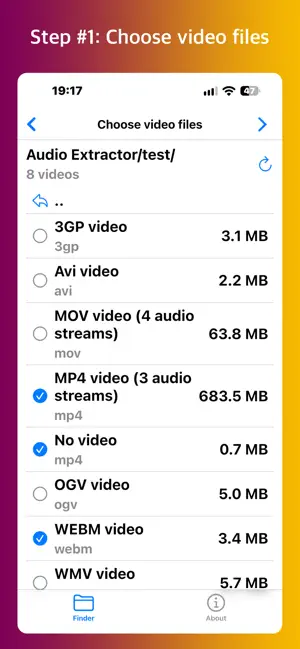
About Audio Extractor - FFmpeg
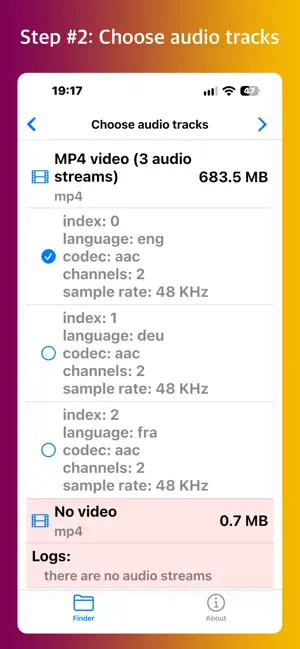
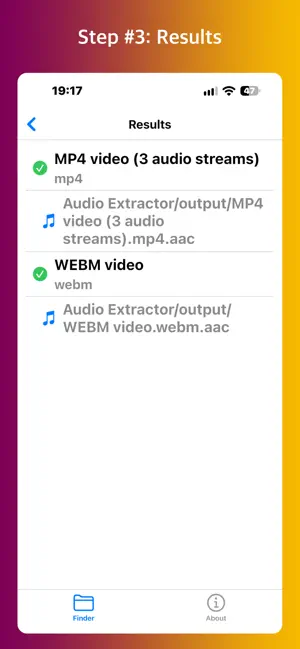
Audio Extractor extracts audio tracks from video files. Supported video formats: 3gp, avi, mov, ogv, mp4, webm, wmv — with support for multiple audio tracks. Steps 1. Add your video files to the Audio Extractor folder by AirDrop 2. Choose added files on the Finder tab 3. Tap Forward button 4. Look into the Audio Extractor/output folder in the Files app No ads.
What’s new
Version 1.9 · Updated November 13, 2026
New app: - Try out new AI Transcriber - whisper.cpp app (link is on the About page) Other: - Updated framework
App privacy
The developer, Vitalii Belov, reported these privacy practices to Apple.
Data Not Collected
The developer does not collect any data from this app.
Alternatives to Audio Extractor - FFmpeg
Looking for apps like Audio Extractor - FFmpeg? Here are 6 similar apps on the App Store. The highest rated is Video to Audio - Extract (5.0/5), and all 6 are free to download.
-
 Kibzi: Photo Compressor
-
 Video to Audio - Extract
5.0
-
 VidZip: Video Compressor
-
 Video Editor - FFmpeg Pro
5.0
-
 Taocars
5.0
-
 Video To MP4 Media Converter
| App | Rating | Price | Last updated | Compare |
|---|---|---|---|---|
| Audio Extractor - FFmpeg | – | Free | November 13, 2026 | |
| Kibzi: Photo Compressor | – | Free | Oct 30, 2026 | Compare |
| Video to Audio - Extract | 5.0 / 5 (1) | Free | Aug 6, 2026 | Compare |
| VidZip: Video Compressor | – | Free | Nov 8, 2026 | Compare |
| Video Editor - FFmpeg Pro | 5.0 / 5 (2) | Free | Nov 19, 2026 | Compare |
| Taocars | 5.0 / 5 (2) | Free | Mar 13, 2026 | Compare |
| Video To MP4 Media Converter | – | Free | Jun 10, 2026 | Compare |