

Video Editor - FFmpeg Pro
Nishaben Patel Utilities iPhoneiPadiPod touch
Video Editor - FFmpeg Pro is a free Utilities app for iPhone and iPad by Nishaben Patel. Rated 5.0/5 from 2 ratings. Requires iOS 16.6.
- Rating
- 5.0
- 2 ratings
- Price
- Free
- on the App Store
- Size
- 34 MB
- Age 4+
- Updated
- Oct 16
- 2026 · v1.0.2
Screenshots
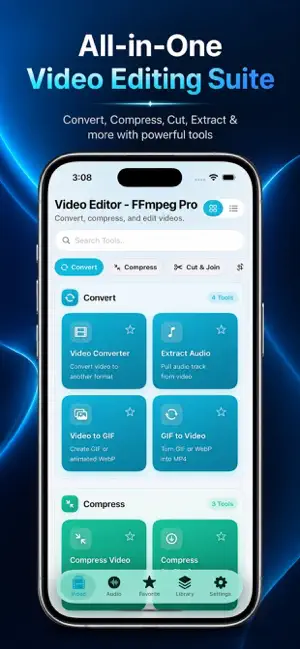


About Video Editor - FFmpeg Pro
Transform your videos and audio files with the most powerful all-in-one media editor for iOS. this app gives you professional-grade editing tools powered by FFmpeg **VIDEO EDITING TOOLS** • Trim & Cut Video - Precisely trim clips to the perfect length • Merge Videos - Combine multiple clips with smooth transitions (fade, dissolve, wipe) • Compress Video - Reduce file size while maintaining quality • Rotate & Flip Video - Fix orientation instantly • Crop Video - Remove unwanted areas with multiple aspect ratios • Resize Video - Scale to any dimensions • Change Speed - Create slow motion or time-lapse effects • Smooth Slow-Mo - AI-powered frame interpolation for buttery smooth slow motion • Reverse Video - Play clips backward • Loop Video - Repeat your favorite moments • Stabilize Video - Remove camera shake • Remove Silence - Automatically cut silent parts from videos • Split Video - Divide clips at any point • Remove Middle - Delete unwanted segments • Freeze Frame - Hold a moment in time • Change FPS - Adjust frame rate (24, 30, 60, 120 fps) **CREATIVE & EFFECTS** • Video Filters - Apply 17 stunning filters: Blur, Grayscale, Sepia, Noir, Warm, Cool, Comic, Sketch, Glow, Grain, Vignette, and more • Color Correction - Adjust brightness, contrast, saturation, highlights, shadows, temperature & tint • Text Overlay - Add custom text with 50+ fonts, colors, shadows & backgrounds • Image Overlay - Layer images with rotation, scale, opacity controls • Video Overlay - Picture-in-picture effects with full positioning • Watermark - Protect your content with logo overlays • Burn Subtitles - Hardcode SRT subtitles with customizable fonts and styles • Chroma Key - Green screen background replacement (solid, image, or video) • Video to GIF - Create animated GIFs or WebP stickers • GIF to Video - Convert GIFs back to video format • Images to Video - Build slideshows with Ken Burns effects and transitions • Video Collage - Side-by-side, stacked, or grid layouts • Extract Frame - Capture perfect still images **SOCIAL MEDIA OPTIMIZATION** • Fit to Aspect - Resize for Instagram Reels (9:16), Feed (4:5), TikTok, YouTube (16:9), Stories, Square (1:1) • Platform Compress - One-tap optimization for WhatsApp, Instagram, Telegram, Email • Blur Fill, Letterbox, or Crop Fill modes • Multiple aspect ratio presets: 9:16, 1:1, 4:5, 16:9, 3:4, 2:3, 1.91:1 **AUDIO EDITING TOOLS** • Trim Audio - Cut audio files precisely • Merge Audio - Combine multiple tracks • Adjust Volume - Boost or reduce audio levels • Fade In/Out - Smooth audio transitions • Replace Audio - Swap video soundtracks • Mute Audio/Video - Remove sound completely • Change Audio Speed - Speed up or slow down audio • Extract Audio - Pull audio from videos (MP3, M4A, AAC, WAV, FLAC, OGG) • Audio EQ - 5-band graphic equalizer with presets (Bass Boost, Voice, Podcast, Treble Boost) • Audio Reverb - Add ambience (Soft Echo, Hall, Cave effects) • Denoise Audio - Remove background noise • Loudness Normalization - Consistent volume levels (EBU R128) • Remove Silence - Strip quiet segments from audio • Channel Remap - Convert stereo to mono or vice versa **FORMAT CONVERSION** • Video Converter - MP4, MOV, AVI, MKV, WebM, MPEG, 3GP, FLV, WMV, OGV • Audio Converter - MP3, M4A, AAC, WAV, FLAC, OGG, WMA, AMR • Batch Processing - Convert multiple files at once • Advanced Encoding - Custom CRF, bitrate, codec settings **METADATA EDITOR** • Edit Video/Audio Metadata - Title, artist, album, genre, year • Album Cover Art - Add custom cover images • Preserve or strip metadata **WHY CHOOSE THIS APP?** • 60+ Professional Tools - Everything you need in one app • FFmpeg Engine - Industry-standard processing power • Offline Processing - No internet required, complete privacy • Fast & Efficient - Optimized for iOS performance • Regular Updates - New features added frequently ## Privacy Policy URL https://videoconvertercompressorios.blogspot.com/2026/08/privacy-policy.html
What’s new
Version 1.0.2 · Updated October 16, 2026
- bug fixed.
App privacy
The developer, Nishaben Patel, reported these privacy practices to Apple.
Data Used to Track You
The following data may be used to track you across apps and websites owned by other companies:
- Identifiers: Device ID
- Usage Data: Advertising Data
Data Linked to You
The following data, which may be collected and linked to your identity, may be used for the following purposes:
- Identifiers: Device ID
- Usage Data: Advertising Data
Used for: Third-Party Advertising
Alternatives to Video Editor - FFmpeg Pro
Looking for apps like Video Editor - FFmpeg Pro? Here are 6 similar apps on the App Store. The highest rated is Video Tools: Edit & Convert (5.0/5), and all 6 are free to download.
-
 Lumina Bible: AI Study & Audio
-
 Media joiner
-
 ffmpeg
4.9
ffmpeg
4.9
-
 Video Tools: Edit & Convert
5.0
Video Tools: Edit & Convert
5.0
-
 Fluxio: Video Compress & Trim
-
 Video Lite: Compress & Resize
| App | Rating | Price | Last updated | Compare |
|---|---|---|---|---|
| Video Editor - FFmpeg Pro | 5.0 / 5 (2 ratings) | Free | October 16, 2026 | |
| Lumina Bible: AI Study & Audio | – | Free | Jan 7, 2026 | Compare |
| Media joiner | – | Free | Apr 30, 2026 | Compare |
| ffmpeg | 4.9 / 5 (14) | Free | Sep 8, 2026 | Compare |
| Video Tools: Edit & Convert | 5.0 / 5 (1) | Free | Aug 11, 2026 | Compare |
| Fluxio: Video Compress & Trim | – | Free | Aug 26, 2026 | Compare |
| Video Lite: Compress & Resize | – | Free | Jun 24, 2026 | Compare |