

Video Tools: Edit & Convert
Harihar Creation Utilities iPhoneiPadiPod touch
Video Tools: Edit & Convert is a free Utilities app for iPhone and iPad by Harihar Creation. Rated 5.0/5 from 1 ratings. Requires iOS 16.6.
- Rating
- 5.0
- 1 ratings
- Price
- Free
- on the App Store
- Size
- 87 MB
- Age 9+
- Updated
- Aug 11
- 2026 · v1.0.0
Screenshots


About Video Tools: Edit & Convert
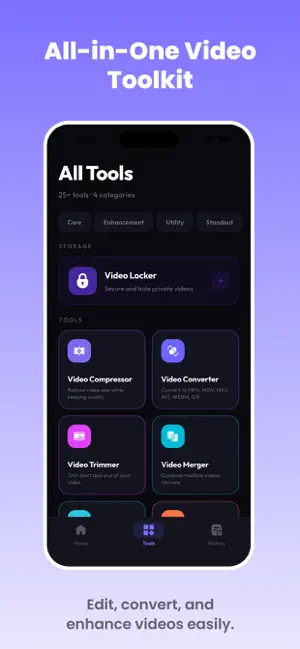
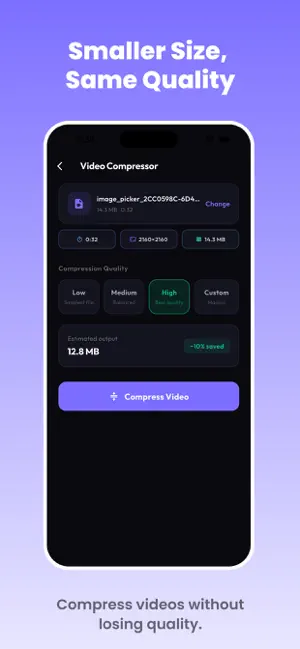
Every video tool you need in one app. Convert, compress, trim, merge, and edit MP4, MOV, MKV, AVI, WEBM & GIF files. ALL-IN-ONE VIDEO TOOLKIT Stop juggling five different apps. Video Tools puts every editing, converting, and compressing feature you need in a single, fast - built for anyone who shoots, shares, or manages video on their iPhone or iPad. CONVERT ANY FORMAT - Convert between MP4, MOV, MKV, AVI, WEBM and GIF - Convert video to images or images to video - Convert video to GIF and GIF to video - Extract audio to MP3, AAC, WAV, or M4A - Replace or swap the audio track on any video COMPRESS & RESIZE - Shrink file size for email, WhatsApp, Instagram, and cloud storage - Custom resolution, bitrate, and frame rate control - Compare original vs. compressed output side-by-side before saving EDIT LIKE A PRO - Trim, split, merge, and crop clips - Resize, rotate, and flip video - Reverse clips or adjust speed for slow motion and fast motion - Mute audio or boost volume - Capture a screenshot from any frame STYLE & POLISH - Adjust brightness, contrast, saturation, and sharpness - Apply blur or color filters - retro, warm, cool, vintage, black & white - Add text or image watermarks to protect and brand your videos - View full video metadata (codec, resolution, bitrate, frame rate) BUILT FOR PRIVACY Every tool runs 100% on your device. Nothing is uploaded to a server, so your videos never leave your phone - fast processing, zero data risk. WHY CHOOSE VIDEO TOOLS - One app instead of five - No watermark on your exports (see in-app terms) - Fast, on-device processing - no waiting on uploads - Regular updates with new formats and features Whether you're prepping a clip for social media, fixing an unplayable format, or polishing a video before you send it - Video Tools handles it in seconds, without sending a single file anywhere. Download Video Tools today and simplify the way you convert, compress, and edit video on iPhone and iPad.
App privacy
The developer, Harihar Creation, reported these privacy practices to Apple.
Data Used to Track You
The following data may be used to track you across apps and websites owned by other companies:
- Usage Data: Advertising Data
- Diagnostics: Performance Data
- Other Data: Other Data Types
Data Not Linked to You
The following data, which may be collected but is not linked to your identity, may be used for the following purposes:
- Usage Data: Advertising Data
- Diagnostics: Performance Data
- Other Data: Other Data Types
Used for: Third-Party Advertising
Alternatives to Video Tools: Edit & Convert
Looking for apps like Video Tools: Edit & Convert? Here are 6 similar apps on the App Store. The highest rated is Eventium (4.7/5), and 5 of the 6 are free to download.
-
 Yiwen Compress
-
 Convert: File Converter
-
 CardSpark: Flashcards & Study
-
 Eluna Media: Video Converter
-
 English Chinese Translator AI
-
 Eventium
4.7
Eventium
4.7
| App | Rating | Price | Last updated | Compare |
|---|---|---|---|---|
| Video Tools: Edit & Convert | 5.0 / 5 (1 rating) | Free | August 11, 2026 | |
| Yiwen Compress | – | Free | May 12, 2026 | Compare |
| Convert: File Converter | – | Free | Sep 17, 2026 | Compare |
| CardSpark: Flashcards & Study | – | Free | Aug 6, 2026 | Compare |
| Eluna Media: Video Converter | – | Free | Oct 14, 2026 | Compare |
| English Chinese Translator AI | – | Free | Aug 11, 2026 | Compare |
| Eventium | 4.7 / 5 (378) | 3.99 USD | Oct 24, 2026 | Compare |