

Eluna Media: Video Converter
Serhii Vakulenchyk Utilities iPhoneiPadiPod touch
Eluna Media: Video Converter is a free Utilities app for iPhone and iPad by Serhii Vakulenchyk. Requires iOS 15.0. Updated October 14, 2026.
- Price
- Free
- on the App Store
- Size
- 72 MB
- Age 4+
- Updated
- Oct 14
- 2026 · v1.0.2
Screenshots


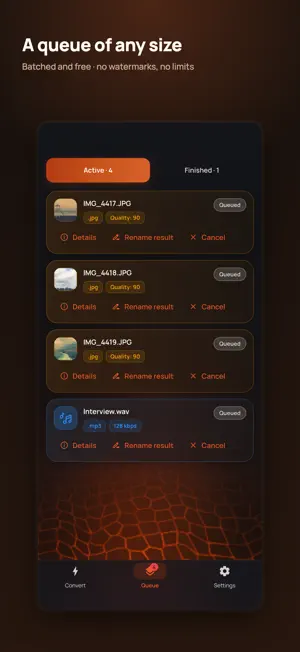
About Eluna Media: Video Converter
Convert and compress video, audio and photos on the phone itself — offline, free, with no ads, no subscription and no watermark. No account either, and the app makes no network requests of its own: your files never leave the device. HIT AN EXACT SIZE Choose 10, 16, 25, 50, 100 MB or your own number. The bitrate is worked out from the real duration with a safety margin, so the result lands under the limit instead of near it. COMPRESSION THAT CANNOT BACKFIRE An already-compressed file will not come out bigger than it went in. FORMATS Video: MP4, MKV, MOV, WebM, AVI with H.264, H.265, AV1, VP9 — or remux with no re-encoding at all. Audio: MP3, M4A, WAV, FLAC, OGG, Opus, plus the sound pulled out of any video. Photos: JPEG, PNG, WebP, AVIF, BMP, TIFF, animated GIF and animated WebP. Camera-roll HEIC is read properly. EDITING Trim or cut a piece out of the middle, split a long recording into equal parts, rotate, mirror and crop — photos too — set an exact pixel size, save a frame from a video as a picture, speed 0.25x to 4x, volume and loudness levelling, merge clips, sharpen or denoise a photo. VIDEO THAT KEEPS ITS QUALITY Change the container without re-encoding: MKV to MP4 in about a second, same picture, same sound. Burn in subtitles, smooth out shake, and bring HDR video to ordinary colour so nothing comes out washed out. BATCH Hundreds of files in one queue. One broken file never kills the batch, every job shows progress and time remaining, and the queue survives a restart. PRIVACY EXIF, GPS and timestamps are stripped from every result by default. Lock the app with a passcode or Face ID. FREE Every feature from the start, batch included. There is no paid tier and no watermark. The only thing that can be bought is a tip, and it unlocks nothing. ONE HONEST NOTE iOS suspends apps that are not on screen, so a conversion pauses when you leave Eluna Media. Keep it open while a long job runs. Everything about the app: eluna-apps.com/media
What’s new
Version 1.0.2 · Updated October 14, 2026
Video quality no longer jumps from frame to frame. The old build switched to a bitrate ceiling to keep files small, and sharp frames alternated with blurry ones — now quality holds steady all the way through. • Compression actually compresses. On some footage the result came out heavier than the original; it never does now. • Photo colours stay as shot. The colour profile used to be dropped, and pictures looked washed out. • Fixed conversion to VP9 and AVIF — those files could come out unplayable. • H.265 files play in Apple players again. • A clear message instead of a raw FFmpeg line when a video has no sound to extract. • New Ember theme: ember and smoke.
App privacy
The developer, Serhii Vakulenchyk, reported these privacy practices to Apple.
Data Not Collected
The developer does not collect any data from this app.
Alternatives to Eluna Media: Video Converter
Looking for apps like Eluna Media: Video Converter? Here are 6 similar apps on the App Store. The highest rated is Video Tools: Edit & Convert (5.0/5), and all 6 are free to download.
-
 Minimal File Converter
-
 SwiftConvert
-
 Pearpair
-
 Video Tools: Edit & Convert
5.0
-
 SolarScout
5.0
-
 AnyConvert: Offline Converter
1.0
| App | Rating | Price | Last updated | Compare |
|---|---|---|---|---|
| Eluna Media: Video Converter | – | Free | October 14, 2026 | |
| Minimal File Converter | – | Free | May 28, 2026 | Compare |
| SwiftConvert | – | Free | Oct 22, 2026 | Compare |
| Pearpair | – | Free | Oct 21, 2026 | Compare |
| Video Tools: Edit & Convert | 5.0 / 5 (1) | Free | Aug 11, 2026 | Compare |
| SolarScout | 5.0 / 5 (2) | Free | Apr 17, 2026 | Compare |
| AnyConvert: Offline Converter | 1.0 / 5 (1) | Free | Sep 2, 2026 | Compare |