

DevKit: Developer Toolbox
Eonix (Pvt) Ltd Developer Tools iPhoneiPadiPod touchMac
DevKit: Developer Toolbox is a free Developer Tools app for iPhone and iPad by Eonix (Pvt) Ltd. Requires iOS 17.0. Updated October 8, 2026.
- Price
- Free
- on the App Store
- Size
- 7 MB
- Age 4+
- Updated
- Oct 8
- 2026 · v1.0.0
Screenshots


About DevKit: Developer Toolbox
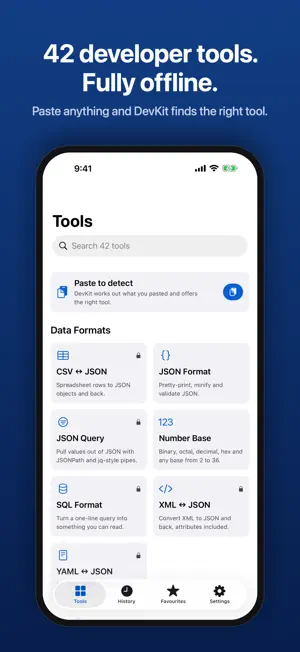
DevKit is the developer toolbox you already keep open in a browser tab, rebuilt as a native app for iPhone, iPad and Mac — and it works with the radio off. Paste something and DevKit works out what it is. A JSON Web Token, a certificate, a cron line, a CIDR block, a colour, a hex digest: it recognises the shape and offers the right tool. WHAT YOU GET FREE • JSON Format — pretty-print, minify and validate, keeping your key order and number literals • JWT Decode — header, claims and expiry, with optional HMAC verification • Base64 — standard and URL-safe, padded or not • URL Encode — query, form and path semantics • Regex Tester — matches, capture groups, named groups, replace and split • Hash — MD5, SHA-1, SHA-256, SHA-384, SHA-512 • UUID Generate — version 4 and time-ordered version 7, in bulk • Unix Time — epoch seconds, milliseconds, microseconds and nanoseconds, any time zone • Colour Convert — HEX, RGB, HSL, HSB, CMYK, with WCAG contrast ratios • String Case — camel, snake, kebab, Pascal and eight more, all at once • Number Base — binary, octal, decimal, hex and any base from 2 to 36, with a bit view • Text Diff — line-by-line comparison with counts WHAT PRO ADDS All 42 tools, including YAML ↔ JSON, XML ↔ JSON, CSV ↔ JSON, HTML entities, string escaping for six languages, ULID and NanoID, HMAC, PBKDF2 calibration, a cron parser that tells you the next ten runs, JSONPath with jq-style pipes, a SQL formatter, native Markdown preview, an offline HTML preview, X.509 certificate decoding, RSA and EC key inspection, QR generation and scanning, lorem ipsum, text statistics, slugify, chmod, IP and CIDR maths, MIME lookup, HTTP status reference, Unicode inspection, seeded sample data, time-zone conversion, semver comparison, URL parsing, a query-string builder and a searchable git command reference. Pro also unlocks unlimited history, iCloud sync of your favourites and history, Home Screen widgets, and the share extension. BUILT FOR HOW YOU WORK • Every tool is a Shortcuts action, so you can compose them into automations • Send selected text straight to DevKit from any app, or from the Services menu on a Mac • Search and keyboard shortcuts on iPad and Mac, and a menu bar popover on macOS • Favourites, history and drafts that pick up where you left off PRIVACY, PLAINLY DevKit makes no network requests. It has no account, no analytics and no third-party SDKs. Everything you paste is processed on your device. History is stored locally, you can turn off saving previews, and you can erase everything from Settings. One purchase covers your iPhone, iPad and Mac. TERMS AND PRIVACY Terms of Use: https://devkit.eonix.lk/terms Apple's standard EULA: https://www.apple.com/legal/internet-services/itunes/dev/stdeula/ Privacy Policy: https://devkit.eonix.lk/privacy
App privacy
The developer, Eonix (Pvt) Ltd, reported these privacy practices to Apple.
Data Not Collected
The developer does not collect any data from this app.
Alternatives to DevKit: Developer Toolbox
Looking for apps like DevKit: Developer Toolbox? Here are 6 similar apps on the App Store.
-
 Curlie: API & cURL Client
-
 Base64 Encode Decode Offline
-
 Beneath: Web Inspector
-
 HTTPBuddy - API & HTTP Client
-
 URL Inspector & Link Tester
-
 API Client - REST HTTP Tester
| App | Rating | Price | Last updated | Compare |
|---|---|---|---|---|
| DevKit: Developer Toolbox | – | Free | October 8, 2026 | |
| Curlie: API & cURL Client | – | Free | Sep 25, 2026 | Compare |
| Base64 Encode Decode Offline | – | Free | Sep 12, 2026 | Compare |
| Beneath: Web Inspector | – | Free | Sep 14, 2026 | Compare |
| HTTPBuddy - API & HTTP Client | – | Free | Oct 15, 2026 | Compare |
| URL Inspector & Link Tester | – | Free | Apr 1, 2026 | Compare |
| API Client - REST HTTP Tester | – | Free | Oct 15, 2026 | Compare |