

Base64 Encode Decode Offline
LEAN ASIA CO., LTD Developer Tools iPhoneiPadiPod touch
Base64 Encode Decode Offline is a free Developer Tools app for iPhone and iPad by LEAN ASIA CO., LTD. Requires iOS 17.0. Updated September 12, 2026.
- Price
- Free
- on the App Store
- Size
- 3 MB
- Age 4+
- Updated
- Sep 12
- 2026 · v1.1
Screenshots


About Base64 Encode Decode Offline
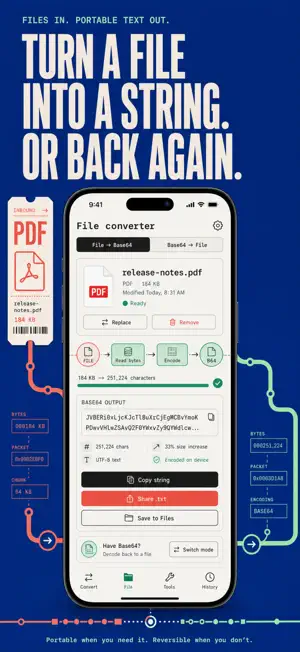
Paste a Base64 string, tap once, read the answer — right on your iPhone, fully offline. No web converter, no upload, no wondering who just logged the token you pasted. Base64 Encode Decode Offline is a developer scratchpad built for the real thing you paste: blobs copied out of logs and terminals. The decoder tolerates URL-safe alphabets, missing padding and line-wrapped copy-paste, auto-detects whether you meant encode or decode, and refuses garbage instead of returning silent nonsense. URL decoding is byte-accurate, so a leading BOM or odd byte is preserved instead of being quietly eaten. Everything renders in a proper monospaced font. WHAT YOU GET • A wrapped, unpadded, URL-safe Base64 blob from a log file still decodes cleanly — whitespace, CRLF and base64url handled for you • Paste a JWT and read its pretty-printed header and payload immediately — the signature never touches a server • One input, four digests: MD5, SHA-1, SHA-256 and SHA-512 update as you type, with one button to copy all four • URL-encode a query value and the &, =, + and # characters that break query strings are actually escaped • Turn any file into Base64 or a ready-to-embed data URI with the correct MIME type — and turn Base64 back into a file • The String Inspector shows characters, UTF-8 / UTF-16 / UTF-32 byte counts, words and lines the moment text is entered PERFECT FOR • Backend and mobile developers debugging an API payload away from the laptop • QA engineers inspecting auth tokens without pasting credentials into a website • Sysadmins decoding config blobs and verifying checksums from a phone session • Students seeing exactly how encodings and hash digests behave WHY NOT JUST USE A WEB CONVERTER? Because every online encode/decode tool receives your string on its server — and the strings developers convert are exactly the ones that should never leave the machine: session tokens, API keys, connection strings, JWTs. This app does all conversion and hashing on the device with Apple's CryptoKit. It works in airplane mode. PRIVATE BY DEFAULT No accounts, no tracking of your content, no network needed to convert. Your inputs and your conversion history are stored only on your iPhone. FULL ACCESS Pro unlocks unlimited saved conversions, file conversion beyond 5 MB in both directions, and Batch mode to convert many lines in one pass. Full access is available as a weekly subscription, a yearly subscription, or a one-time lifetime purchase. Decode that string before the next station — download Base64 Encode Decode Offline. Terms of Use: https://leanstudio.asia/terms-of-use Privacy Policy: https://leanstudio.asia/privacy-policy Support: [email protected]
What’s new
Version 1.1 · Updated September 12, 2026
First release of Base64Tool.
App privacy
The developer, LEAN ASIA CO., LTD, reported these privacy practices to Apple.
Data Not Collected
The developer does not collect any data from this app.
Alternatives to Base64 Encode Decode Offline
Looking for apps like Base64 Encode Decode Offline? Here are 6 similar apps on the App Store. The highest rated is CodeDiff + (2.0/5), and 5 of the 6 are free to download.
-
 Base64 Encode Decode
-
 DevKit: Developer Toolbox
-
 CodeDiff +
2.0
CodeDiff +
2.0
-
 JWT & Base64 Decoder/Verifier
-
 Curlie: API & cURL Client
-
 Lovacode AI - Vibe coding
| App | Rating | Price | Last updated | Compare |
|---|---|---|---|---|
| Base64 Encode Decode Offline | – | Free | September 12, 2026 | |
| Base64 Encode Decode | – | Free | Aug 16, 2026 | Compare |
| DevKit: Developer Toolbox | – | Free | Oct 8, 2026 | Compare |
| CodeDiff + | 2.0 / 5 (1) | 3.99 USD | Jun 28, 2026 | Compare |
| JWT & Base64 Decoder/Verifier | – | Free | Sep 30, 2026 | Compare |
| Curlie: API & cURL Client | – | Free | Sep 25, 2026 | Compare |
| Lovacode AI - Vibe coding | – | Free | Feb 18, 2026 | Compare |