

Rhea Cam: Phone Webcam for Mac
Schweizerpunkt GmbH Photo & Video iPhoneiPadiPod touchMac
Rhea Cam: Phone Webcam for Mac is a free Photo & Video app for iPhone and iPad by Schweizerpunkt GmbH. Requires iOS 15.0. Updated October 23, 2026.
- Price
- Free
- on the App Store
- Size
- 36 MB
- Age 4+
- Updated
- Oct 23
- 2026 · v2.27.0
Screenshots



About Rhea Cam: Phone Webcam for Mac
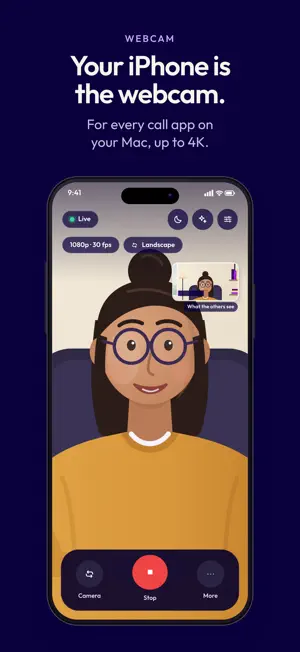
Use your iPhone or iPad as a webcam for your Mac, as a reels studio and as a document scanner that signs and stamps PDFs. Reels and scans work on the device alone. The webcam needs the Rhea Cam app on a Mac on the same Wi-Fi. REELS STUDIO • Record upright 9:16 videos in 1080p or 4K at 30 or 60 fps, with stabilisation, timer, grid, safe zone and a teleprompter close to the lens • Templates guide you clip by clip: Hook + 3 tips, Before/after, Step by step, Story and Product • Auto-cut removes long pauses and "ums"; captions and zooms follow the cut • Captions word by word or as a line, recognised on your device • Fast zooms at every new sentence, five looks, film grain, cinema bars or a film strip, texts with styles and animations • Speed per clip, cut a clip in two, and picture in picture with a second video or photo • Hand gestures: an open palm starts and stops the recording, a victory sign zooms • Blur background: a sharp 1:1, 4:5 or 16:9 strip with the same picture blurred around it • Beauty with five sliders (skin, glow, slim, eyes, lips), live in the viewfinder and in the finished reel • Photos like the viewfinder; several clips make one reel • Export in 1080×1920, play it in the app, share it or save it to Photos SCAN AND SIGN • Apple's document scanner finds the page, takes it by itself and straightens it • Scanner look removes shadows and grey paper; text recognition on your device makes the PDF searchable • Sign with your finger, or use a photo of your signature or stamp: the paper becomes transparent. Place it on any page, move it, resize it and save a new PDF • PDFs from other apps ("Open with" or "Share") can be signed too • Scans and reels are in the Files app; send a scan to your Mac with one tap WEBCAM FOR YOUR MAC • Your camera goes over the local network to your Mac and becomes the camera "Rhea Cam" in FaceTime, Teams, Zoom, Meet and other apps • 480p up to 4K, or 1080p at 60 fps; front or back camera, torch, zoom, tap to focus • The viewfinder shows what the others see, with look, Beauty and effects from the Mac • Your device can also be the microphone and a remote control for Rhea Cam on the Mac • Pocket mode: black screen, the camera keeps running • Record in full quality, up to 4K; the movie goes to Movies › Rhea Cam on your Mac MORE IN THE MAC APP • Up to four cameras with a director that switches by hand, on a timer or by voice • Camera look: background blur or replacement, Beauty, lighting, name banner and logo • Rhea Studio: screen recordings with your device as the camera bubble (macOS 15 or later) • Edit: cut in the transcript, remove filler words, show notes with chapters, thumbnails and clips for reels • Live translated captions, meeting translation and minutes, transcripts of audio files (macOS 26) HOW IT WORKS WITH A MAC 1. Open Rhea Cam on your Mac and allow its camera extension once in System Settings. 2. Open Rhea Cam on your iPhone or iPad, allow access, and tap your Mac. 3. In your video call app, choose "Rhea Cam" as the camera. REQUIREMENTS • Reel captions work in the languages your device can recognise offline • For the webcam: a Mac with the Rhea Cam app (macOS 13 or later) on the same local network • Keep Rhea Cam open while streaming (iOS stops the camera when locked) • Your call app keeps its own microphone; the phone microphone is for Rhea Cam on the Mac • In English, German, French and Italian PRIVACY Rhea Cam sends nothing to anyone: no account, no ads, no tracking, no telemetry, no server in between. Reels, captions, Beauty, scans and signatures are made on your device. The live video goes directly to your Mac, encrypted with WebRTC; recordings and scans go only to your own Mac on your local network. Works with FaceTime, Microsoft Teams, Zoom, Google Meet and other apps that let you choose a camera. Third-party names are trademarks of their respective owners; Rhea Cam is not affiliated with or endorsed by them. Rhea Cam is made by Schweizerpunkt GmbH, Switzerland.
What’s new
Version 2.27.0 · Updated October 23, 2026
• Real photos in the reels camera: full resolution with the camera's own photo processing (Smart HDR, noise reduction where your iPhone has them); the original is kept • New on-device photo retouch with Natural, Soft and Glam looks: keeps skin texture, removes small blemishes, brightens eyes and teeth and subtly shapes the face. Before/after slider, every setting on its own, back to the original anytime, 9:16 or 3:4. Everything stays on your iPhone • Send scans to your computer straight from the scanner: the connection is made in the background and stays open for several scans, optionally with auto-send after each scan • New "Scan QR code" button in the app to connect to your computer • Rhea Cam is now in French and Italian, including the iOS permission prompts; the app follows the language of your device • On a French or Italian device, reel captions start with that language as the spoken language • Fixed: the connect screen no longer runs off the bottom in landscape
App privacy
The developer, Schweizerpunkt GmbH, reported these privacy practices to Apple.
Data Not Collected
The developer does not collect any data from this app.
Alternatives to Rhea Cam: Phone Webcam for Mac
Looking for apps like Rhea Cam: Phone Webcam for Mac? Here are 6 similar apps on the App Store. The highest rated is Overlay Expert (5.0/5), and all 6 are free to download.
-
 SuperCam Studio
-
 OMTake
-
 Overlay Expert
5.0
Overlay Expert
5.0
-
 Screenmi: Screen Rec Facecam
4.0
Screenmi: Screen Rec Facecam
4.0
-
 Screen Lab: Recorder & Editor
5.0
Screen Lab: Recorder & Editor
5.0
-
 DualCam – Front & Back
5.0
DualCam – Front & Back
5.0
| App | Rating | Price | Last updated | Compare |
|---|---|---|---|---|
| Rhea Cam: Phone Webcam for Mac | – | Free | October 23, 2026 | |
| SuperCam Studio | – | Free | Sep 14, 2026 | Compare |
| OMTake | – | Free | Oct 22, 2026 | Compare |
| Overlay Expert | 5.0 / 5 (2) | Free | Oct 27, 2026 | Compare |
| Screenmi: Screen Rec Facecam | 4.0 / 5 (4) | Free | Jul 15, 2026 | Compare |
| Screen Lab: Recorder & Editor | 5.0 / 5 (2) | Free | Apr 27, 2026 | Compare |
| DualCam – Front & Back | 5.0 / 5 (2) | Free | Oct 17, 2026 | Compare |