

LockDay: To-Do List & Planner
Dat Pham Productivity iPhoneiPadiPod touch
LockDay: To-Do List & Planner is a free Productivity app for iPhone and iPad by Dat Pham. Rated 4.8/5 from 30 ratings. Requires iOS 17.0.
- Rating
- 4.8
- 30 ratings
- Price
- Free
- on the App Store
- Size
- 73 MB
- Age 4+
- Updated
- Oct 5
- 2026 · v1.6.0
Screenshots


About LockDay: To-Do List & Planner
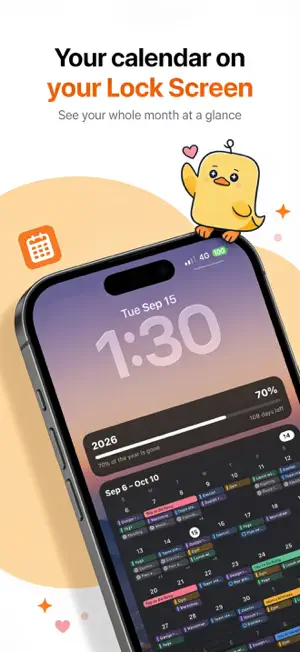
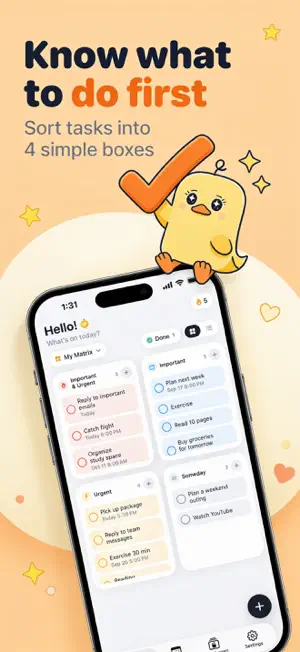
Your whole day, right on your Lock Screen. LockDay turns your to-dos, calendar and notes into a Lock Screen that updates itself. Pick up your phone and you already know what's next. — PRIORITIES FIRST Sort tasks by importance and urgency in a simple four-box matrix. The tasks that matter stay in view. — CALENDAR + TASKS See events from your iPhone calendars next to your tasks: week strip, month view and today's timeline. — A LOCK SCREEN THAT UPDATES ITSELF Pick a template, choose what to show and add your own photo. A quick one-time Shortcuts setup keeps it fresh. — NOTES & WIDGETS Pin a note or checklist to your Lock Screen. Widgets for your Home Screen and Lock Screen. — PRIVATE BY DESIGN No account, no ads, no tracking. Your data stays on your device or in your own iCloud. LockDay Pro unlocks every template and style, unlimited tasks and notes, repeating tasks and iCloud sync. Subscriptions renew automatically unless cancelled at least 24 hours before the end of the current period. Manage or cancel anytime in your Apple Account settings. Terms of Use: https://lockday.xyz/terms/ Privacy Policy: https://lockday.xyz/privacy/
Ratings & reviews
4.8
30 ratings
What’s new
Version 1.6.0 · Updated October 5, 2026
LockDay turns your to-do list and calendar into your Lock Screen. • See your tasks, events and month calendar right on your Lock Screen, no unlocking needed. • Sort tasks with the Eisenhower Matrix: important, urgent, or someday. • Mix and match components: month calendar, week, today's timeline, upcoming, checklist, year progress, countdown, notes and more. • Ready-made templates, photo backgrounds and full control over colors, fonts and layout. • After a one-time Shortcuts setup, your Lock Screen updates by itself. • Home Screen and Lock Screen widgets, reminders and your iPhone calendars, all in one place.
App privacy
The developer, Dat Pham, reported these privacy practices to Apple.
Data Not Linked to You
The following data, which may be collected but is not linked to your identity, may be used for the following purposes:
- Purchases: Purchase History
- Location: Coarse Location
- Identifiers: User ID, Device ID
- Usage Data: Product Interaction
Used for: Analytics, App Functionality
Alternatives to LockDay: To-Do List & Planner
Looking for apps like LockDay: To-Do List & Planner? Here are 6 similar apps on the App Store. The highest rated is Eva - Calendar & Daily Planner (5.0/5), and all 6 are free to download.
-
 LockScreen Calendar Maker
4.7
LockScreen Calendar Maker
4.7
-
 Trace - AI Calendar, Planner
4.2
Trace - AI Calendar, Planner
4.2
-
 Eva - Calendar & Daily Planner
5.0
Eva - Calendar & Daily Planner
5.0
-
 Eisenhower Matrix: Todo & Task
4.6
Eisenhower Matrix: Todo & Task
4.6
-
 Taska: To-Do List & Planner
4.9
Taska: To-Do List & Planner
4.9
-
 AnySchedule Calendar & Planner
4.7
AnySchedule Calendar & Planner
4.7
| App | Rating | Price | Last updated | Compare |
|---|---|---|---|---|
| LockDay: To-Do List & Planner | 4.8 / 5 (30 ratings) | Free | October 5, 2026 | |
| LockScreen Calendar Maker | 4.7 / 5 (31) | Free | Oct 5, 2026 | Compare |
| Trace - AI Calendar, Planner | 4.2 / 5 (18) | Free | Oct 3, 2026 | Compare |
| Eva - Calendar & Daily Planner | 5.0 / 5 (1,047) | Free | Aug 28, 2026 | Compare |
| Eisenhower Matrix: Todo & Task | 4.6 / 5 (99) | Free | Sep 21, 2026 | Compare |
| Taska: To-Do List & Planner | 4.9 / 5 (182) | Free | Sep 25, 2026 | Compare |
| AnySchedule Calendar & Planner | 4.7 / 5 (101) | Free | Oct 5, 2026 | Compare |