

LockScreen Calendar Maker
Vinh Vo Productivity iPhoneiPadiPod touch
LockScreen Calendar Maker is a free Productivity app for iPhone and iPad by Vinh Vo. Rated 4.8/5 from 34 ratings. Requires iOS 17.0.
- Rating
- 4.8
- 34 ratings
- Price
- Free
- on the App Store
- Size
- 89 MB
- Age 4+
- Updated
- Oct 14
- 2026 · v2.5.6
Screenshots


About LockScreen Calendar Maker
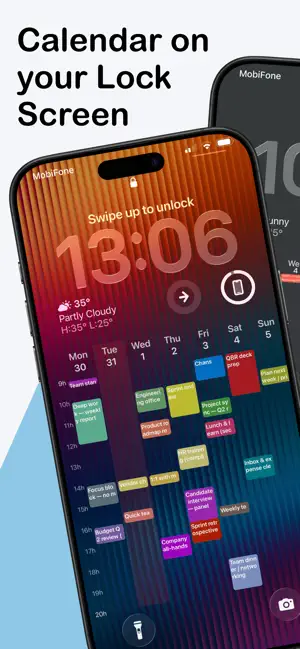
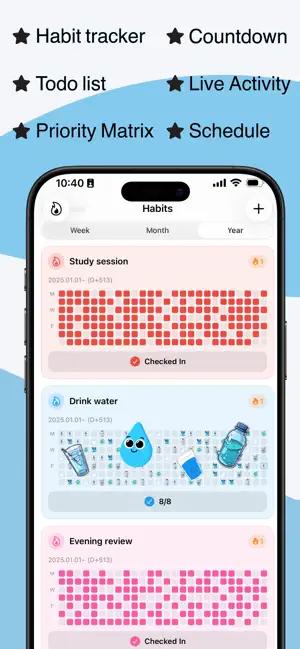
Turn your iPhone Lock Screen into a beautiful, functional calendar. Lock Screen Calendar allows you to create custom wallpaper that display your monthly or yearly schedule directly on your lock screen. View dates at a glance without ever opening an app or unlocking your phone. Whether you need a productivity tool or an aesthetic upgrade, our calendar wallpaper maker lets you combine your favorite photos with clean, readable calendar grids. KEY FEATURES: - CALENDAR WALLPAPERS Overlay a calendar, schedule, to-do list on your Lock Screen. Check the date instantly. Perfect for minimalists and planners who value efficiency. + Sync with APPLE calendar & GOOGLE calendar & OUTLOOK calendar + Sync with APPLE Reminders - IN-APP CALENDAR & REMINDERS * View your month and events inside the app. * Add, edit, and delete events – Create events with title, date/time, repeat (daily, weekly, monthly, etc.), reminders, and notes. * Event reminders – Get notified before events (e.g. 5 or 15 minutes before). Tapping the notification opens the app to the Calendar tab. - TOTAL CUSTOMIZATION Make it yours. Choose from multiple styles: * Eisenhower Matrix: priority matrix, todo list * Agenda/Schedule: Today, Month, Week, 2-Week Schedule, Week + daily agenda * Classic Month: A clean grid view of the current month. * Full Year: See the big picture with progress dots. * Lunar Calendar: Track solar and lunar dates together. * Life Progress: Visualize your week or month of life. - DESIGN YOUR WAY * Photos: Use your own images as backgrounds. * Style: Adjust colors, dim levels, and first day of the week (Mon/Sun). * Markers: Highlight "Today" with dots, rings, or squares. - SMART AUTOMATION Set it and forget it. Use our pre-built iOS Shortcut to automatically update your Lock Screen wallpaper every morning. Your calendar stays fresh daily without manual editing. *** PRIVACY FIRST Your data belongs to you. All calendar processing happens locally on your device. We do not collect, store, or track your personal events. Download Lock Screen Calendar today and organize your life right from your wallpaper. Terms of Use: https://www.apple.com/legal/internet-services/itunes/dev/stdeula/
Ratings & reviews
4.8
34 ratings
What’s new
Version 2.5.6 · Updated October 14, 2026
Thank you for using LockScreen Calendar Maker! This update includes the following: ・ Optional icons on wallpaper event chips, and weekday labels in your language on the month grid. ・ Event colors and icons now sync across your devices with iCloud. ・ Home Screen list widgets stay compact on quiet days. The 2-week agenda can show a year progress bar, and lunar dates are available on more templates. ・ Deleting one day of a repeating event keeps its color, icon, and alert.
App privacy
The developer, Vinh Vo, reported these privacy practices to Apple.
Data Not Collected
The developer does not collect any data from this app.
Alternatives to LockScreen Calendar Maker
Looking for apps like LockScreen Calendar Maker? Here are 6 similar apps on the App Store. The highest rated is LockDay: To-Do List & Planner (4.9/5), and all 6 are free to download.
-
 Kibori: Sticker, Meme Keyboard
4.8
-
 AnySchedule Calendar & Planner
4.7
-
 LockDay: To-Do List & Planner
4.9
-
 Fast Rekap - AI Meeting Notes
4.9
-
 Calendarly Lockscreen Calendar
4.4
-
 Trace - AI Calendar, Planner
4.2
| App | Rating | Price | Last updated | Compare |
|---|---|---|---|---|
| LockScreen Calendar Maker | 4.8 / 5 (34 ratings) | Free | October 14, 2026 | |
| Kibori: Sticker, Meme Keyboard | 4.8 / 5 (108) | Free | Oct 2, 2026 | Compare |
| AnySchedule Calendar & Planner | 4.7 / 5 (106) | Free | Oct 10, 2026 | Compare |
| LockDay: To-Do List & Planner | 4.9 / 5 (46) | Free | Oct 13, 2026 | Compare |
| Fast Rekap - AI Meeting Notes | 4.9 / 5 (44) | Free | Oct 12, 2026 | Compare |
| Calendarly Lockscreen Calendar | 4.4 / 5 (41) | Free | Oct 14, 2026 | Compare |
| Trace - AI Calendar, Planner | 4.2 / 5 (18) | Free | Oct 14, 2026 | Compare |